This is the multi-page printable view of this section. .
Concepts
-
1: Architecture
- 1.1: Nodes
- 1.2: Infrastructure
- 1.3: PGSQL Arch
- 2: ER Model
-
3: Infra as Code
- 3.1: Inventory
- 3.2: Configure
- 3.3: Parameters
- 3.4: Conf Templates
- 3.5: Use CMDB as Config Inventory
-
4: High Availability
- 4.1: RPO Trade-offs
-
4.2: Failure Model
- 4.2.1: Model of Patroni Passive Failure
- 4.2.2: Model of Patroni Active Failure
- 4.2.3: Network Partition
- 4.3: RTO Trade-offs
- 4.4: Service Access
-
5: Point-in-Time Recovery — A Time Machine for PostgreSQL
- 5.1: How PITR Works
- 5.2: PITR Architecture
- 5.3: PITR Tradeoffs
- 5.4: Declarative Recovery
- 5.5: PITR Scenarios
- 6: Monitoring System
-
7: Security and Compliance
- 7.1: Security Model
- 7.2: Authentication
- 7.3: Access Control
- 7.4: Encrypted Communication
- 7.5: Data Security
- 7.6: Compliance
Pigsty is a portable, extensible open-source PostgreSQL distribution for building production-grade database services in local environments with declarative configuration and automation. It has a vast ecosystem providing a complete set of tools, scripts, and best practices to bring PostgreSQL to enterprise-grade RDS service levels.
Pigsty’s name comes from PostgreSQL In Great STYle, also understood as Postgres, Infras, Graphics, Service, Toolbox, it’s all Yours—a self-hosted PostgreSQL solution with graphical monitoring that’s all yours. You can find the source code on GitHub, visit the official documentation for more information, or experience the Web UI in the online demo.
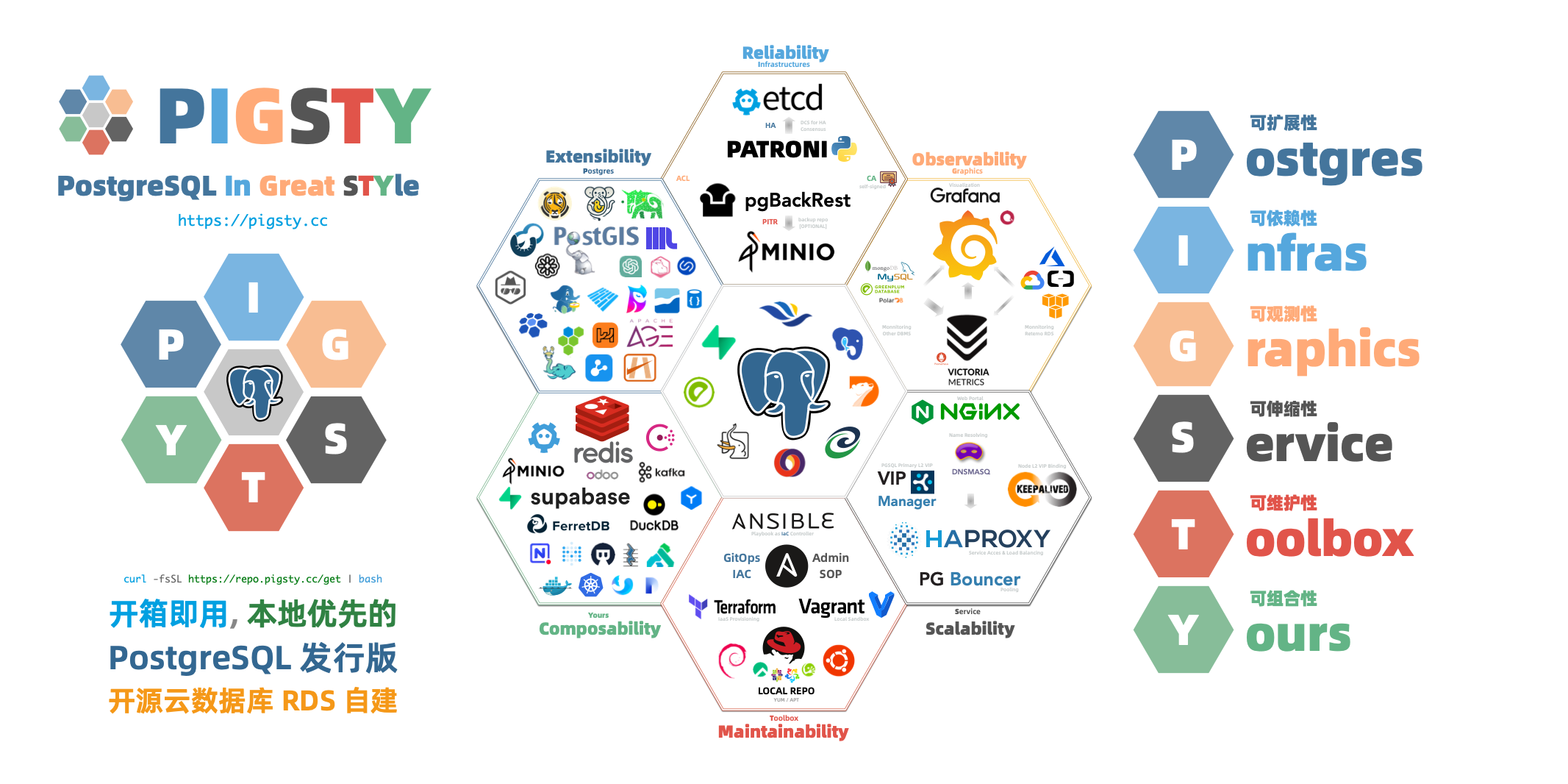
Why Pigsty? What Can It Do?
PostgreSQL is a sufficiently perfect database kernel, but it needs more tools and systems to become a truly excellent database service. In production environments, you need to manage every aspect of your database: high availability, backup recovery, monitoring alerts, access control, parameter tuning, extension installation, connection pooling, load balancing…
Wouldn’t it be easier if all this complex operational work could be automated? This is precisely why Pigsty was created.
Pigsty provides:
-
Out-of-the-Box PostgreSQL Distribution
Pigsty deeply integrates 575 extensions from the PostgreSQL ecosystem, providing out-of-the-box distributed, time-series, geographic, spatial, graph, vector, search, and other multi-modal database capabilities. From kernel to RDS distribution, providing production-grade database services for versions 14-18 on EL/Debian/Ubuntu.
-
Self-Healing High Availability Architecture
A high availability architecture built on Patroni, Etcd, and HAProxy enables automatic failover for hardware failures with seamless traffic handoff. Primary failure recovery time RTO < 45s, data recovery point RPO ≈ 0. You can perform rolling maintenance and upgrades on the entire cluster without application coordination.
-
Complete Point-in-Time Recovery Capability
Based on pgBackRest and an optional Silo object-storage cluster, providing out-of-the-box PITR point-in-time recovery capability. Giving you the ability to quickly return to any point in time, protecting against software defects and accidental data deletion.
-
Flexible Service Access and Traffic Management
Through HAProxy, Pgbouncer, and VIP, providing flexible service access patterns for read-write separation, connection pooling, and automatic routing. Delivering stable, reliable, auto-routing, transaction-pooled high-performance database services.
-
Stunning Observability
An observability stack based on VictoriaMetrics and Grafana provides unparalleled monitoring best practices. Over three thousand types of monitoring metrics describe every aspect of the system, from global dashboards to CRUD operations on individual objects.
-
Declarative Configuration Management
Following the Infrastructure as Code philosophy, using declarative configuration to describe the entire environment. You just tell Pigsty “what kind of database cluster you want” without worrying about how to implement it—the system automatically adjusts to the desired state.
-
Modular Architecture Design
A modular architecture design that can be freely combined to suit different scenarios. Beyond the core PostgreSQL module, it also provides optional modules for Redis, MINIO (Silo), Etcd, and support for various PG-compatible kernels and modes.
-
Industry-leading security practices: a self-signed CA for encrypted communication, AES-encrypted backups, SCRAM-SHA-256 password hashing, an out-of-the-box ACL model, and least-privilege HBA rules.
-
Simple and Easy Deployment
All dependencies are pre-packaged for one-click installation in environments without internet access. Local sandbox environments can run on micro VMs with 1 core and 2GB RAM, providing functionality identical to production environments. Provides Vagrant-based local sandboxes and Terraform-based cloud deployments.
What Pigsty Is Not
Pigsty is not a traditional, all-encompassing PaaS (Platform as a Service) system.
-
Pigsty doesn’t provide basic hardware resources. It runs on nodes you provide, whether bare metal, VMs, or cloud instances, but it doesn’t create or manage these resources itself (though it provides Terraform templates to simplify cloud resource preparation).
-
Pigsty is not a container orchestration system. It runs directly on the operating system, not requiring Kubernetes or Docker as infrastructure. Of course, it can coexist with these systems and provides a Docker module for running stateless applications.
-
Pigsty is not a general database management tool. It focuses on PostgreSQL and its ecosystem. While it also supports peripheral components like Redis, Etcd, and Silo, the core is always built around PostgreSQL.
-
Pigsty won’t lock you in. It’s built on open-source components, doesn’t modify the PostgreSQL kernel, and introduces no proprietary protocols. You can continue using your well-managed PostgreSQL clusters anytime without Pigsty.
Pigsty doesn’t restrict how you should or shouldn’t build your database services. For example:
- Pigsty provides good parameter defaults and configuration templates, but you can override any parameter.
- Pigsty provides a declarative API, but you can still use underlying tools (Ansible, Patroni, pgBackRest, etc.) for manual management.
- Pigsty can manage the complete lifecycle, or you can use only its monitoring system to observe existing database instances or RDS.
Pigsty provides a different level of abstraction than the hardware layer—it works at the database service layer, focusing on how to deliver PostgreSQL at its best, rather than reinventing the wheel.
Evolution of PostgreSQL Deployment
To understand Pigsty’s value, let’s review the evolution of PostgreSQL deployment approaches.
Manual Deployment Era
In traditional deployment, DBAs needed to manually install and configure PostgreSQL, manually set up replication, manually configure monitoring, and manually handle failures. The problems with this approach are obvious:
- Low efficiency: Each instance requires repeating many manual operations, prone to errors.
- Lack of standardization: Databases configured by different DBAs can vary greatly, making maintenance difficult.
- Poor reliability: Failure handling depends on manual intervention, with long recovery times and susceptibility to human error.
- Weak observability: Lack of unified monitoring, making problem discovery and diagnosis difficult.
Managed Database Era
To solve these problems, cloud providers offer managed database services (RDS). Cloud RDS does solve some operational issues, but also brings new challenges:
- High cost: Managed services typically charge multiples to dozens of times hardware cost as “service fees.”
- Vendor lock-in: Migration is difficult, tied to specific cloud platforms.
- Limited functionality: Cannot use certain advanced features, extensions are restricted, parameter tuning is limited.
- Data sovereignty: Data stored in the cloud, reducing autonomy and control.
Local RDS Era
Pigsty represents a third approach: building database services in local environments that match or exceed cloud RDS.
Pigsty combines the advantages of both approaches:
- High automation: One-click deployment, automatic configuration, self-healing failures—as convenient as cloud RDS.
- Complete autonomy: Runs on your own infrastructure, data completely in your own hands.
- Extremely low cost: Run enterprise-grade database services at near-pure-hardware costs.
- Complete functionality: Unlimited use of PostgreSQL’s full capabilities and ecosystem extensions.
- Open architecture: Based on open-source components, no vendor lock-in, free to migrate anytime.
This approach is particularly suitable for:
- Private and hybrid clouds: Enterprises needing to run databases in local environments.
- Cost-sensitive users: Organizations looking to reduce database TCO.
- High-security scenarios: Critical data requiring complete autonomy and control.
- PostgreSQL power users: Scenarios requiring advanced features and rich extensions.
- Development and testing: Quickly setting up databases locally that match production environments.
What’s Next
Now that you understand Pigsty’s basic concepts, you can:
- View System Architecture to understand Pigsty’s modular design
- Learn about Cluster Model to understand how Pigsty organizes database clusters
- Study High Availability mechanisms to master self-healing principles
- Explore Point-in-Time Recovery to learn how to handle data deletion
- Research Service Access to understand stable database service delivery
- Experience Infrastructure as Code to feel the magic of declarative configuration
- Or directly start Quick Start to deploy your first Pigsty environment in minutes
1 - Architecture
Pigsty uses a modular architecture with a declarative interface. You can freely combine modules like building blocks as needed.
- Pigsty adopts a modular design that can be freely combined and used on demand (use one or all) to suit different scenarios.
- Pigsty uses config inventory and config parameters to describe the entire deployment environment, implemented via Ansible playbooks.
- Pigsty can run on any node—physical or virtual—as long as the OS is compatible.
Modules
Pigsty uses a modular design with six main default modules: PGSQL, INFRA, NODE, ETCD, REDIS, and MINIO.
PGSQL: Self-healing HA Postgres clusters powered by Patroni, Pgbouncer, HAproxy, PgBackrest, and more.INFRA: Local software repo, Nginx, Grafana, Victoria, AlertManager, Blackbox Exporter—the complete observability stack.NODE: Tune nodes to desired state—hostname, timezone, NTP, ssh, sudo, haproxy, docker, vector, keepalived.ETCD: Distributed key-value store as DCS for HA Postgres clusters: consensus leader election/config management/service discovery.REDIS: Redis servers supporting standalone primary-replica, sentinel, and cluster modes with full monitoring.MINIO: S3-compatible simple object storage that can serve as an optional backup destination for PG databases.
You can declaratively compose them freely. If you only want host monitoring, installing the INFRA module on infrastructure nodes and the NODE module on managed nodes is sufficient.
The ETCD and PGSQL modules are used to build HA PG clusters—installing these modules on multiple nodes automatically forms a high-availability database cluster.
You can reuse Pigsty infrastructure and develop your own modules; REDIS and MINIO can serve as examples. Protocol compatibility layers such as PostgreSQL Mongo mode are composed from standard PGSQL and Docker APP workflows.
Note that all modules depend strongly on the NODE module: in Pigsty, nodes must first have the NODE module installed to be managed before deploying other modules.
When nodes (by default) use the local software repo for installation, the NODE module has a weak dependency on the INFRA module. Therefore, the admin/infrastructure nodes with the INFRA module complete the bootstrap process in the deploy.yml playbook, resolving the circular dependency.
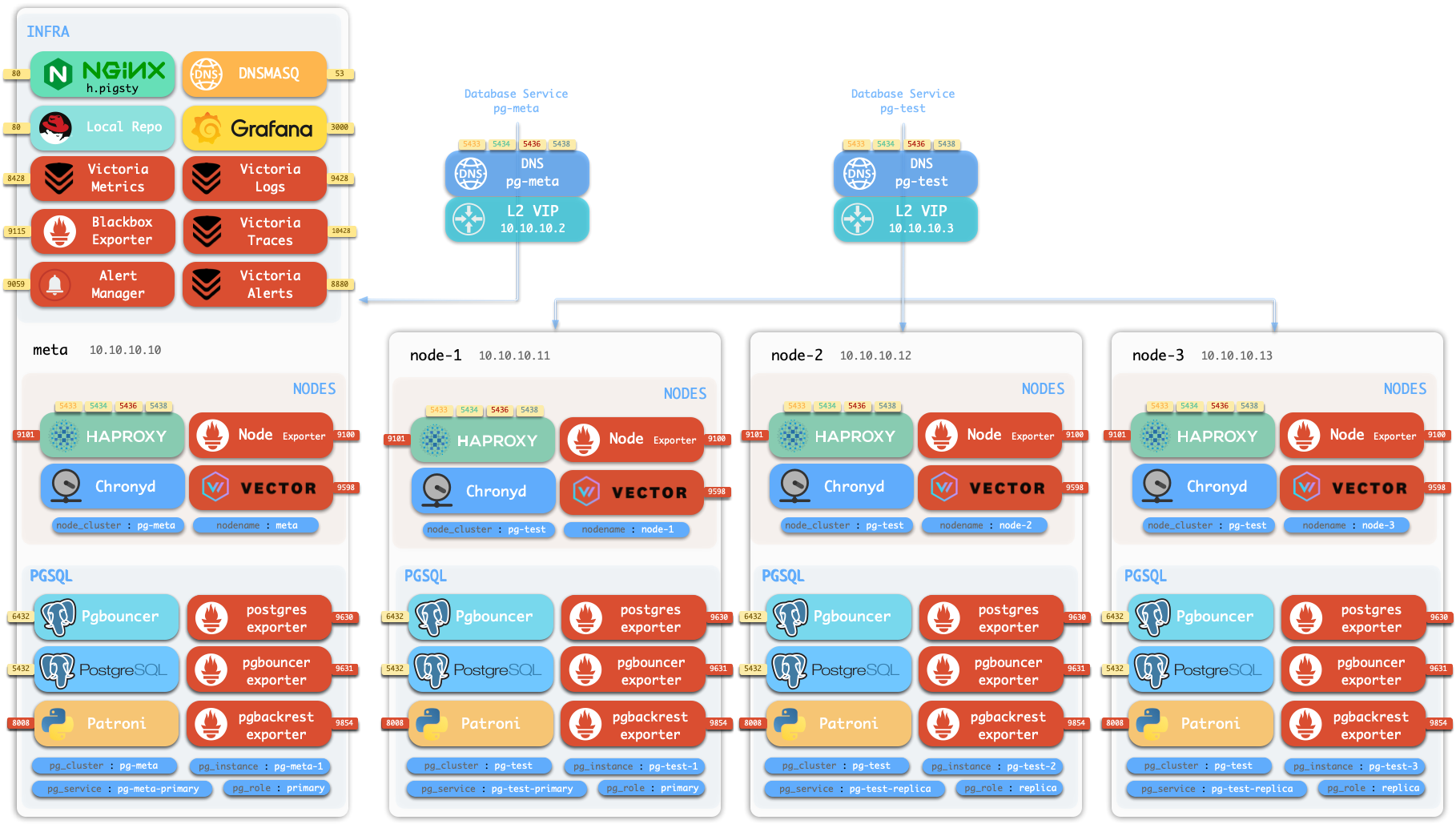
Standalone Installation
By default, Pigsty installs on a single node (physical/virtual machine). The deploy.yml playbook installs INFRA, ETCD, PGSQL, and optionally MINIO modules on the current node,
giving you a fully-featured observability stack (VictoriaMetrics, VictoriaLogs, VictoriaTraces, Grafana, Alertmanager, Blackbox Exporter, etc.), plus a built-in PostgreSQL standalone instance as a CMDB, ready to use out of the box (cluster name pg-meta, database name meta).
This node now has a complete self-monitoring system, visualization tools, and a Postgres database with PITR auto-configured (HA unavailable since you only have one node). You can use this node as a devbox, for testing, running demos, and data visualization/analysis. Or, use this node as an admin node to deploy and manage more nodes!
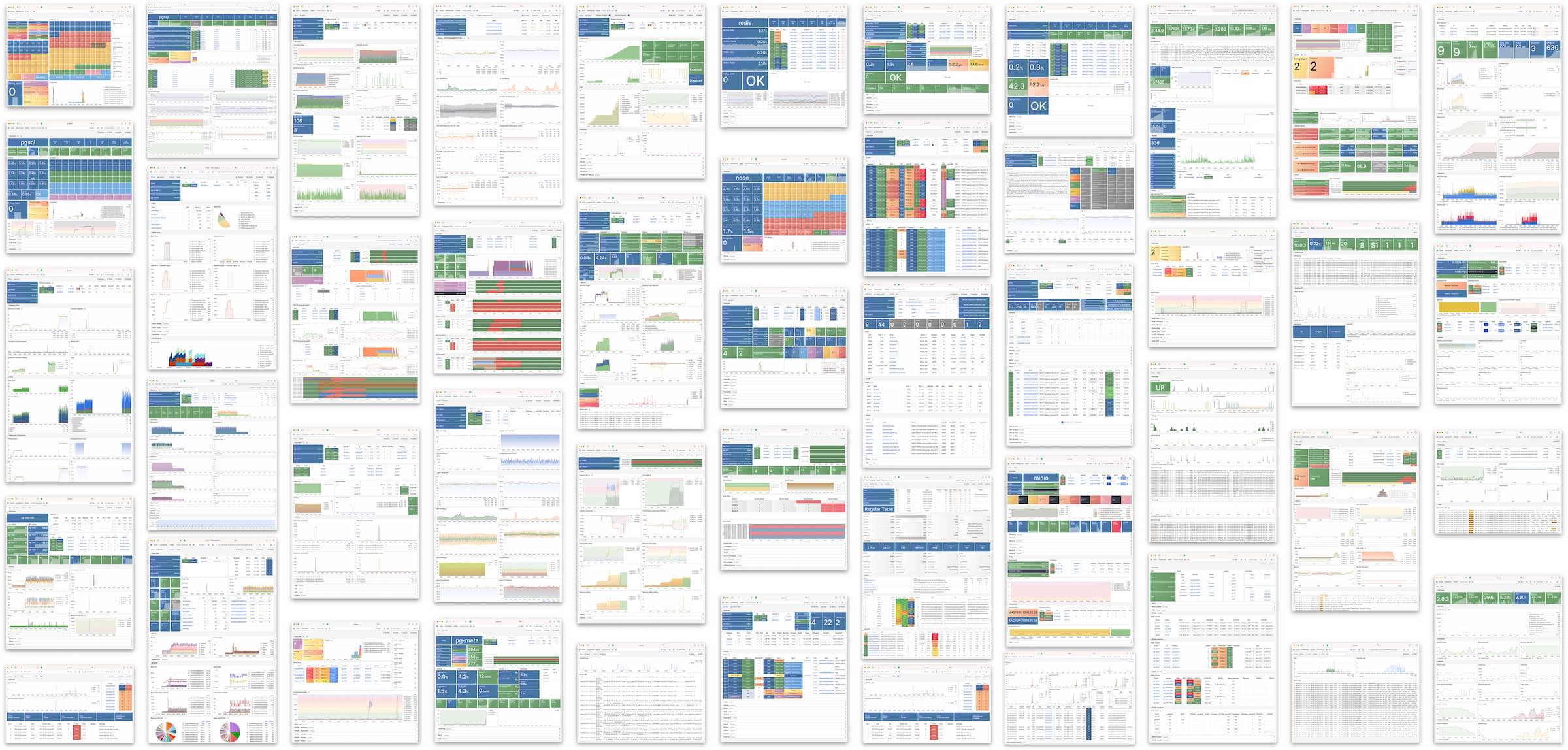
Monitoring
The installed standalone meta node can serve as an admin node and monitoring center to bring more nodes and database servers under its supervision and control.
Pigsty’s monitoring system can be used independently. If you want to install the VictoriaMetrics/Grafana observability stack, Pigsty provides best practices! It offers rich dashboards for host nodes and PostgreSQL databases. Whether or not these nodes or PostgreSQL servers are managed by Pigsty, with simple configuration, you immediately have a production-grade monitoring and alerting system, bringing existing hosts and PostgreSQL under management.
HA PostgreSQL Clusters
Pigsty helps you own your own production-grade HA PostgreSQL RDS service anywhere.
To create such an HA PostgreSQL cluster/RDS service, you simply describe it with a short config and run the playbook to create it:
In less than 10 minutes, you’ll have a PostgreSQL database cluster with service access, monitoring, backup PITR, and HA fully configured.
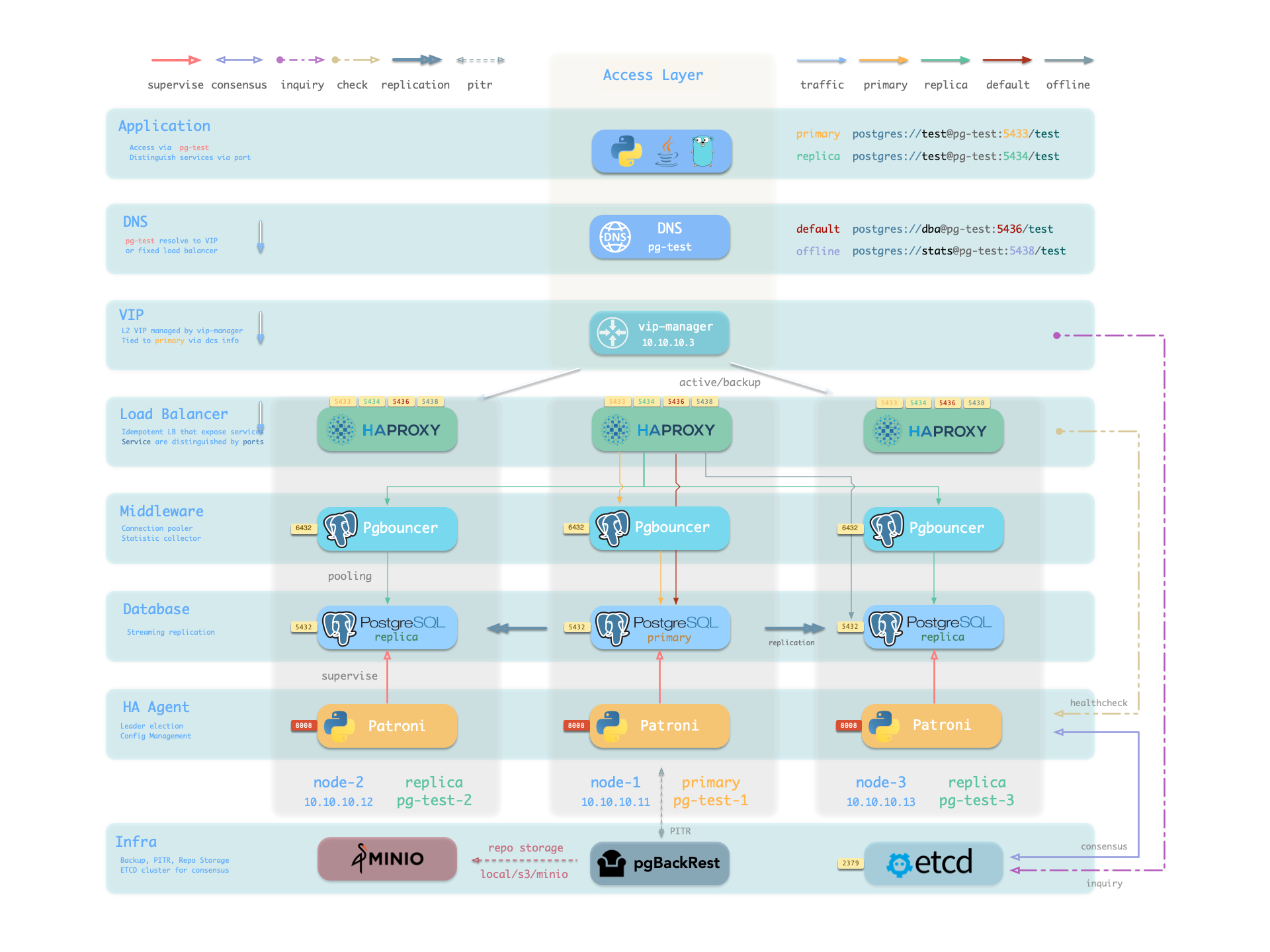
Hardware failures are covered by the self-healing HA architecture provided by patroni, etcd, and haproxy—in case of primary failure, automatic failover executes within 45 seconds by default. Clients don’t need to modify config or restart applications: Haproxy uses patroni health checks for traffic distribution, and read-write requests are automatically routed to the new cluster primary, avoiding split-brain issues. This process is seamless—for example, in case of replica failure or planned switchover, clients experience only a momentary flash of the current query.
Software failures, human errors, and datacenter-level disasters are covered by pgBackRest and the optional Silo cluster. This provides local/cloud PITR capabilities and, in case of datacenter failure, offers cross-region replication and disaster recovery.
1.1 - Nodes
A node is an abstraction of hardware resources and operating systems. It can be a physical machine, bare metal, virtual machine, or container/pod.
Any machine running a Linux OS (with systemd daemon) and standard CPU/memory/disk/network resources can be treated as a node.
Nodes can have modules installed. Pigsty has several node types, distinguished by which modules are deployed:
| Type | Description |
|---|---|
| Regular Node | A node managed by Pigsty |
| ADMIN Node | The node that runs Ansible to issue management commands |
| INFRA Node | Nodes with the INFRA module installed |
| ETCD Node | Nodes with the ETCD module for DCS |
| MINIO Node | Nodes with the MINIO module for object storage |
| PGSQL Node | Nodes with the PGSQL module installed |
| … | Nodes with other modules… |
In a singleton Pigsty deployment, multiple roles converge on one node: it serves as the regular node, admin node, infra node, ETCD node, and database node simultaneously.
Regular Node
Nodes managed by Pigsty can have modules installed. The node.yml playbook configures nodes to the desired state.
A regular node may run the following services:
| Component | Port | Description | Status |
|---|---|---|---|
node_exporter |
9100 |
Host metrics exporter | Enabled |
haproxy |
9101 |
HAProxy load balancer (admin port) | Enabled |
vector |
9598 |
Log collection agent | Enabled |
docker |
9323 |
Container runtime support | Optional |
keepalived |
n/a |
L2 VIP for node cluster | Optional |
keepalived_exporter |
9650 |
Keepalived status monitor | Optional |
Here, node_exporter exposes host metrics, vector sends logs to the collection system, and haproxy provides load balancing. These three are enabled by default.
Docker, keepalived, and keepalived_exporter are optional and can be enabled as needed.
ADMIN Node
A Pigsty deployment has exactly one admin node—the node that runs Ansible playbooks and issues control/deployment commands.
This node has ssh/sudo access to all other nodes. Admin node security is critical and access must be strictly controlled; see Security Model: Trust Boundaries for its trust scope and critical assets.
During single-node installation and configuration, the current node becomes the admin node. However, alternatives exist. For example, if your laptop can SSH to all managed nodes and has Ansible installed, it can serve as the admin node—though this isn’t recommended for production.
For instance, you might use your laptop to manage a Pigsty VM in the cloud. In this case, your laptop is the admin node.
In serious production environments, the admin node is typically 1-2 dedicated DBA machines. In resource-constrained setups, INFRA nodes often double as admin nodes since all INFRA nodes have Ansible installed by default.
INFRA Node
A Pigsty deployment may have 1 or more INFRA nodes; large production environments typically have 2-3.
The infra group in the inventory defines which nodes are INFRA nodes. These nodes run the INFRA module with these components:
| Component | Port | Description |
|---|---|---|
nginx |
80/443 |
Web UI, local software repository |
grafana |
3000 |
Visualization platform |
victoriaMetrics |
8428 |
Time-series database (metrics) |
victoriaLogs |
9428 |
Log collection server |
victoriaTraces |
10428 |
Trace collection server |
vmalert |
8880 |
Alerting and derived metrics |
alertmanager |
9059 |
Alert aggregation and routing |
blackbox_exporter |
9115 |
Blackbox probing (ping nodes/VIPs) |
dnsmasq |
53 |
Internal DNS resolution |
chronyd |
123 |
NTP time server |
ansible |
- |
Playbook execution |
Nginx serves as the module’s entry point, providing the web UI and local software repository. With multiple INFRA nodes, services on each are independent, but you can access all monitoring data sources from any INFRA node’s Grafana.
Pigsty is licensed under Apache-2.0, though embedded Grafana component uses AGPLv3.
ETCD Node
The ETCD module provides Distributed Consensus Service (DCS) for PostgreSQL high availability.
The etcd group in the inventory defines ETCD nodes. These nodes run etcd servers on two ports:
| Component | Port | Description |
|---|---|---|
etcd |
2379 |
ETCD key-value store (client port) |
etcd |
2380 |
ETCD cluster peer communication |
MINIO Node
The MINIO module provides optional backup storage for PostgreSQL.
The minio inventory group defines MINIO module nodes. In v4.5.0, these nodes run Silo servers on:
| Component | Port | Description |
|---|---|---|
silo |
9000 |
S3 API endpoint |
silo |
9001 |
Silo admin console |
PGSQL Node
Nodes with the PGSQL module are called PGSQL nodes. Node and PostgreSQL instance have a 1:1 deployment—one PG instance per node.
PGSQL nodes can borrow identity from their PostgreSQL instance—controlled by node_id_from_pg, defaulting to true, meaning the node name is set to the PG instance name.
PGSQL nodes run these additional components beyond regular node services:
| Component | Port | Description | Status |
|---|---|---|---|
postgres |
5432 |
PostgreSQL database server | Enabled |
pgbouncer |
6432 |
PgBouncer connection pool | Enabled |
patroni |
8008 |
Patroni HA management | Enabled |
pg_exporter |
9630 |
PostgreSQL metrics exporter | Enabled |
pgbouncer_exporter |
9631 |
PgBouncer metrics exporter | Enabled |
pgbackrest_exporter |
9854 |
pgBackRest metrics exporter | Enabled |
vip-manager |
n/a |
Binds L2 VIP to cluster primary | Optional |
{{ pg_cluster }}-primary |
5433 |
HAProxy service: pooled read/write | Enabled |
{{ pg_cluster }}-replica |
5434 |
HAProxy service: pooled read-only | Enabled |
{{ pg_cluster }}-default |
5436 |
HAProxy service: primary direct connection | Enabled |
{{ pg_cluster }}-offline |
5438 |
HAProxy service: offline read | Enabled |
{{ pg_cluster }}-<service> |
543x |
HAProxy service: custom PostgreSQL services | Custom |
The vip-manager is only enabled when users configure a PG VIP.
Additional custom services can be defined in pg_services, exposed via haproxy using additional service ports.
Node Relationships
Regular nodes typically reference an INFRA node via the admin_ip parameter as their infrastructure provider.
For example, with global admin_ip = 10.10.10.10, all nodes use infrastructure services at this IP.
Parameters that reference ${admin_ip}:
| Parameter | Module | Default Value | Description |
|---|---|---|---|
repo_endpoint |
INFRA |
http://${admin_ip}:80 |
Software repo URL |
repo_upstream.baseurl |
INFRA |
http://${admin_ip}/pigsty |
Local repo baseurl |
infra_portal.endpoint |
INFRA |
${admin_ip}:<port> |
Nginx proxy backend |
dns_records |
INFRA |
["${admin_ip} i.pigsty", ...] |
DNS records |
node_default_etc_hosts |
NODE |
["${admin_ip} i.pigsty"] |
Default static DNS |
node_etc_hosts |
NODE |
- | Custom static DNS |
node_dns_servers |
NODE |
["${admin_ip}"] |
Dynamic DNS servers |
node_ntp_servers |
NODE |
- | NTP servers (optional) |
Typically the admin node and INFRA node coincide. With multiple INFRA nodes, the admin node is usually the first one; others serve as backups.
In large-scale production deployments, you might separate the Ansible admin node from INFRA module nodes. For example, use 1-2 small dedicated hosts under the DBA team as the control hub (ADMIN nodes), and 2-3 high-spec physical machines as monitoring infrastructure (INFRA nodes).
Typical node counts by deployment scale:
| Scale | ADMIN | INFRA | ETCD | MINIO | PGSQL |
|---|---|---|---|---|---|
| Single-node | 1 | 1 | 1 | 0 | 1 |
| 3-node | 1 | 3 | 3 | 0 | 3 |
| Small prod | 1 | 2 | 3 | 0 | N |
| Large prod | 2 | 3 | 5 | 4+ | N |
1.2 - Infrastructure
Running production-grade, highly available PostgreSQL clusters typically requires a comprehensive set of infrastructure services (foundation) for support, such as monitoring and alerting, log collection, time synchronization, DNS resolution, and local software repositories. Pigsty provides the INFRA module to address this—it’s an optional module, but we strongly recommend enabling it.
Overview
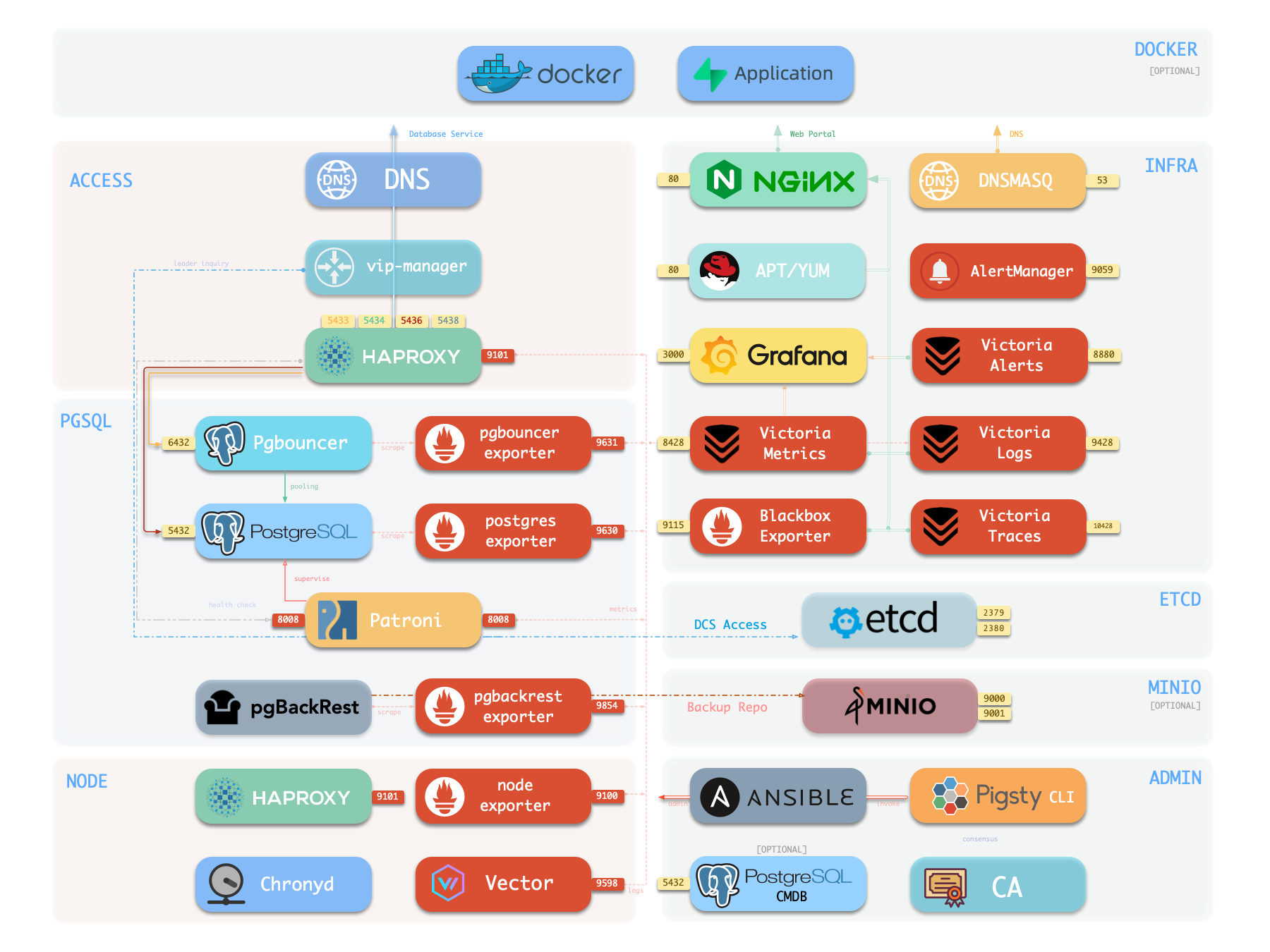
The diagram below shows the architecture of a single-node deployment. The right half represents the components included in the INFRA module:
| Component | Type | Description |
|---|---|---|
| Nginx | Web Server | Unified entry for WebUI, local repo, reverse proxy for internal services |
| Repo | Software Repo | APT/DNF repository with all RPM/DEB packages needed for deployment |
| Grafana | Visualization | Displays metrics, logs, and traces; hosts dashboards, reports, and custom data apps |
| VictoriaMetrics | Time Series DB | Scrapes all metrics, Prometheus API compatible, provides VMUI query interface |
| VictoriaLogs | Log Platform | Centralized log storage; all nodes run Vector by default, pushing logs here |
| VictoriaTraces | Tracing | Collects slow SQL, service traces, and other tracing data |
| VMAlert | Eval Rule/Alert | Evaluates alerting rules, pushes events to Alertmanager |
| AlertManager | Alert Manager | Aggregates alerts, dispatches notifications via email, Webhook, etc. |
| BlackboxExporter | Blackbox Probe | Probes reachability of IPs/VIPs/URLs |
| DNSMASQ | DNS Service | Provides DNS resolution for domains used within Pigsty [Optional] |
| Chronyd | Time Sync | Provides NTP time synchronization to ensure consistent time across nodes [Optional] |
| CA | Certificate | Issues encryption certificates within the environment |
| Ansible | Orchestration | Batch, declarative, agentless tool for managing large numbers of servers |
Nginx
Nginx is the access entry point for all WebUI services in Pigsty, using ports 80 / 443 for HTTP/HTTPS by default. Live Demo
| IP Access (replace) | Domain (HTTP) | Domain (HTTPS) | Public Demo |
|---|---|---|---|
http://10.10.10.10 |
http://i.pigsty |
https://i.pigsty |
https://demo.pigsty.io |
Infrastructure components with WebUIs can be exposed uniformly through Nginx, such as Grafana, VictoriaMetrics (VMUI), AlertManager, and HAProxy console. Additionally, the local software repository and other static resources are served via Nginx.
Nginx configures local web servers or reverse proxy servers based on definitions in infra_portal.
By default, it exposes Pigsty’s admin homepage: i.pigsty. Different endpoints on this page proxy different components:
| Endpoint | Component | Native Port | Notes | Public Demo |
|---|---|---|---|---|
/ |
Nginx | 80/443 |
Homepage, local repo, file server | demo.pigsty.io |
/ui/ |
Grafana | 3000 |
Grafana dashboard entry | demo.pigsty.io/ui/ |
/vmetrics/ |
VictoriaMetrics | 8428 |
Time series DB Web UI | demo.pigsty.io/vmetrics/ |
/vlogs/ |
VictoriaLogs | 9428 |
Log DB Web UI | demo.pigsty.io/vlogs/ |
/vtraces/ |
VictoriaTraces | 10428 |
Tracing Web UI | demo.pigsty.io/vtraces/ |
/vmalert/ |
VMAlert | 8880 |
Alert rule management | demo.pigsty.io/vmalert/ |
/alertmgr/ |
AlertManager | 9059 |
Alert management Web UI | demo.pigsty.io/alertmgr/ |
/blackbox/ |
Blackbox | 9115 |
Blackbox probe |
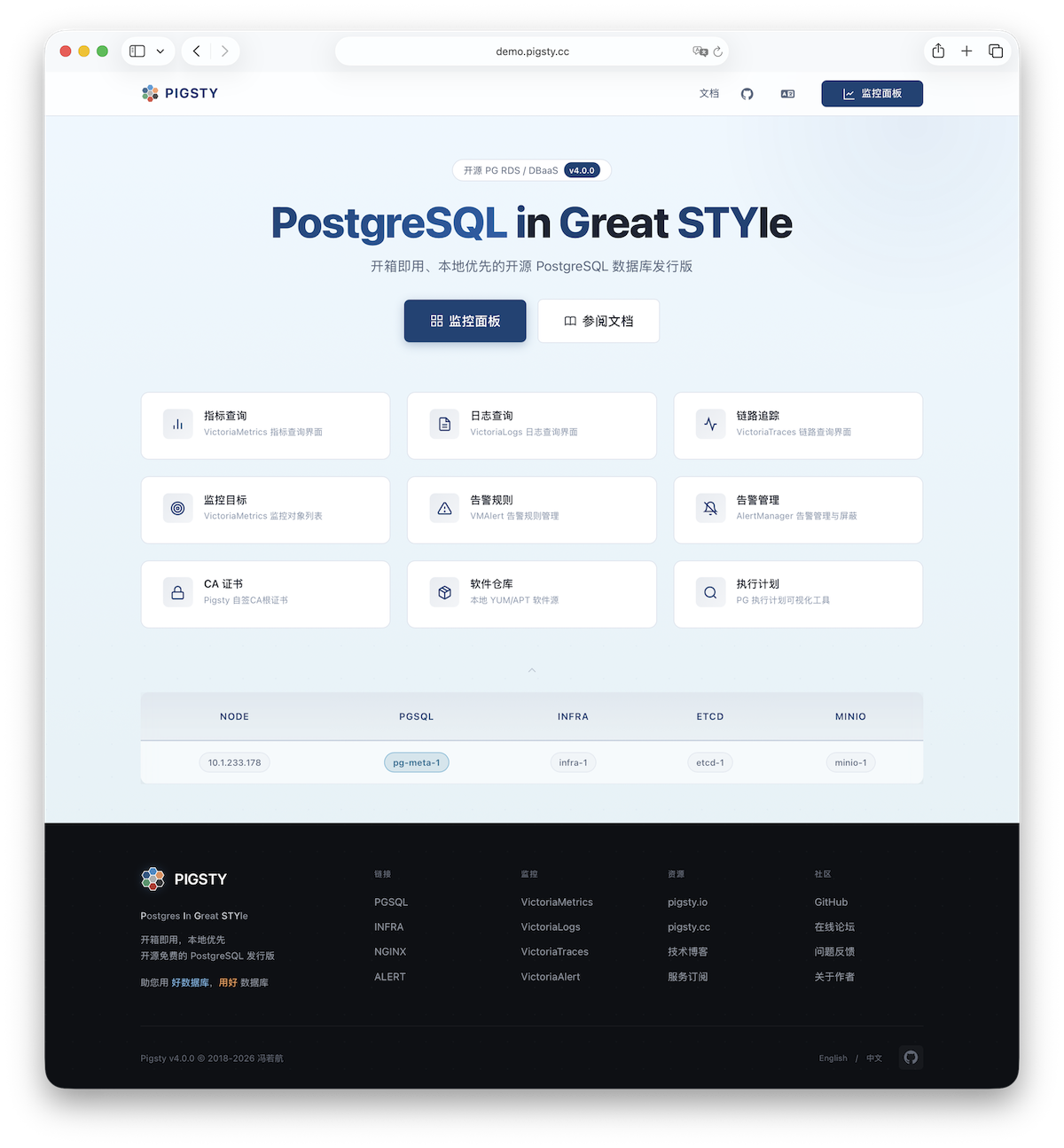
Pigsty allows rich customization of Nginx as a local file server or reverse proxy, with self-signed or real HTTPS certificates.
For more information, see: Tutorial: Nginx—Expose Web Services via Proxy and Tutorial: Certbot—Request and Renew HTTPS Certificates
Repo
Pigsty creates a local software repository on the Infra node during installation to accelerate subsequent software installations. Live Demo
This repository defaults to the /www/pigsty directory,
served by Nginx and mounted at the /pigsty path:
| IP Access (replace) | Domain (HTTP) | Domain (HTTPS) | Public Demo |
|---|---|---|---|
http://10.10.10.10/pigsty |
http://i.pigsty/pigsty |
https://i.pigsty/pigsty |
https://demo.pigsty.io/pigsty |
Pigsty supports offline installation, which essentially pre-copies a prepared local software repository to the target environment.
When Pigsty finds /www/pigsty/repo_complete during deployment, it skips upstream downloads and uses the existing repository directly.
The current source has sow generate this file as both a completion marker and a SHA-256 manifest of repository contents. To force a rebuild, run ./infra.yml -t repo_build -e repo_build=true.
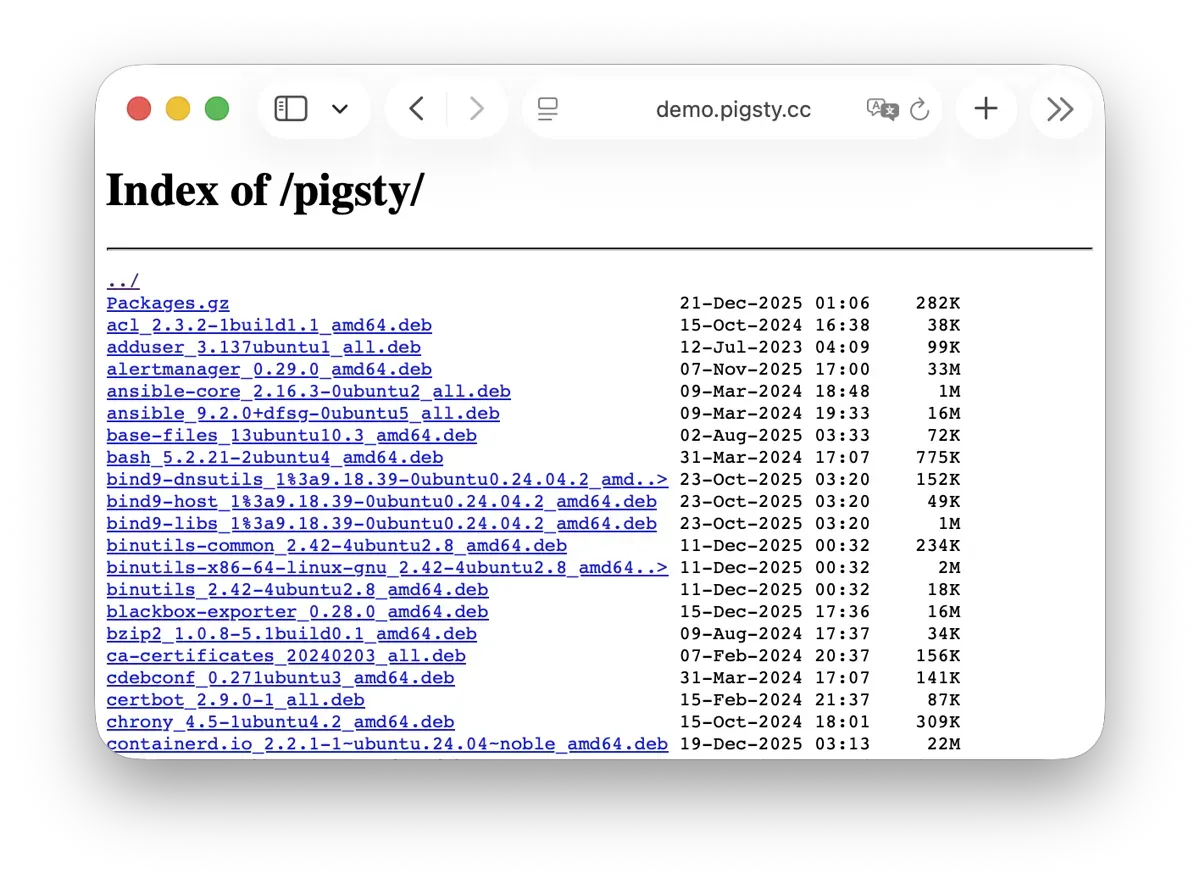
For more information, see: Config: INFRA - REPO
Grafana
Grafana is the core component of Pigsty’s monitoring system, used for visualizing metrics, logs, and various information. Live Demo
Grafana listens on port 3000 by default and is proxied via Nginx at the /ui path:
| IP Access (replace) | Domain (HTTP) | Domain (HTTPS) | Public Demo |
|---|---|---|---|
http://10.10.10.10/ui |
http://i.pigsty/ui |
https://i.pigsty/ui |
https://demo.pigsty.io/ui |
Pigsty provides pre-built dashboards based on VictoriaMetrics / Logs / Traces, with one-click drill-down and roll-up via URL jumps for rapid troubleshooting.
Grafana can also serve as a low-code visualization platform, so ECharts, victoriametrics-datasource, victorialogs-datasource plugins are installed by default,
with Vector / Victoria datasources registered uniformly as vmetrics-*, vlogs-*, vtraces-* for easy custom dashboard extension.
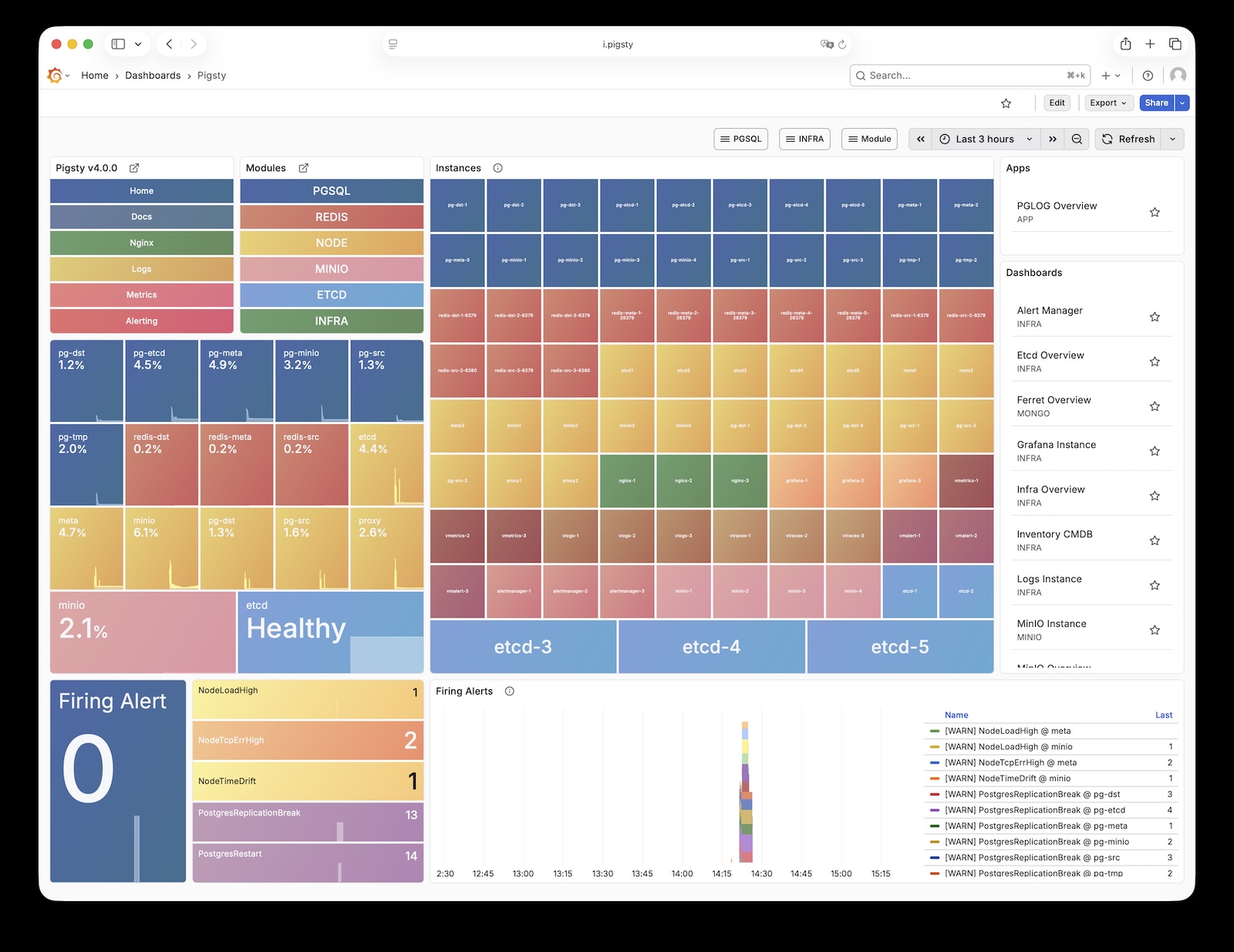
For more information, see: Config: INFRA - GRAFANA.
VictoriaMetrics
VictoriaMetrics is Pigsty’s time series database, responsible for scraping and storing all monitoring metrics. Live Demo
It listens on port 8428 by default, mounted at Nginx /vmetrics path, and also accessible via the p.pigsty domain:
| IP Access (replace) | Domain (HTTP) | Domain (HTTPS) | Public Demo |
|---|---|---|---|
http://10.10.10.10/vmetrics |
http://p.pigsty |
https://i.pigsty/vmetrics |
https://demo.pigsty.io/vmetrics |
VictoriaMetrics is fully compatible with the Prometheus API, supporting PromQL queries, remote read/write protocols, and the Alertmanager API. The built-in VMUI provides an ad-hoc query interface for exploring metrics data directly, and also serves as a Grafana datasource.
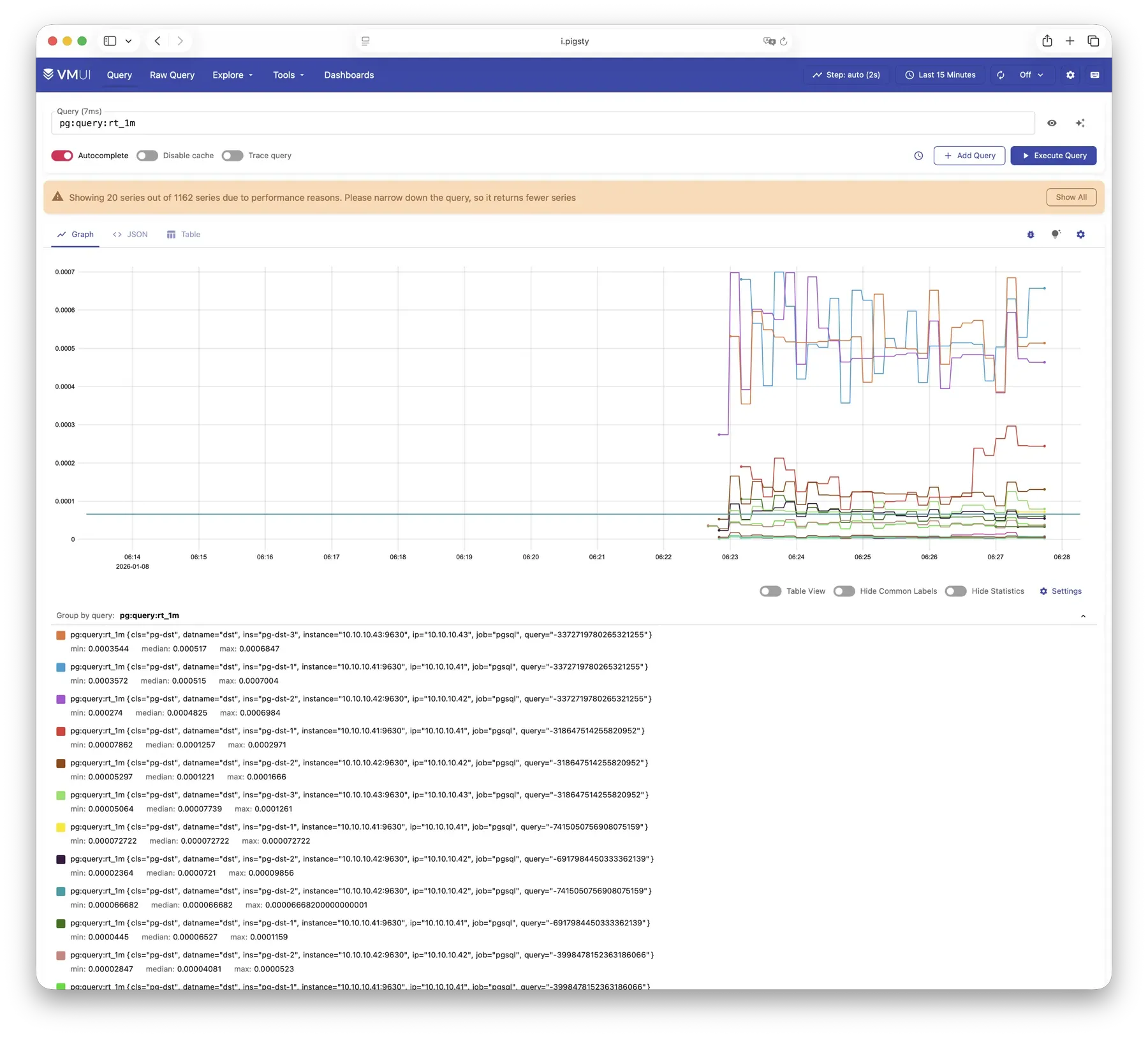
For more information, see: Config: INFRA - VMETRICS
VictoriaLogs
VictoriaLogs is Pigsty’s log platform, centrally storing structured logs from all nodes. Live Demo
It listens on port 9428 by default, mounted at Nginx /vlogs path:
| IP Access (replace) | Domain (HTTP) | Domain (HTTPS) | Public Demo |
|---|---|---|---|
http://10.10.10.10/vlogs |
http://i.pigsty/vlogs |
https://i.pigsty/vlogs |
https://demo.pigsty.io/vlogs |
All managed nodes run Vector Agent by default, collecting system logs, PostgreSQL logs, Patroni logs, Pgbouncer logs, etc., processing them into structured format and pushing to VictoriaLogs. The built-in Web UI supports log search and filtering, and can be integrated with Grafana’s victorialogs-datasource plugin for visual analysis.
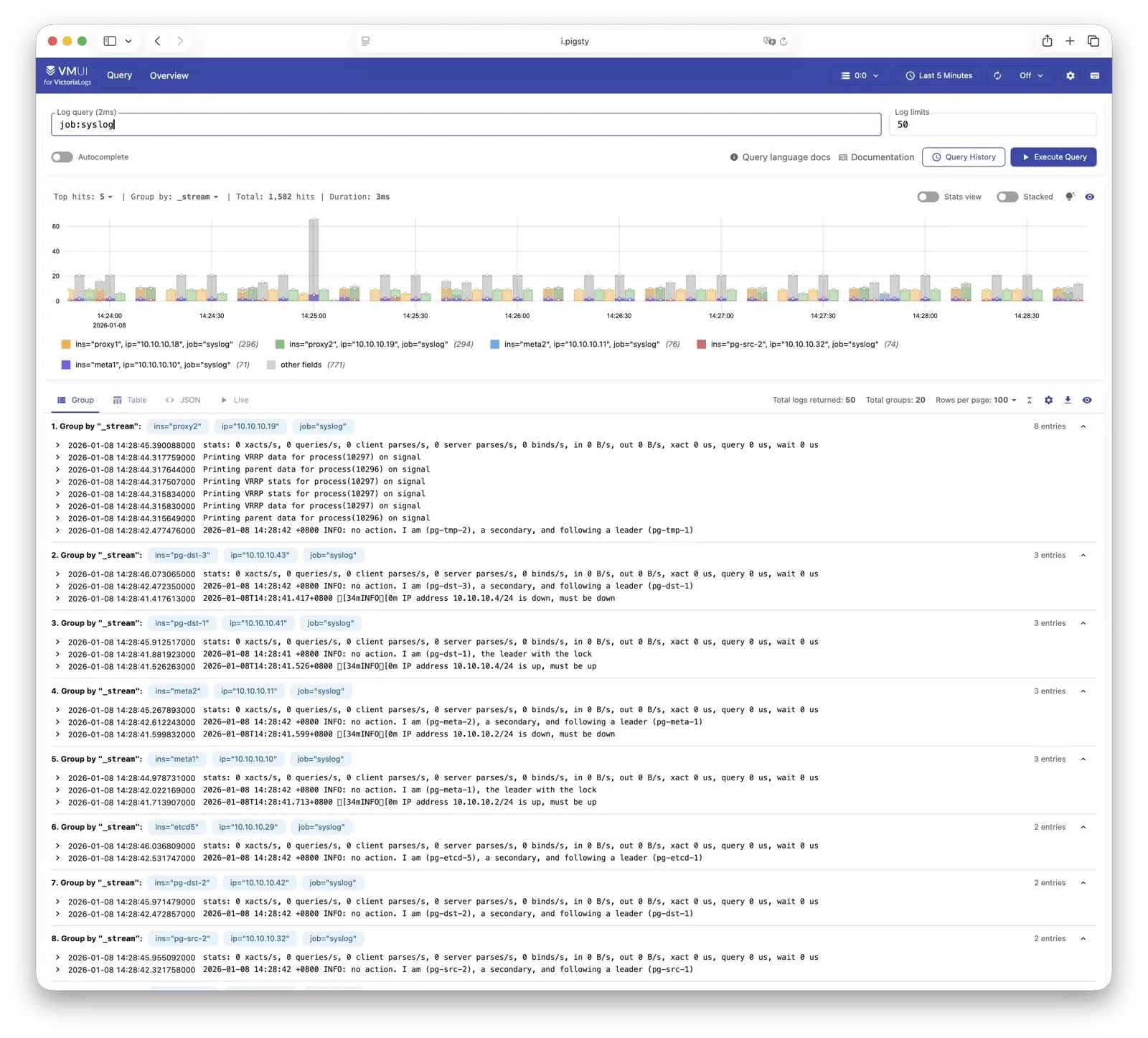
For more information, see: Config: INFRA - VLOGS
VictoriaTraces
VictoriaTraces is used for collecting trace data and slow SQL records. Live Demo
It listens on port 10428 by default, mounted at Nginx /vtraces path:
| IP Access (replace) | Domain (HTTP) | Domain (HTTPS) | Public Demo |
|---|---|---|---|
http://10.10.10.10/vtraces |
http://i.pigsty/vtraces |
https://i.pigsty/vtraces |
https://demo.pigsty.io/vtraces |
VictoriaTraces provides a Jaeger-compatible interface for analyzing service call chains and database slow queries. Combined with Grafana dashboards, it enables rapid identification of performance bottlenecks and root cause tracing.
For more information, see: Config: INFRA - VTRACES
VMAlert
VMAlert is the alerting rule computation engine, responsible for evaluating alert rules and pushing triggered events to Alertmanager. Live Demo
It listens on port 8880 by default, mounted at Nginx /vmalert path:
| IP Access (replace) | Domain (HTTP) | Domain (HTTPS) | Public Demo |
|---|---|---|---|
http://10.10.10.10/vmalert |
http://i.pigsty/vmalert |
https://i.pigsty/vmalert |
https://demo.pigsty.io/vmalert |
VMAlert reads metrics data from VictoriaMetrics and periodically evaluates alerting rules. Pigsty provides pre-built alerting rules for PGSQL, NODE, REDIS, and other modules, covering common failure scenarios out of the box.
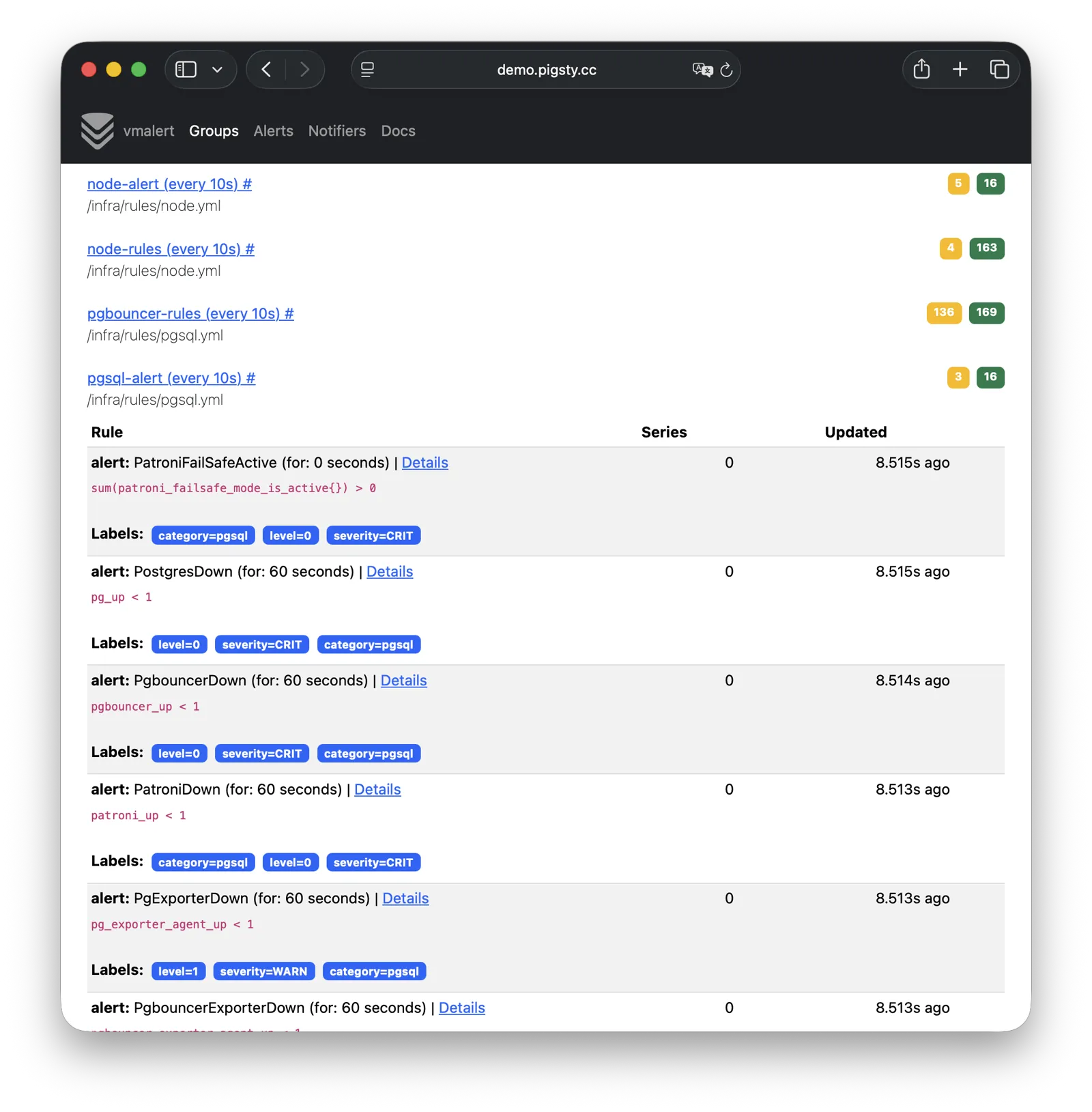
For more information, see: Config: INFRA - VMALERT
AlertManager
AlertManager handles alert event aggregation, deduplication, grouping, and dispatch. Live Demo
It listens on port 9059 by default, mounted at Nginx /alertmgr path, and also accessible via the a.pigsty domain:
| IP Access (replace) | Domain (HTTP) | Domain (HTTPS) | Public Demo |
|---|---|---|---|
http://10.10.10.10/alertmgr |
http://a.pigsty |
https://i.pigsty/alertmgr |
https://demo.pigsty.io/alertmgr |
AlertManager supports multiple notification channels: email, Webhook, Slack, PagerDuty, WeChat Work, etc. Through alert routing rules, differentiated dispatch based on severity level and module type is possible, with support for silencing, inhibition, and other advanced features.
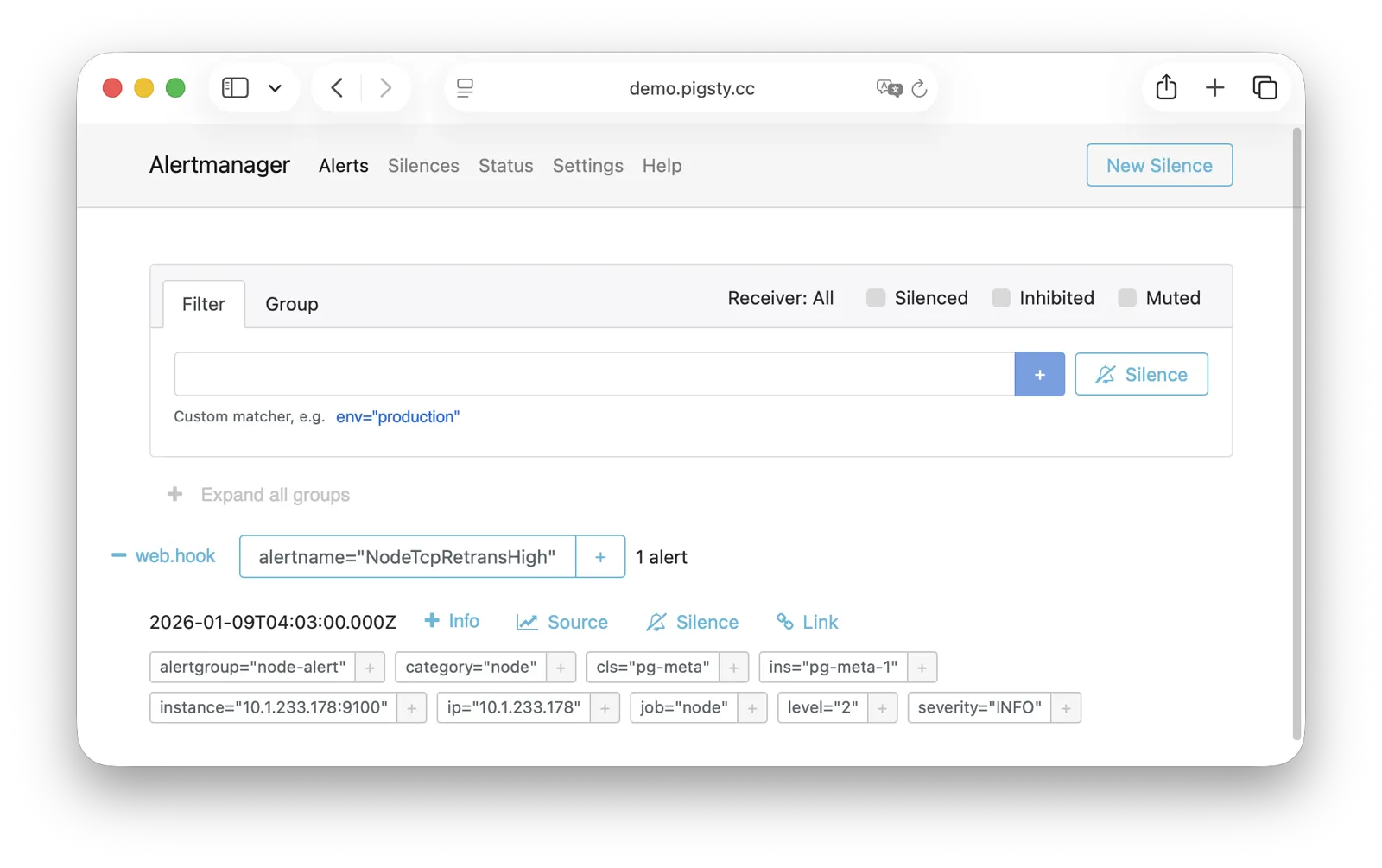
For more information, see: Config: INFRA - AlertManager
BlackboxExporter
Blackbox Exporter is used for active probing of target reachability, enabling blackbox monitoring.
It listens on port 9115 by default, mounted at Nginx /blackbox path:
| IP Access (replace) | Domain (HTTP) | Domain (HTTPS) | Public Demo |
|---|---|---|---|
http://10.10.10.10/blackbox |
http://i.pigsty/blackbox |
https://i.pigsty/blackbox |
https://demo.pigsty.io/blackbox |
It supports multiple probe methods including ICMP Ping, TCP ports, and HTTP/HTTPS endpoints. Useful for monitoring VIP reachability, service port availability, external dependency health, etc.—an important tool for assessing failure impact scope.
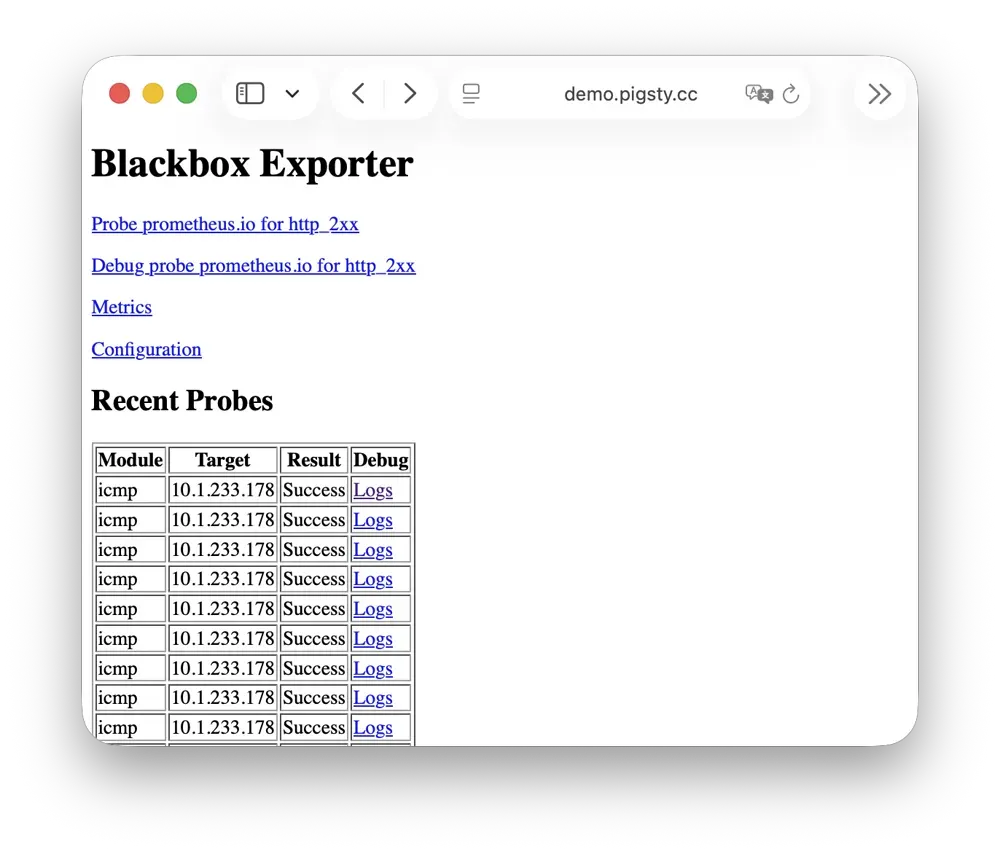
For more information, see: Config: INFRA - BLACKBOX
Ansible
Ansible is Pigsty’s core orchestration tool; all deployment, configuration, and management operations are performed through Ansible Playbooks.
Pigsty automatically installs Ansible on the admin node (Infra node) during installation. It adopts a declarative configuration style and idempotent playbook design: the same playbook can be run repeatedly, and the system automatically converges to the desired state without side effects.
Ansible’s core advantages:
- Agentless: Executes remotely via SSH, no additional software needed on target nodes.
- Declarative: Describes the desired state rather than execution steps; configuration is documentation.
- Idempotent: Multiple executions produce consistent results; supports retry after partial failures.
For more information, see: Playbooks: Pigsty Playbook
DNSMASQ
DNSMASQ provides DNS resolution on INFRA nodes, resolving domain names to their corresponding IP addresses.
DNSMASQ listens on port 53 (UDP/TCP) by default, providing DNS resolution for all nodes. Records are stored in the /etc/dnsmasq.d/pigsty directory.
Other modules automatically register their domain names with DNSMASQ during deployment, which you can use as needed. DNS is completely optional—Pigsty works normally without it. Client nodes can configure INFRA nodes as their DNS servers, allowing access to services via domain names without remembering IP addresses.
dns_records: Default DNS records written to INFRA nodesnode_dns_servers: Configure DNS servers for nodes, defaults to INFRA node viaadmin_ip(can also be disabled)
For more information, see: Config: INFRA - DNS and Tutorial: DNS—Configure Domain Resolution
Chronyd
Chronyd provides NTP time synchronization, ensuring consistent clocks across all nodes. It listens on port 123 (UDP) by default as the time source.
Time synchronization is critical for distributed systems: log analysis requires aligned timestamps, certificate validation depends on accurate clocks, and PostgreSQL streaming replication is sensitive to clock drift. In isolated network environments, the INFRA node can serve as an internal NTP server with other nodes synchronizing to it.
In Pigsty, all nodes run chronyd by default for time sync. The default upstream is pool.ntp.org public NTP servers.
Chronyd is essentially managed by the Node module, but in isolated networks, you can use admin_ip to point to the INFRA node’s Chronyd service as the internal time source.
In this case, the Chronyd service on the INFRA node serves as the internal time synchronization infrastructure.
For more information, see: Config: NODE - TIME
INFRA Node vs Regular Node
In Pigsty, the relationship between nodes and infrastructure is a weak circular dependency: node_monitor → infra → node
The NODE module itself doesn’t depend on the INFRA module, but the monitoring functionality (node_monitor) requires the monitoring platform and services provided by the infrastructure module.
Therefore, in the infra.yml and deploy playbooks, an “interleaved deployment” technique is used:
- First, initialize the NODE module on all regular nodes, but skip monitoring config since infrastructure isn’t deployed yet.
- Then, initialize the INFRA module on the INFRA node—monitoring is now available.
- Finally, reconfigure monitoring on all regular nodes, connecting to the now-deployed monitoring platform.
If you don’t need “one-shot” deployment of all nodes, you can use phased deployment: initialize INFRA nodes first, then regular nodes.
How Are Nodes Coupled to Infrastructure?
Regular nodes reference an INFRA node via the admin_ip parameter as their infrastructure provider.
For example, when you configure global admin_ip = 10.10.10.10, all nodes will typically use infrastructure services at this IP.
This design allows quick, batch switching of infrastructure providers. Parameters that may reference ${admin_ip}:
| Parameter | Module | Default Value | Description |
|---|---|---|---|
repo_endpoint |
INFRA |
http://${admin_ip}:80 |
Software repo URL |
repo_upstream.baseurl |
INFRA |
http://${admin_ip}/pigsty |
Local repo baseurl |
infra_portal.endpoint |
INFRA |
${admin_ip}:<port> |
Nginx proxy backend |
dns_records |
INFRA |
["${admin_ip} i.pigsty", ...] |
DNS records |
node_default_etc_hosts |
NODE |
["${admin_ip} i.pigsty"] |
Default static DNS |
node_etc_hosts |
NODE |
[] |
Custom static DNS |
node_dns_servers |
NODE |
["${admin_ip}"] |
Dynamic DNS servers |
node_ntp_servers |
NODE |
["pool pool.ntp.org iburst"] |
NTP servers (optional) |
For example, when a node installs software, the local repo points to the Nginx local software repository at admin_ip:80/pigsty. The DNS server also points to DNSMASQ at admin_ip:53.
However, this isn’t mandatory—nodes can ignore the local repo and install directly from upstream internet sources (most single-node config templates); DNS servers can also remain unconfigured, as Pigsty has no DNS dependency.
INFRA Node vs ADMIN Node
The management-initiating ADMIN node typically coincides with the INFRA node.
In single-node deployment, this is exactly the case. In multi-node deployment with multiple INFRA nodes, the admin node is usually the first in the infra group; others serve as backups.
However, exceptions exist. You might separate them for various reasons:
For example, in large-scale production deployments, a classic pattern uses 1-2 dedicated management hosts (tiny VMs suffice) belonging to the DBA team as the control hub, with 2-3 high-spec physical machines (or more!) as monitoring infrastructure. Here, admin nodes are separate from infrastructure nodes. In this case, the admin_ip in your config should point to an INFRA node’s IP, not the current ADMIN node’s IP. This is for historical reasons: initially ADMIN and INFRA nodes were tightly coupled concepts, with separation capabilities evolving later, so the parameter name wasn’t changed.
Another common scenario is managing cloud nodes locally. For example, you can install Ansible on your laptop and specify cloud nodes as “managed targets.” In this case, your laptop acts as the ADMIN node, while cloud servers act as INFRA nodes.
Multiple INFRA Nodes
By default, Pigsty only needs one INFRA node for most requirements. Even if the INFRA module goes down, it won’t affect database services on other nodes.
However, in production environments with high monitoring and alerting requirements, you may want multiple INFRA nodes to improve infrastructure availability. A common deployment uses two Infra nodes for redundancy, monitoring each other… or more nodes to deploy a distributed Victoria cluster for unlimited horizontal scaling.
Each Infra node is independent—Nginx points to services on the local machine. VictoriaMetrics independently scrapes metrics from all services in the environment, and logs are pushed to all VictoriaLogs collection endpoints by default. The only exception is Grafana: every Grafana instance registers all VictoriaMetrics / Logs / Traces / PostgreSQL instances as datasources. Therefore, each Grafana instance can see complete monitoring data.
If you modify Grafana—such as adding new dashboards or changing datasource configs—these changes only affect the Grafana instance on that node. To keep Grafana consistent across all nodes, use a PostgreSQL database as shared storage. See Tutorial: Configure Grafana High Availability for details.
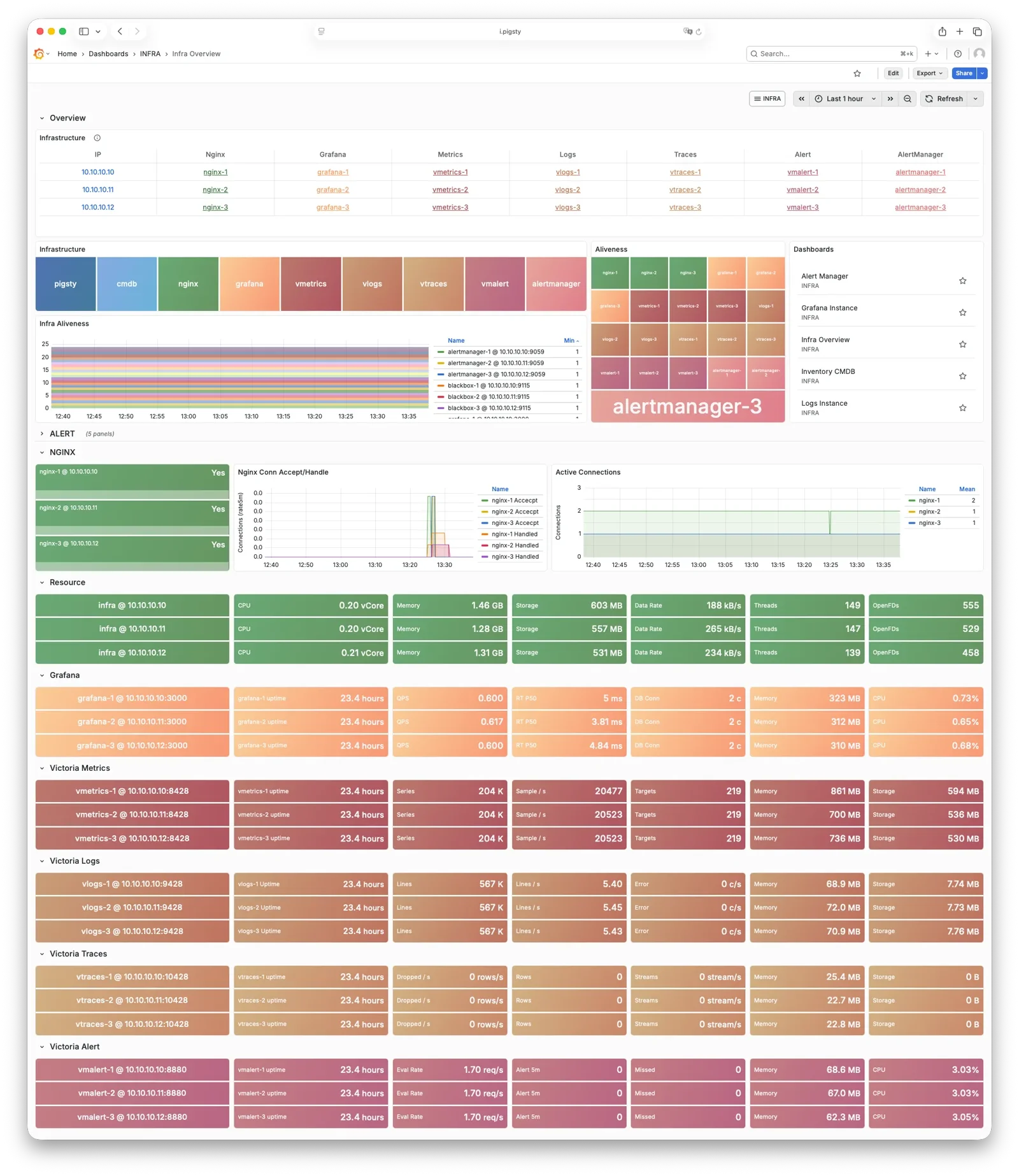
1.3 - PGSQL Arch
The PGSQL module organizes PostgreSQL in production as clusters—logical entities composed of a group of database instances associated by primary-replica relationships.
Overview
The PGSQL module includes the following components, working together to provide production-grade PostgreSQL HA cluster services:
| Component | Type | Description |
|---|---|---|
postgres |
Database | The world’s most advanced open-source relational database, PGSQL core |
patroni |
HA | Manages PostgreSQL, coordinates failover, leader election, config changes |
pgbouncer |
Pool | Lightweight connection pooling middleware, reduces overhead, adds flexibility |
pgbackrest |
Backup | Full/incremental backup and WAL archiving, supports local and object storage |
pg_exporter |
Metrics | Exports PostgreSQL monitoring metrics in a Prometheus-compatible format |
pgbouncer_exporter |
Metrics | Exports Pgbouncer connection pool metrics |
pgbackrest_exporter |
Metrics | Exports backup status metrics |
vip-manager |
VIP | Binds L2 VIP to current primary node for transparent failover [Optional] |
The vip-manager is an on-demand component. Additionally, PGSQL uses components from other modules:
| Component | Module | Type | Description |
|---|---|---|---|
haproxy |
NODE | LB | Exposes service ports, routes traffic to primary or replicas |
vector |
NODE | Logging | Collects PostgreSQL, Patroni, Pgbouncer logs and ships to center |
etcd |
ETCD | DCS | Distributed consistent store for cluster metadata and leader info |
By analogy, the PostgreSQL database kernel is the CPU, while the PGSQL module packages it as a complete computer. Patroni and Etcd form the HA subsystem, while pgBackRest and optional Silo form the backup subsystem. HAProxy, Pgbouncer, and vip-manager form the access subsystem. Various Exporters and Vector build the observability subsystem; finally, you can swap different kernel CPUs and extension cards.

| Subsystem | Components | Function |
|---|---|---|
| HA Subsystem | Patroni + etcd | Failure detection, auto-failover, config management |
| Access Subsystem | HAProxy + Pgbouncer + vip-manager | Service exposure, load balancing, pooling, VIP |
| Backup Subsystem | pgBackRest (+ Silo) | Full/incremental backup, WAL archiving, PITR |
| Observability Subsystem | pg_exporter / pgbouncer_exporter / pgbackrest_exporter + Vector | Metrics collection, log aggregation |
Component Interaction
- Cluster DNS is resolved by DNSMASQ on infra nodes
- Cluster VIP is managed by vip-manager, which binds
pg_vip_addressto the cluster primary node.- vip-manager gets cluster leader info written by patroni from the etcd cluster
- Cluster services are exposed by HAProxy on nodes, different services distinguished by node ports (543x).
- HAProxy port 9101: Monitoring metrics & statistics & admin page
- HAProxy port 5433: Routes to primary pgbouncer: read-write service
- HAProxy port 5434: Routes to replica pgbouncer: read-only service
- HAProxy port 5436: Routes to primary postgres: default service
- HAProxy port 5438: Routes to offline postgres: offline service
- HAProxy routes traffic based on health check info from patroni.
- Pgbouncer is connection pooling middleware, listening on port 6432 by default, buffering connections, exposing additional metrics, and providing extra flexibility.
- PostgreSQL listens on port 5432, providing relational database services
- Installing PGSQL module on multiple nodes with the same cluster name automatically forms an HA cluster via streaming replication
- PostgreSQL process is managed by patroni by default.
- Patroni listens on port 8008 by default, supervising PostgreSQL server processes
- pg_exporter exposes postgres monitoring metrics on port 9630
- pgbouncer_exporter exposes pgbouncer metrics on port 9631
- pgBackRest uses local backup repository by default (
pgbackrest_method=local)- If using
local(default), pgBackRest creates local repository underpg_fs_bkupon primary node - If using
minio, pgBackRest creates the backup repository on dedicated Silo or an external S3 service
- If using
- Vector collects Postgres-related logs (postgres, pgbouncer, patroni, pgbackrest)
HA Subsystem
The HA subsystem consists of Patroni and etcd, responsible for PostgreSQL cluster failure detection, automatic failover, and configuration management.
How it works: Patroni runs on each node, managing the local PostgreSQL process and writing cluster state (leader, members, config) to etcd. When the primary fails, Patroni coordinates election via etcd, promoting the healthiest replica to new primary. The entire process is automatic, with RTO typically under 45 seconds.
Key Interactions:
- PostgreSQL: Starts, stops, reloads PG as parent process, controls its lifecycle
- etcd: External dependency, writes/watches leader key for distributed consensus and failure detection
- HAProxy: Provides health checks via REST API (
:8008), reporting instance role - vip-manager: Watches leader key in etcd, auto-migrates VIP
For more information, see: High Availability and Config: PGSQL - PG_BOOTSTRAP
Access Subsystem
The access subsystem consists of HAProxy, Pgbouncer, and vip-manager, responsible for service exposure, traffic routing, and connection pooling.
There are multiple access methods. A typical traffic path is: Client → DNS/VIP → HAProxy (543x) → Pgbouncer (6432) → PostgreSQL (5432)
| Layer | Component | Port | Role |
|---|---|---|---|
| L2 VIP | vip-manager | - | Binds L2 VIP to primary (optional) |
| L4 Load Bal | HAProxy | 543x | Service exposure, load balancing, health checks |
| L7 Pool | Pgbouncer | 6432 | Connection reuse, session management, transaction pooling |
Service Ports:
5433primary: Read-write service, routes to primary Pgbouncer5434replica: Read-only service, routes to replica Pgbouncer5436default: Default service, direct to primary (bypasses pool)5438offline: Offline service, direct to offline replica (ETL/analytics)
Key Features:
- HAProxy uses Patroni REST API to determine instance role, auto-routes traffic
- Pgbouncer uses transaction-level pooling, absorbs connection spikes, reduces PG connection overhead
- vip-manager watches etcd leader key, auto-migrates VIP during failover
For more information, see: Service Access and Config: PGSQL - PG_ACCESS
Backup Subsystem
The backup subsystem consists of pgBackRest (optionally with Silo or external S3 as a remote repository), responsible for data backup and point-in-time recovery (PITR).
Backup Types:
- Full backup: Complete database copy
- Incremental/differential backup: Only backs up changed data blocks
- WAL archiving: Continuous transaction log archiving, enables any point-in-time recovery
Storage Backends:
local(default): Local disk, backups stored atpg_fs_bkupmount pointminio: S3-compatible object storage, supports centralized backup management and off-site DR
Key Interactions:
- pgBackRest → PostgreSQL: Executes backup commands, manages WAL archiving
- pgBackRest → Patroni: Recovery can bootstrap replicas as new primary or standby
- pgbackrest_exporter → VictoriaMetrics: Exports backup status metrics through the Prometheus-compatible protocol to monitor backup health
For more information, see: PITR, Backup & Recovery, and Config: PGSQL - PG_BACKUP
Observability Subsystem
The observability subsystem consists of three Exporters and Vector, responsible for metrics collection and log aggregation.
| Component | Port | Target | Key Metrics |
|---|---|---|---|
| pg_exporter | 9630 |
PostgreSQL | Sessions, transactions, replication lag, buffer hits |
| pgbouncer_exporter | 9631 |
Pgbouncer | Pool utilization, wait queue, hit rate |
| pgbackrest_exporter | 9854 |
pgBackRest | Latest backup time, size, type |
| vector | 9598 |
postgres/patroni/pgbouncer logs | Structured log stream |
Data Flow:
- Metrics: Exporter → VictoriaMetrics (INFRA) → Grafana dashboards
- Logs: Vector → VictoriaLogs (INFRA) → Grafana log queries
pg_exporter / pgbouncer_exporter connect to target services via local Unix socket, decoupled from HA topology. In slim install mode, these components can be disabled.
For more information, see: Config: PGSQL - PG_MONITOR
PostgreSQL
PostgreSQL is the PGSQL module core, listening on port 5432 by default for relational database services, deployed 1:1 with nodes.
Pigsty currently supports PostgreSQL 14-18 (lifecycle major versions), installed via binary packages from the PGDG official repo. Pigsty also allows you to use other PG kernel forks to replace the default PostgreSQL kernel, and install up to 575 extension plugins on top of the PG kernel.
PostgreSQL processes are managed by default by the HA agent—Patroni. When a cluster has only one node, that instance is the primary; when the cluster has multiple nodes, other instances automatically join as replicas: through physical replication, syncing data changes from the primary in real-time. Replicas can handle read-only requests and automatically take over when the primary fails.
You can access PostgreSQL directly, or through HAProxy and Pgbouncer connection pool.
For more information, see: Config: PGSQL - PG_BOOTSTRAP
Patroni
Patroni is the PostgreSQL HA control component, listening on port 8008 by default.
Patroni takes over PostgreSQL startup, shutdown, configuration, and health status, writing leader and member information to etcd. It handles automatic failover, maintains replication factor, coordinates parameter changes, and provides a REST API for HAProxy, monitoring, and administrators.
HAProxy uses Patroni health check endpoints to determine instance roles and route traffic to the correct primary or replica. vip-manager monitors the leader key in etcd and automatically migrates the VIP when the primary changes.
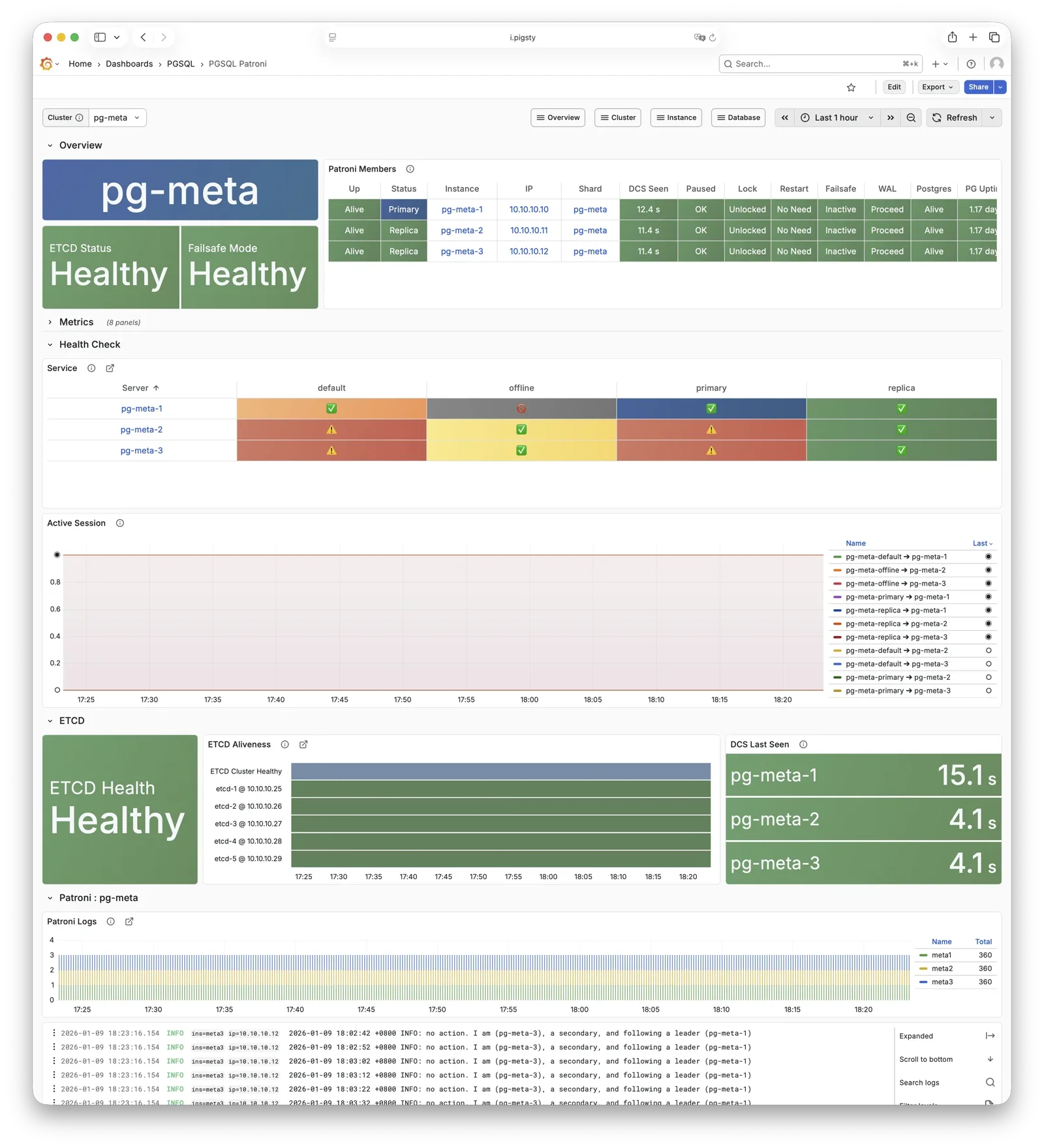
For more information, see: Config: PGSQL - PG_BOOTSTRAP
Pgbouncer
Pgbouncer is a lightweight connection pooling middleware, listening on port 6432 by default, deployed 1:1 with PostgreSQL database and node.
Pgbouncer runs statelessly on each instance, connecting to PostgreSQL via local Unix socket, using Transaction Pooling by default for pool management, absorbing burst client connections, stabilizing database sessions, reducing lock contention, and significantly improving performance under high concurrency.
Pigsty routes production traffic (read-write service 5433 / read-only service 5434) through Pgbouncer by default,
while only the default service (5436) and offline service (5438) bypass the pool for direct PostgreSQL connections.
Pool mode is controlled by pgbouncer_poolmode, defaulting to transaction (transaction-level pooling).
Connection pooling can be disabled via pgbouncer_enabled.
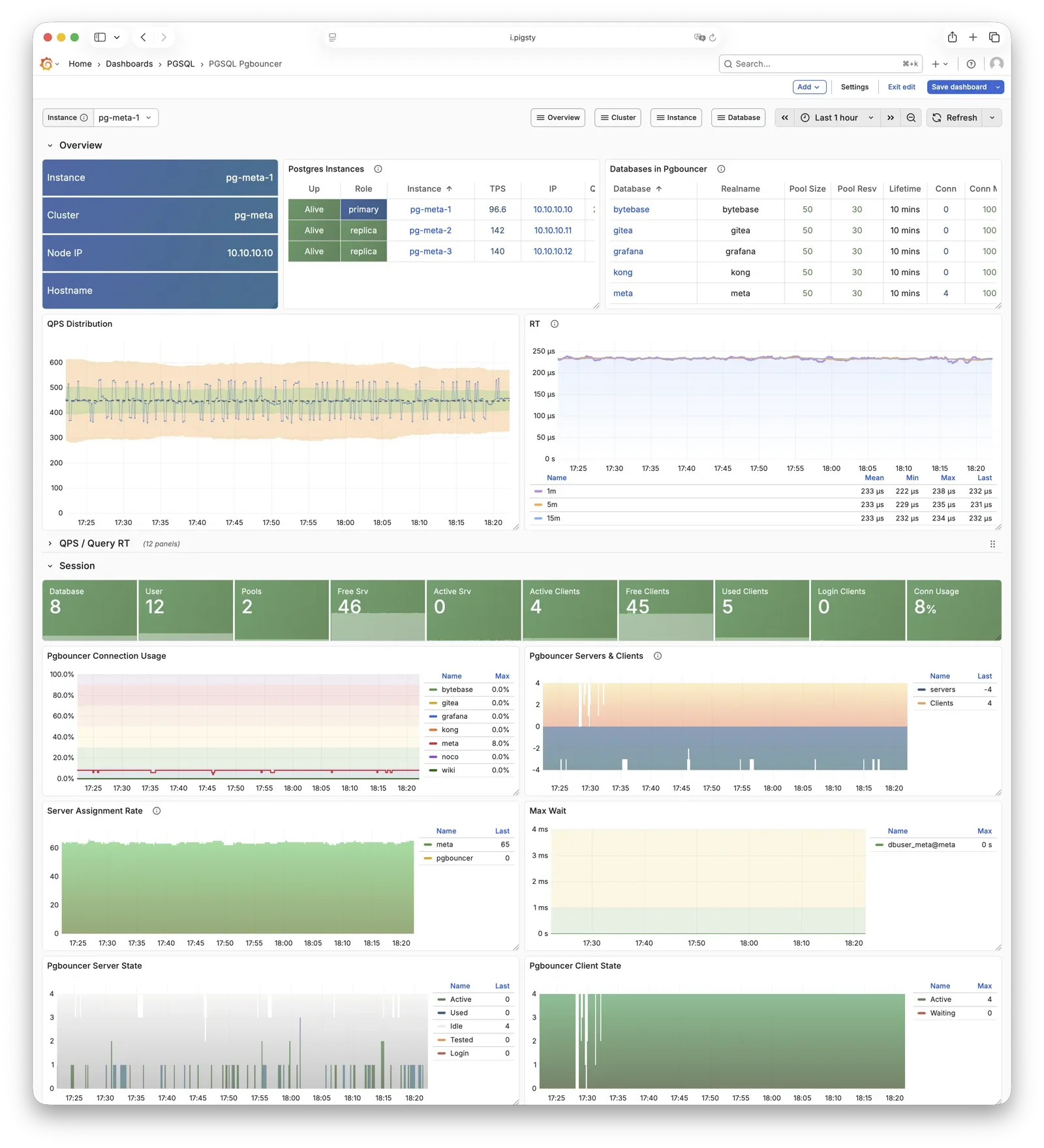
For more information, see: Config: PGSQL - PG_ACCESS
pgBackRest
pgBackRest is a professional PostgreSQL backup/recovery tool, one of the strongest in the PG ecosystem, supporting full/incremental/differential backup and WAL archiving.
Pigsty uses pgBackRest for PostgreSQL PITR capability, allowing you to roll back clusters to any point within the backup retention window.
pgBackRest works with PostgreSQL to create backup repositories on the primary, executing backup and archive tasks.
By default, it uses local backup repository (pgbackrest_method = local),
but can be configured for Silo or external S3 object storage for centralized backup management.
After initialization, pgbackrest_init_backup can automatically trigger the first full backup.
Recovery integrates with Patroni, supporting bootstrapping replicas as new primaries or standbys.
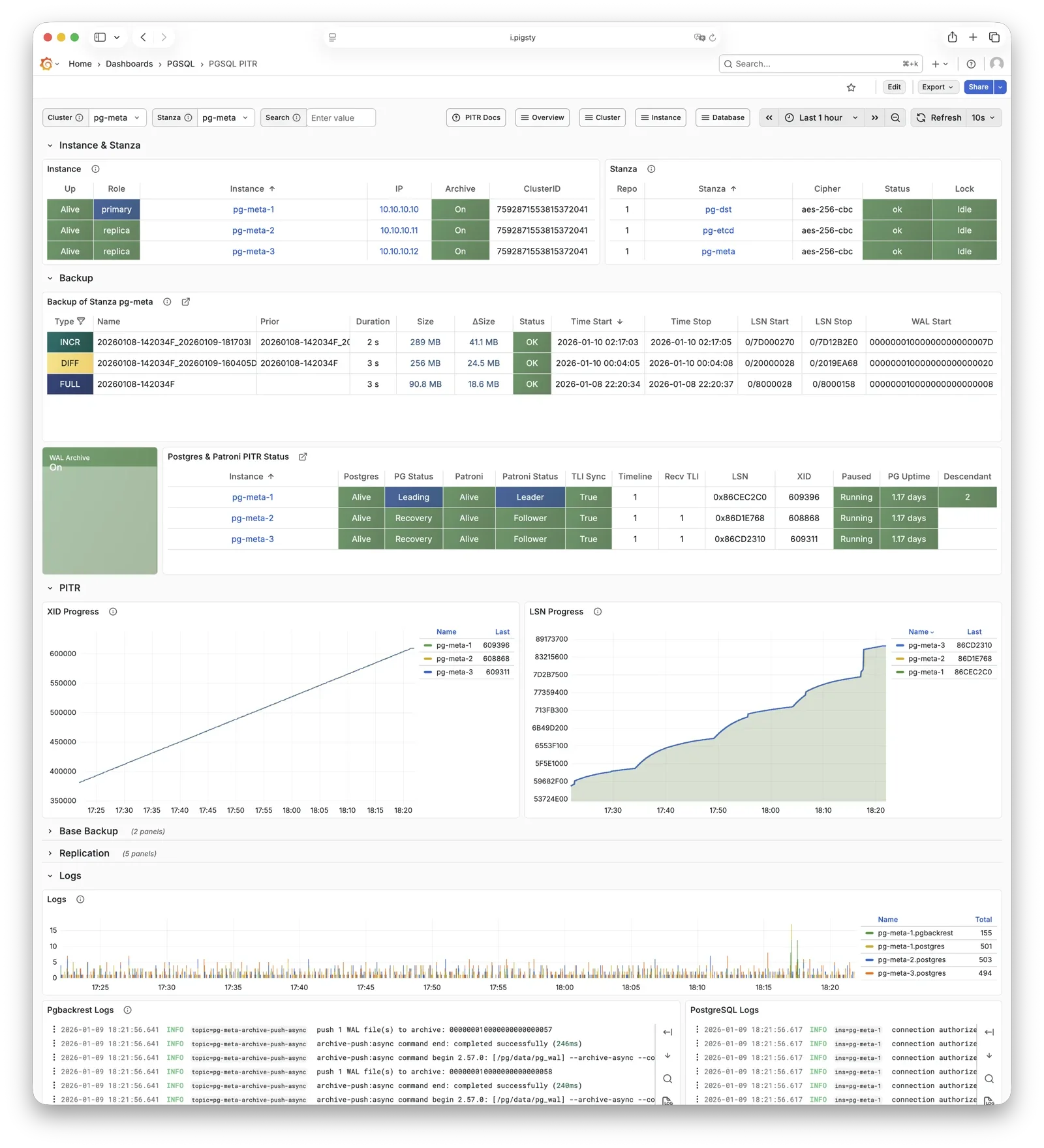
For more information, see: Backup & Recovery and Config: PGSQL - PG_BACKUP
HAProxy
HAProxy is the service entry point and load balancer, exposing multiple database service ports.
| Port | Service | Target | Description |
|---|---|---|---|
9101 |
Admin | - | HAProxy statistics and admin page |
5433 |
primary | Primary Pgbouncer | Read-write service, routes to primary pool |
5434 |
replica | Replica Pgbouncer | Read-only service, routes to replica pool |
5436 |
default | Primary Postgres | Default service, direct to primary (bypasses pool) |
5438 |
offline | Offline Postgres | Offline service, direct to offline replica (ETL/analytics) |
HAProxy uses Patroni REST API health checks to determine instance roles and route traffic to the appropriate primary or replica.
Service definitions are composed from pg_default_services and pg_services.
A dedicated HAProxy node group can be specified via pg_service_provider to handle higher traffic;
by default, HAProxy on local nodes publishes services.
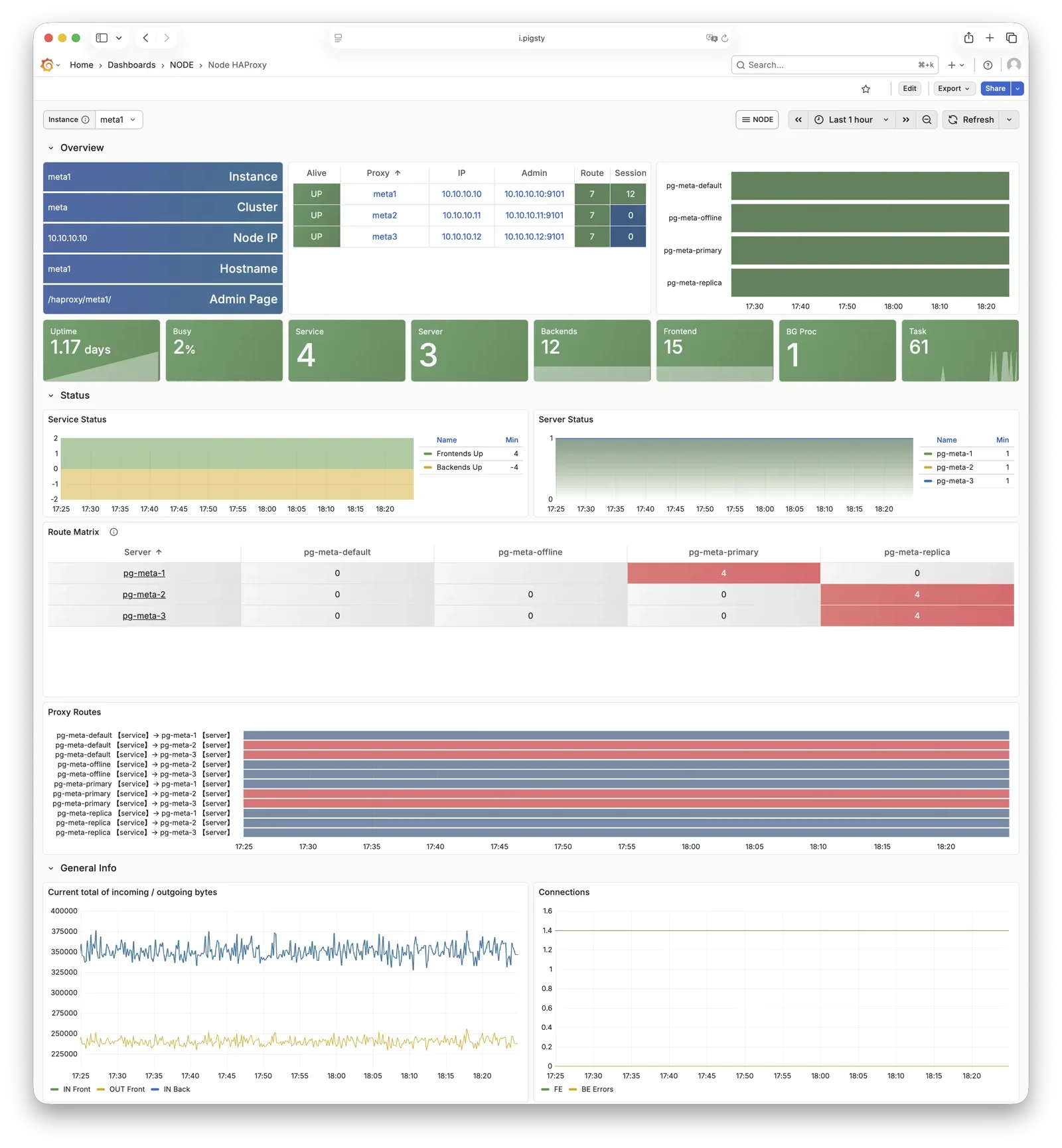
For more information, see: Service Access and Config: PGSQL - PG_ACCESS
vip-manager
vip-manager binds L2 VIP to the current primary node. This is an optional component; enable it if your network supports L2 VIP.
vip-manager runs on each PG node, monitoring the leader key written by Patroni in etcd,
and binds pg_vip_address to the current primary node’s network interface.
When cluster failover occurs, vip-manager immediately releases the VIP from the old primary and rebinds it on the new primary, switching traffic to the new primary.
This component is optional, enabled via pg_vip_enabled.
When enabled, ensure all nodes are in the same VLAN; otherwise, VIP migration will fail.
Public cloud networks typically don’t support L2 VIP; it’s recommended only for on-premises and private cloud environments.
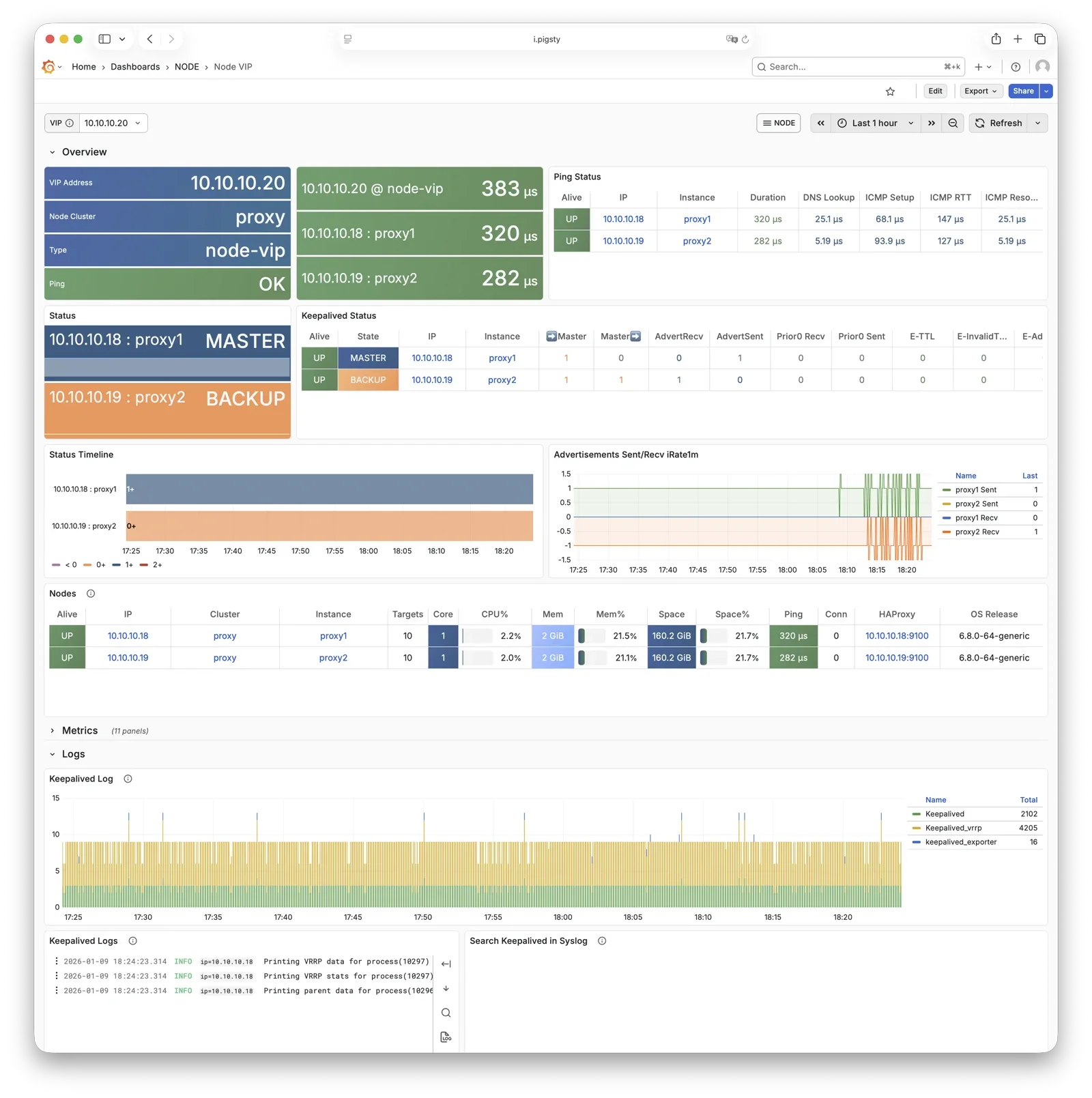
For more information, see: Tutorial: VIP Configuration and Config: PGSQL - PG_ACCESS
pg_exporter
pg_exporter exports PostgreSQL monitoring metrics, listening on port 9630 by default.
pg_exporter runs on each PG node, connecting to PostgreSQL via local Unix socket, exporting rich metrics covering sessions, buffer hits, replication lag, transaction rates, etc., scraped by VictoriaMetrics on INFRA nodes.
Collection configuration is specified by pg_exporter_config,
with support for automatic database discovery (pg_exporter_auto_discovery),
and tiered cache strategies via pg_exporter_cache_ttls.
You can disable this component via parameters; in slim install, this component is not enabled.
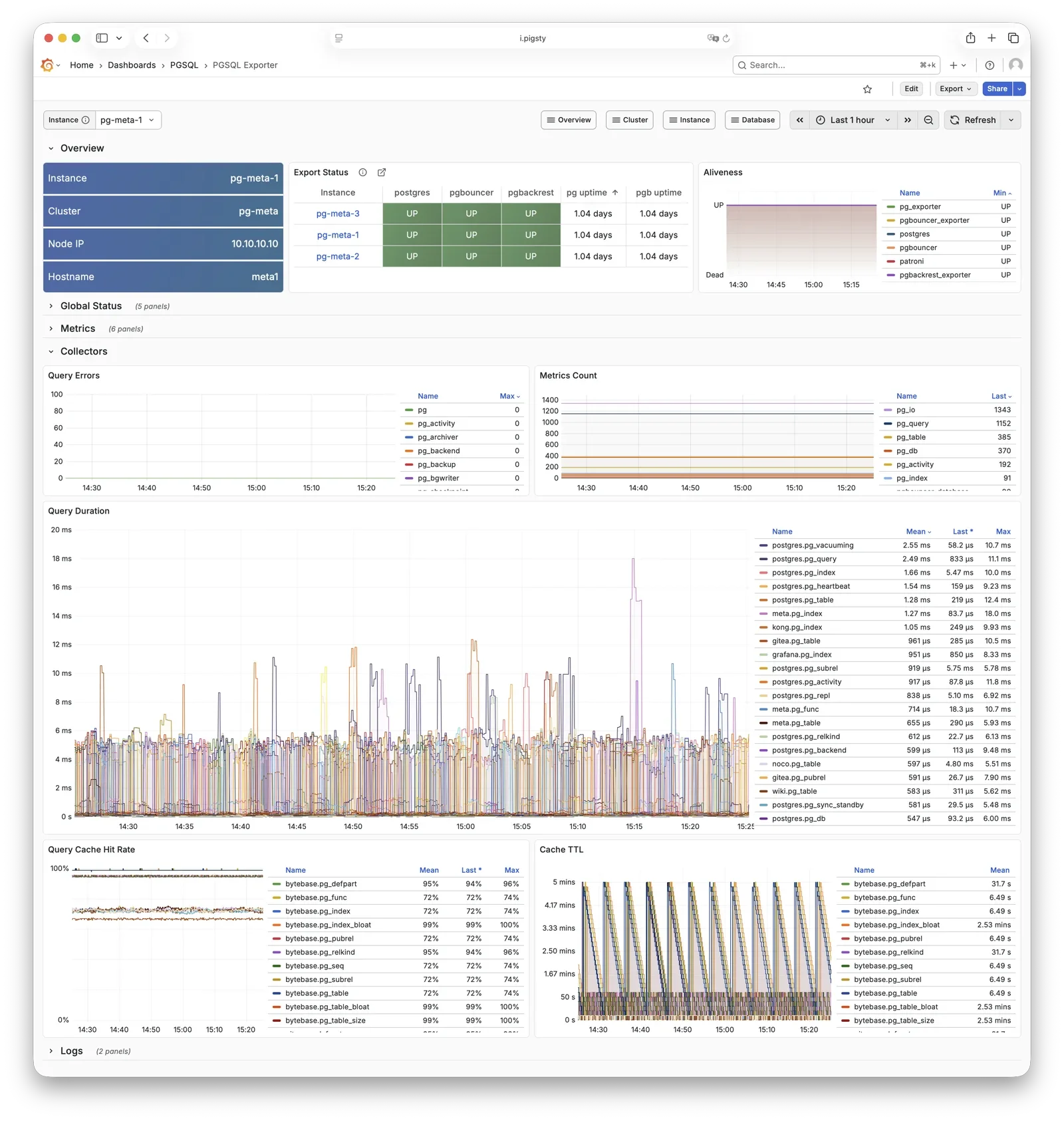
For more information, see: Config: PGSQL - PG_MONITOR
pgbouncer_exporter
pgbouncer_exporter exports Pgbouncer connection pool metrics, listening on port 9631 by default.
pgbouncer_exporter uses the same pg_exporter binary but with a dedicated metrics config file, supporting pgbouncer 1.8-1.25+.
pgbouncer_exporter reads Pgbouncer statistics views, providing pool utilization, wait queue, and hit rate metrics.
If Pgbouncer is disabled, this component is also disabled. In slim install, this component is not enabled.
For more information, see: Config: PGSQL - PG_MONITOR
pgbackrest_exporter
pgbackrest_exporter exports backup status metrics, listening on port 9854 by default.
pgbackrest_exporter parses pgBackRest status, generating metrics for most recent backup time, size, type, etc. Combined with alerting policies, it quickly detects expired or failed backups, ensuring data safety. Note that when there are many backups or using large network repositories, collection overhead can be significant, so pgbackrest_exporter has a default 2-minute collection interval. In the worst case, you may see the latest backup status in the monitoring system 2 minutes after a backup completes.
For more information, see: Config: PGSQL - PG_MONITOR
etcd
etcd is a distributed consistent store (DCS), providing cluster metadata storage and leader election capability for Patroni.
etcd is deployed and managed by the independent ETCD module, not part of the PGSQL module itself, but critical for PostgreSQL HA. Patroni writes cluster state, leader info, and config parameters to etcd; all nodes reach consensus through etcd. vip-manager also reads the leader key from etcd to enable automatic VIP migration.
For more information, see: ETCD Module
vector
Vector is a high-performance log collection component, deployed by the NODE module, responsible for collecting PostgreSQL-related logs.
Vector runs on nodes, tracking PostgreSQL, Pgbouncer, Patroni, and pgBackRest log directories, sending structured logs to VictoriaLogs on INFRA nodes for centralized storage and querying.
For more information, see: NODE Module
2 - ER Model
The largest entity concept in Pigsty is a Deployment. The main entities and relationships (E-R diagram) in a deployment are shown below:
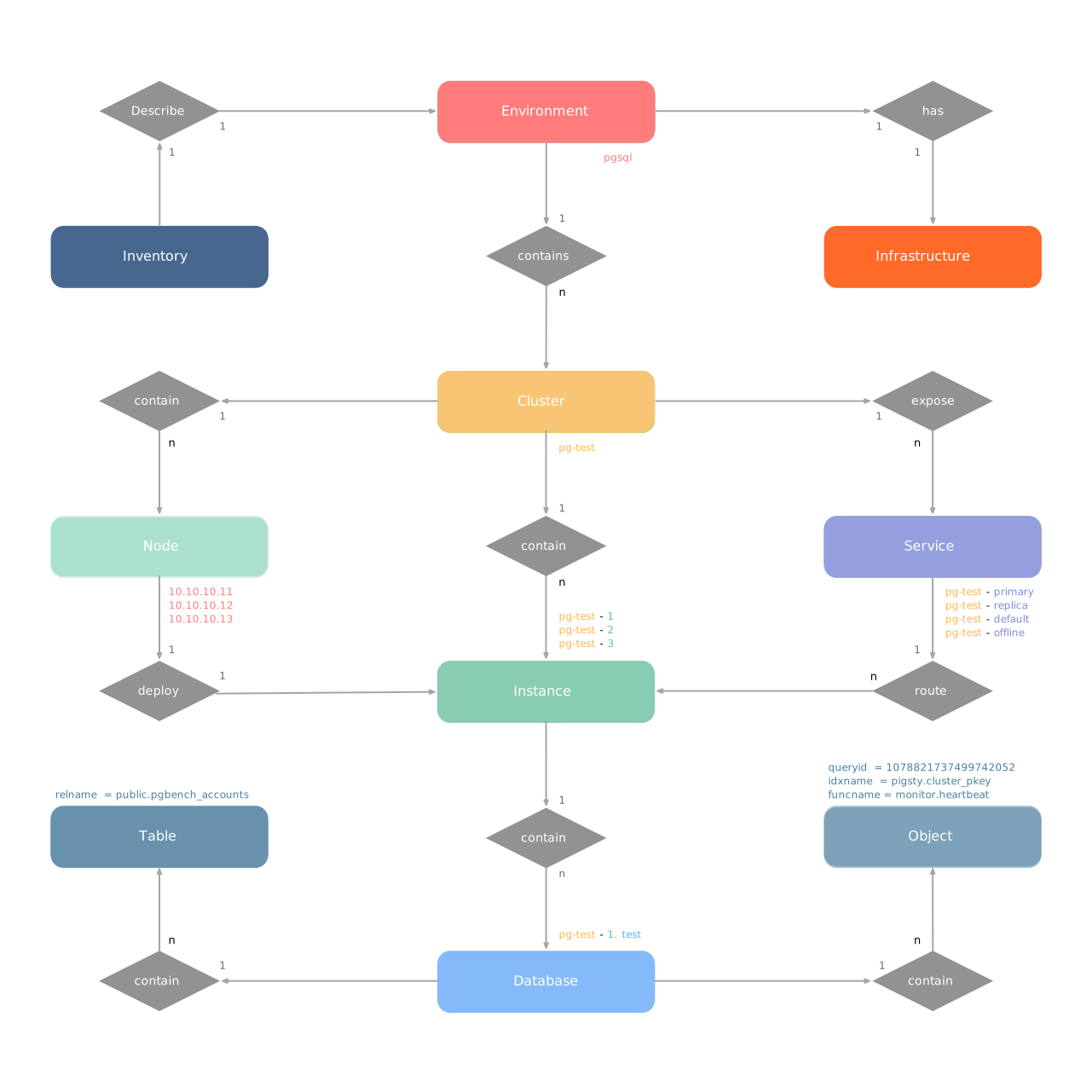
A deployment can also be understood as an Environment. For example, Production (Prod), User Acceptance Testing (UAT), Staging, Testing, Development (Devbox), etc. Each environment corresponds to a Pigsty inventory that describes all entities and attributes in that environment.
Typically, an environment includes shared infrastructure (INFRA), which broadly includes ETCD (HA DCS) and MINIO (centralized backup repository),
serving multiple PostgreSQL database clusters (and other database module components). (Exception: there are also deployments without infrastructure)
In Pigsty, almost all database modules are organized as “Clusters”. Each cluster is an Ansible group containing several node resources. For example, PostgreSQL HA database clusters, Redis, Etcd, and Silo all exist as clusters. An environment can contain multiple clusters.
2.1 - E-R Model of Infra Cluster
The INFRA module plays a special role in Pigsty: it’s not a traditional “cluster” but rather a management hub composed of a group of infrastructure nodes, providing core services for the entire Pigsty deployment. Each INFRA node is an autonomous infrastructure service unit running core components like Nginx, Grafana, and VictoriaMetrics, collectively providing observability and management capabilities for managed database clusters.
There are two core entities in Pigsty’s INFRA module:
- Node: A server running infrastructure components—can be bare metal, VM, container, or Pod.
- Component: Various infrastructure services running on nodes, such as Nginx, Grafana, VictoriaMetrics, etc.
INFRA nodes typically serve as Admin Nodes, the control plane of Pigsty.
Component Composition
Each INFRA node runs the following core components:
| Component | Port | Description |
|---|---|---|
| Nginx | 80/443 |
Web portal, local repo, unified reverse proxy |
| Grafana | 3000 |
Visualization platform, dashboards, data apps |
| VictoriaMetrics | 8428 |
Time-series database, Prometheus API compatible |
| VictoriaLogs | 9428 |
Log database, receives structured logs from Vector |
| VictoriaTraces | 10428 |
Trace storage for slow SQL / request tracing |
| VMAlert | 8880 |
Alert rule evaluator based on VictoriaMetrics |
| Alertmanager | 9059 |
Alert aggregation and dispatch |
| Blackbox Exporter | 9115 |
ICMP/TCP/HTTP black-box probing |
| DNSMASQ | 53 |
DNS server for internal domain resolution |
| Chronyd | 123 |
NTP time server |
These components together form Pigsty’s observability infrastructure.
Examples
Let’s look at a concrete example with a two-node INFRA deployment:
The above config fragment defines a two-node INFRA deployment:
| Group | Description |
|---|---|
infra |
INFRA infrastructure node group |
| Node | Description |
infra-1 |
10.10.10.10 INFRA node #1 |
infra-2 |
10.10.10.11 INFRA node #2 |
For production environments, deploying at least two INFRA nodes is recommended for infrastructure component redundancy.
Identity Parameters
Pigsty uses the INFRA_ID parameter group to assign deterministic identities to each INFRA module entity. One parameter is required:
| Parameter | Type | Level | Description | Format |
|---|---|---|---|---|
infra_seq |
int |
Node | INFRA node sequence, required | Natural number, starting from 1, unique within group |
With node sequence assigned at node level, Pigsty automatically generates unique identifiers for each entity based on rules:
| Entity | Generation Rule | Example |
|---|---|---|
| Node | infra-{{ infra_seq }} |
infra-1, infra-2 |
The INFRA module assigns infra-N format identifiers to nodes for distinguishing multiple infrastructure nodes in the monitoring system.
However, this doesn’t change the node’s hostname or system identity; nodes still use their existing hostname or IP address for identification.
Service Portal
INFRA nodes provide unified web service entry through Nginx. The infra_portal parameter defines services exposed through Nginx.
The default configuration only defines the home server:
Pigsty automatically configures reverse proxy endpoints for enabled components (Grafana, VictoriaMetrics, AlertManager, etc.). If you need to access these services via separate domains, you can explicitly add configurations:
| Domain | Service | Description |
|---|---|---|
i.pigsty |
Home | Pigsty homepage |
g.pigsty |
Grafana | Monitoring dashboard |
p.pigsty |
VictoriaMetrics | TSDB Web UI |
a.pigsty |
Alertmanager | Alert management UI |
Accessing Pigsty services via domain names is recommended over direct IP + port.
Deployment Scale
The number of INFRA nodes depends on deployment scale and HA requirements:
| Scale | INFRA Nodes | Description |
|---|---|---|
| Dev/Test | 1 | Single-node deployment, all on one node |
| Small Prod | 1-2 | Single or dual node, can share with other services |
| Medium Prod | 2-3 | Dedicated INFRA nodes, redundant components |
| Large Prod | 3+ | Multiple INFRA nodes, component separation |
In singleton deployment, INFRA components share the same node with PGSQL, ETCD, etc.
In small-scale deployments, INFRA nodes typically also serve as “Admin Node” / backup admin node and local software repository (/www/pigsty).
In larger deployments, these responsibilities can be separated to dedicated nodes.
Monitoring Label System
Pigsty’s monitoring system collects metrics from INFRA components themselves. Unlike database modules, each component in the INFRA module is treated as an independent monitoring object, distinguished by the cls (class) label.
| Label | Description | Example |
|---|---|---|
cls |
Component type, each forming a “class” | nginx |
ins |
Instance name, format {component}-{infra_seq} |
nginx-1 |
ip |
INFRA node IP running the component | 10.10.10.10 |
job |
VictoriaMetrics scrape job, fixed as infra |
infra |
Using a two-node INFRA deployment (infra_seq: 1 and infra_seq: 2) as example, component monitoring labels are:
| Component | cls |
ins Example |
Port |
|---|---|---|---|
| Nginx | nginx |
nginx-1, nginx-2 |
9113 |
| Grafana | grafana |
grafana-1, grafana-2 |
3000 |
| VictoriaMetrics | vmetrics |
vmetrics-1, vmetrics-2 |
8428 |
| VictoriaLogs | vlogs |
vlogs-1, vlogs-2 |
9428 |
| VictoriaTraces | vtraces |
vtraces-1, vtraces-2 |
10428 |
| VMAlert | vmalert |
vmalert-1, vmalert-2 |
8880 |
| Alertmanager | alertmanager |
alertmanager-1, alertmanager-2 |
9059 |
| Blackbox | blackbox |
blackbox-1, blackbox-2 |
9115 |
All INFRA component metrics use a unified job="infra" label, distinguished by the cls label:
2.2 - E-R Model of PostgreSQL Cluster
The PGSQL module organizes PostgreSQL in production as clusters—logical entities composed of a group of database instances associated by primary-replica relationships.
Each cluster is an autonomous business unit consisting of at least one primary instance, exposing capabilities through services.
There are four core entities in Pigsty’s PGSQL module:
- Cluster: An autonomous PostgreSQL business unit serving as the top-level namespace for other entities.
- Service: A named abstraction that exposes capabilities, routes traffic, and exposes services using node ports.
- Instance: A single PostgreSQL server consisting of running processes and database files on a single node.
- Node: A hardware resource abstraction running Linux + Systemd environment—can be bare metal, VM, container, or Pod.
Along with two business entities—“Database” and “Role”—these form the complete logical view as shown below:
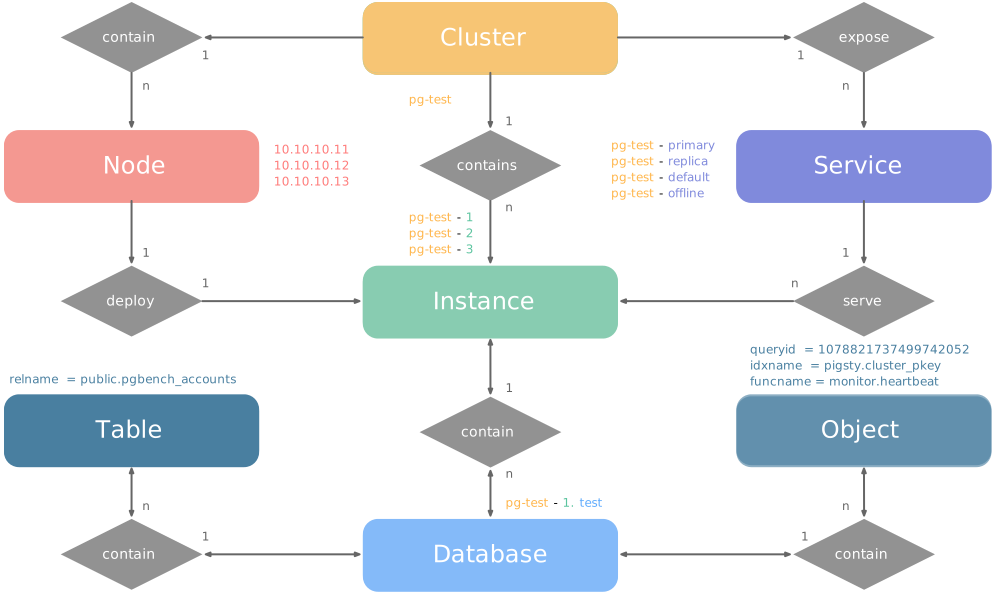
Examples
Let’s look at two concrete examples. Using the four-node Pigsty sandbox, there’s a three-node pg-test cluster:
The above config fragment defines a high-availability PostgreSQL cluster with these related entities:
| Cluster | Description |
|---|---|
pg-test |
PostgreSQL 3-node HA cluster |
| Instance | Description |
pg-test-1 |
PostgreSQL instance #1, default primary |
pg-test-2 |
PostgreSQL instance #2, initial replica |
pg-test-3 |
PostgreSQL instance #3, initial replica |
| Service | Description |
pg-test-primary |
Read-write service (routes to primary pgbouncer) |
pg-test-replica |
Read-only service (routes to replica pgbouncer) |
pg-test-default |
Direct read-write service (routes to primary postgres) |
pg-test-offline |
Offline read service (routes to dedicated postgres) |
| Node | Description |
node-1 |
10.10.10.11 Node #1, hosts pg-test-1 PG instance |
node-2 |
10.10.10.12 Node #2, hosts pg-test-2 PG instance |
node-3 |
10.10.10.13 Node #3, hosts pg-test-3 PG instance |
Identity Parameters
Pigsty uses the PG_ID parameter group to assign deterministic identities to each PGSQL module entity. Three parameters are required:
| Parameter | Type | Level | Description | Format |
|---|---|---|---|---|
pg_cluster |
string |
Cluster | PG cluster name, required | Valid DNS name, regex [a-zA-Z0-9-]+ |
pg_seq |
int |
Instance | PG instance number, required | Natural number, starting from 0 or 1, unique within cluster |
pg_role |
enum |
Instance | PG instance role, required | Enum: primary, replica, offline |
With cluster name defined at cluster level and instance number/role assigned at instance level, Pigsty automatically generates unique identifiers for each entity based on rules:
| Entity | Generation Rule | Example |
|---|---|---|
| Instance | {{ pg_cluster }}-{{ pg_seq }} |
pg-test-1, pg-test-2, pg-test-3 |
| Service | {{ pg_cluster }}-{{ pg_role }} |
pg-test-primary, pg-test-replica, pg-test-offline |
| Node | Explicitly specified or borrowed from PG | pg-test-1, pg-test-2, pg-test-3 |
Because Pigsty adopts a 1:1 exclusive deployment model for nodes and PG instances, by default the host node identifier borrows from the PG instance identifier (node_id_from_pg).
You can also explicitly specify nodename to override, or disable nodename_overwrite to use the current default.
Sharding Identity Parameters
When using multiple PostgreSQL clusters (sharding) to serve the same business, two additional identity parameters are used: pg_shard and pg_group.
In this case, this group of PostgreSQL clusters shares the same pg_shard name with their own pg_group numbers, like this Citus cluster:
In this case, pg_cluster cluster names are typically composed of: {{ pg_shard }}{{ pg_group }}, e.g., pg-citus0, pg-citus1, etc.
Pigsty provides dedicated monitoring dashboards for horizontal sharding clusters, making it easy to compare performance and load across shards, but this requires using the above entity naming convention.
There are also other identity parameters for special scenarios, such as pg_upstream for specifying backup clusters/cascading replication upstream, gp_role for Greenplum cluster identity,
pg_exporters for external monitoring instances, pg_offline_query for offline query instances, etc. See PG_ID parameter docs.
Monitoring Label System
Pigsty provides an out-of-box monitoring system that uses the above identity parameters to identify various PostgreSQL entities.
For example, the cls, ins, ip labels correspond to cluster name, instance name, and node IP—the identifiers for these three core entities.
They appear along with the job label in all native monitoring metrics collected by VictoriaMetrics and VictoriaLogs log streams.
The job name for collecting PostgreSQL metrics is fixed as pgsql;
The job name for monitoring remote PG instances is fixed as pgrds.
The job name for collecting PostgreSQL CSV logs is fixed as postgres;
The job name for collecting pgbackrest logs is fixed as pgbackrest, other PG components collect logs via job: syslog.
Additionally, some entity identity labels appear in specific entity-related monitoring metrics, such as:
datname: Database name, if a metric belongs to a specific database.relname: Table name, if a metric belongs to a specific table.idxname: Index name, if a metric belongs to a specific index.funcname: Function name, if a metric belongs to a specific function.seqname: Sequence name, if a metric belongs to a specific sequence.query: Query fingerprint, if a metric belongs to a specific query.
2.3 - E-R Model of Etcd Cluster
The ETCD module organizes ETCD in production as clusters—logical entities composed of a group of ETCD instances associated through the Raft consensus protocol.
Each cluster is an autonomous distributed key-value storage unit consisting of at least one ETCD instance, exposing service capabilities through client ports.
There are three core entities in Pigsty’s ETCD module:
- Cluster: An autonomous ETCD service unit serving as the top-level namespace for other entities.
- Instance: A single ETCD server process running on a node, participating in Raft consensus.
- Node: A hardware resource abstraction running Linux + Systemd environment, implicitly declared.
Compared to PostgreSQL clusters, the ETCD cluster model is simpler, without Services or complex Role distinctions. All ETCD instances are functionally equivalent, electing a Leader through the Raft protocol while others become Followers. During scale-out intermediate states, non-voting Learner instance members are also allowed.
Examples
Let’s look at a concrete example with a three-node ETCD cluster:
The above config fragment defines a three-node ETCD cluster with these related entities:
| Cluster | Description |
|---|---|
etcd |
ETCD 3-node HA cluster |
| Instance | Description |
etcd-1 |
ETCD instance #1 |
etcd-2 |
ETCD instance #2 |
etcd-3 |
ETCD instance #3 |
| Node | Description |
10.10.10.10 |
Node #1, hosts etcd-1 instance |
10.10.10.11 |
Node #2, hosts etcd-2 instance |
10.10.10.12 |
Node #3, hosts etcd-3 instance |
Identity Parameters
Pigsty uses the ETCD parameter group to assign deterministic identities to each ETCD module entity. Two parameters are required:
| Parameter | Type | Level | Description | Format |
|---|---|---|---|---|
etcd_cluster |
string |
Cluster | ETCD cluster name, required | Valid DNS name, defaults to fixed etcd |
etcd_seq |
int |
Instance | ETCD instance number, required | Natural number, starting from 1, unique within cluster |
With cluster name defined at cluster level and instance number assigned at instance level, Pigsty automatically generates unique identifiers for each entity based on rules:
| Entity | Generation Rule | Example |
|---|---|---|
| Instance | {{ etcd_cluster }}-{{ etcd_seq }} |
etcd-1, etcd-2, etcd-3 |
The ETCD module does not assign additional identity to host nodes; nodes are identified by their existing hostname or IP address.
Ports & Protocols
Each ETCD instance listens on the following two ports:
| Port | Parameter | Purpose |
|---|---|---|
| 2379 | etcd_port |
Client port, accessed by Patroni, vip-manager, etc. |
| 2380 | etcd_peer_port |
Peer communication port, used for Raft consensus |
ETCD clusters enable TLS-encrypted communication by default and use RBAC authentication. Clients need the correct certificates and passwords to access ETCD services.
Cluster Size
As a distributed coordination service, ETCD cluster size directly affects availability, requiring more than half (quorum) of nodes to be alive to maintain service.
| Cluster Size | Quorum | Fault Tolerance | Use Case |
|---|---|---|---|
| 1 node | 1 | 0 | Dev, test, demo |
| 3 nodes | 2 | 1 | Small-medium production |
| 5 nodes | 3 | 2 | Large-scale production |
Even-member ETCD clusters are technically valid, but they do not tolerate more failures than an odd cluster with one fewer member and add deployment and quorum cost. Production clusters therefore usually have one, three, or five members; clusters larger than five are uncommon.
Monitoring Label System
Pigsty provides an out-of-box monitoring system that uses the above identity parameters to identify various ETCD entities.
For example, the cls, ins, ip labels correspond to cluster name, instance name, and node IP—the identifiers for these three core entities.
They appear along with the job label in all ETCD monitoring metrics collected by VictoriaMetrics.
The job name for collecting ETCD metrics is fixed as etcd.
2.4 - MINIO Cluster Model
MINIO is Pigsty’s compatibility module name for object storage. The current v4.5.0 source deploys Silo through minio_type: silo and organizes a group of object-storage instances into a cluster.
Each cluster is an autonomous S3-compatible object-storage unit consisting of at least one instance and exposing service through the S3 API port.
There are three core entities in Pigsty’s MINIO module:
- Cluster: An autonomous object-storage service unit serving as the top-level namespace for other entities.
- Instance: A single Silo server process running on a node and managing local disks.
- Node: A hardware resource abstraction running Linux + Systemd environment, implicitly declared.
Silo also retains the Storage Pool concept for expansion.
Deployment Modes
Silo supports Pigsty’s three inventory deployment modes:
| Mode | Code | Description | Use Case |
|---|---|---|---|
| Single-Node Single-Drive | SNSD | Single node, single data directory or disk | Dev, test, demo |
| Single-Node Multi-Drive | SNMD | Single node, multiple disks, typically 4+ | Resource-constrained small deployments |
| Multi-Node Multi-Drive | MNMD | Multiple nodes, multiple disks per node | Production recommended |
SNSD mode can use a regular directory for quick experimentation. Multi-drive Silo deployments should use real disk mount points or the service will refuse to start.
Examples
The following example explicitly selects the current default Silo backend and defines a four-node multi-drive cluster:
This config fragment defines a four-node Silo cluster with four disks per node. Instance identifiers retain the MINIO module’s compatibility naming:
| Cluster | Description |
|---|---|
minio |
Silo 4-node HA cluster |
| Instance | Description |
minio-1 |
Object-storage instance #1, managing 4 disks |
minio-2 |
Object-storage instance #2, managing 4 disks |
minio-3 |
Object-storage instance #3, managing 4 disks |
minio-4 |
Object-storage instance #4, managing 4 disks |
| Node | Description |
10.10.10.10 |
Node #1, hosts minio-1 instance |
10.10.10.11 |
Node #2, hosts minio-2 instance |
10.10.10.12 |
Node #3, hosts minio-3 instance |
10.10.10.13 |
Node #4, hosts minio-4 instance |
Identity Parameters
Pigsty uses the MINIO parameter group to assign deterministic identities to each MinIO module entity. Two parameters are required:
| Parameter | Type | Level | Description | Format |
|---|---|---|---|---|
minio_cluster |
string |
Cluster | Object-storage cluster name, required | Valid non-empty name, no default |
minio_seq |
int |
Instance | Object-storage instance number, required | Natural number, starting from 1, unique within cluster |
With cluster name defined at cluster level and instance number assigned at instance level, Pigsty automatically generates unique identifiers for each entity based on rules:
| Entity | Generation Rule | Example |
|---|---|---|
| Instance | {{ minio_cluster }}-{{ minio_seq }} |
minio-1, minio-2, minio-3, minio-4 |
The MINIO module does not assign additional identity to host nodes; nodes are identified by their existing hostname or IP address.
The minio_node parameter generates node names for internal Silo cluster use (written to /etc/hosts for cluster discovery), not host-node identity.
Roles locate actual members across the entire inventory by minio_cluster; the Ansible group name does not need to match the cluster name. minio_type is a retained backend selector and currently must be silo.
Core Configuration Parameters
Beyond identity parameters, the following parameters are critical for Silo cluster configuration:
| Parameter | Type | Description |
|---|---|---|
minio_type |
enum |
Retained selector; currently only silo |
minio_data |
path |
Data directory, use {x...y} for multi-drive |
minio_node |
string |
Node name pattern for multi-node deployment |
minio_domain |
string |
Service domain, defaults to sss.pigsty |
These parameters determine minio_volumes, which the role writes to Silo’s MINIO_VOLUMES:
- SNSD: Direct
minio_datavalue, e.g.,/data/minio - SNMD: Expanded
minio_datadirectories, e.g.,/data{1...4} - MNMD: Combined
minio_nodeandminio_data, e.g.,https://minio-{1...4}.pigsty:9000/data{1...4}
Ports & Services
Each object-storage instance listens on the following ports:
| Port | Parameter | Purpose |
|---|---|---|
| 9000 | minio_port |
S3 API service port |
| 9001 | minio_admin_port |
Web admin console port |
The MINIO module enables HTTPS by default, controlled by minio_https. Keep HTTPS enabled with the default pgBackRest S3 repository configuration and install the Pigsty CA correctly.
Clients can reach a multi-node Silo cluster through any member. For a stable entry point, use a load balancer such as HAProxy with a VIP.
Resource Provisioning
After Silo cluster deployment, Pigsty automatically creates the following resources (controlled by minio_provision):
Default Buckets (defined by minio_buckets):
| Bucket | Purpose |
|---|---|
pgsql |
PostgreSQL pgBackREST backup storage |
meta |
Metadata storage, versioning enabled |
data |
General data storage |
Default Users (defined by minio_users):
| User | Default Password | Policy | Purpose |
|---|---|---|---|
pgbackrest |
S3User.Backup |
pgsql |
PostgreSQL backup dedicated user |
s3user_meta |
S3User.Meta |
meta |
Access meta bucket |
s3user_data |
S3User.Data |
data |
Access data bucket |
These passwords are publicly documented default credentials, intended only for demonstrations and local development. Replace them before production deployment.
pgbackrest is used for PostgreSQL cluster backups; s3user_meta and s3user_data are reserved users not actively used.
Monitoring Label System
Pigsty uses the identity parameters above to identify object-storage entities. A Silo availability series looks like this:
Here cls, ins, and ip identify the cluster name, instance name, and node IP. Compatible monitoring naming keeps job="minio", while the current backend label is flavor=silo. See the metric list for details.
2.5 - E-R Model of Redis Cluster
The Redis module organizes Redis in production as clusters—logical entities composed of a group of Redis instances deployed on one or more nodes.
Each cluster is an autonomous high-performance cache/storage unit consisting of at least one Redis instance, exposing service capabilities through ports.
There are three core entities in Pigsty’s Redis module:
- Cluster: An autonomous Redis service unit serving as the top-level namespace for other entities.
- Instance: A single Redis server process running on a specific port on a node.
- Node: A hardware resource abstraction running Linux + Systemd environment, can host multiple Redis instances, implicitly declared.
Unlike PostgreSQL, Redis uses a single-node multi-instance deployment model: one physical/virtual machine node typically deploys multiple Redis instances to fully utilize multi-core CPUs. Therefore, nodes and instances have a 1:N relationship. Additionally, production typically advises against Redis instances with memory > 12GB.
Operating Modes
Redis has three different operating modes, specified by the redis_mode parameter:
| Mode | Code | Description | HA Mechanism |
|---|---|---|---|
| Standalone | standalone |
Classic master-replica, default mode | Requires Sentinel |
| Sentinel | sentinel |
HA monitoring and auto-failover for standalone | Multi-node quorum |
| Native Cluster | cluster |
Redis native distributed cluster, no sentinel needed | Built-in auto-failover |
- Standalone: Default mode, replication via
replica_ofparameter. Requires additional Sentinel cluster for HA. - Sentinel: Stores no business data, dedicated to monitoring standalone Redis clusters for auto-failover; multi-node itself provides HA.
- Native Cluster: Data auto-sharded across multiple primaries, each can have multiple replicas, built-in HA, no sentinel needed.
Examples
Let’s look at concrete examples for each mode:
Standalone Cluster
Classic master-replica on a single node:
| Cluster | Description |
|---|---|
redis-ms |
Redis standalone cluster |
| Node | Description |
redis-ms-1 |
10.10.10.10 Node #1, hosts 2 instances |
| Instance | Description |
redis-ms-1-6379 |
Primary instance, listening on port 6379 |
redis-ms-1-6380 |
Replica instance, port 6380, replicates from 6379 |
Sentinel Cluster
Three sentinel instances on a single node for monitoring standalone clusters. Sentinel clusters specify monitored standalone clusters via redis_sentinel_monitor:
Native Cluster
A Redis native distributed cluster with two nodes and six instances (minimum spec: 3 primaries, 3 replicas):
This creates a 3 primary 3 replica native Redis cluster.
| Cluster | Description |
|---|---|
redis-test |
Redis native cluster (3P3R) |
| Instance | Description |
redis-test-1-6379 |
Instance on node 1, port 6379 |
redis-test-1-6380 |
Instance on node 1, port 6380 |
redis-test-1-6381 |
Instance on node 1, port 6381 |
redis-test-2-6379 |
Instance on node 2, port 6379 |
redis-test-2-6380 |
Instance on node 2, port 6380 |
redis-test-2-6381 |
Instance on node 2, port 6381 |
| Node | Description |
redis-test-1 |
10.10.10.12 Node #1, hosts 3 instances |
redis-test-2 |
10.10.10.13 Node #2, hosts 3 instances |
Identity Parameters
Pigsty uses the REDIS parameter group to assign deterministic identities to each Redis module entity. Three parameters are required:
| Parameter | Type | Level | Description | Format |
|---|---|---|---|---|
redis_cluster |
string |
Cluster | Redis cluster name, required | Valid DNS name, regex [a-z][a-z0-9-]* |
redis_node |
int |
Node | Redis node number, required | Natural number, starting from 1, unique within cluster |
redis_instances |
dict |
Node | Redis instance definition, required | JSON object, key is port, value is instance config |
With cluster name defined at cluster level and node number/instance definition assigned at node level, Pigsty automatically generates unique identifiers for each entity:
| Entity | Generation Rule | Example |
|---|---|---|
| Instance | {{ redis_cluster }}-{{ redis_node }}-{{ port }} |
redis-ms-1-6379, redis-ms-1-6380 |
The Redis module does not assign additional identity to host nodes; nodes are identified by their existing hostname or IP address.
redis_node is used for instance naming, not host node identity.
Instance Definition
redis_instances is a JSON object with port number as key and instance config as value:
Each Redis instance listens on a unique port within the node. You can choose any port number,
but avoid system reserved ports (< 1024) or conflicts with Pigsty used ports.
The replica_of parameter sets replication relationship in standalone mode, format '<ip> <port>', specifying upstream primary address and port.
Additionally, each Redis node runs a Redis Exporter collecting metrics from all local instances:
| Port | Parameter | Purpose |
|---|---|---|
| 9121 | redis_exporter_port |
Redis Exporter port |
Redis’s single-node multi-instance deployment model has some limitations:
- Node Exclusive: A node can only belong to one Redis cluster, not assigned to different clusters simultaneously.
- Port Unique: Redis instances on the same node must use different ports to avoid conflicts.
- Password Shared: Multiple instances on the same node cannot have different passwords (redis_exporter limitation).
- Manual HA: Standalone Redis clusters require additional Sentinel configuration for auto-failover.
Monitoring Label System
Pigsty provides an out-of-box monitoring system that uses the above identity parameters to identify various Redis entities.
For example, the cls, ins, ip labels correspond to cluster name, instance name, and node IP—the identifiers for these three core entities.
They appear along with the job label in all Redis monitoring metrics collected by VictoriaMetrics.
The job name for collecting Redis metrics is fixed as redis.
3 - Infra as Code
Pigsty follows the IaC and GitOPS philosophy: use a declarative config inventory to describe the entire environment, and materialize it through idempotent playbooks.
Users describe their desired state declaratively through parameters, and playbooks idempotently adjust target nodes to reach that state. This is similar to Kubernetes CRDs & Operators, but Pigsty implements this functionality on bare metal and virtual machines through Ansible.
Pigsty was born to solve the operational management problem of ultra-large-scale PostgreSQL clusters. The idea behind it is simple — we need the ability to replicate the entire infrastructure (100+ database clusters + PG/Redis + observability) on ready servers within ten minutes. No GUI + ClickOps can complete such a complex task in such a short time, making CLI + IaC the only choice — it provides precise, efficient control.
The config inventory pigsty.yml file describes the state of the entire deployment. Whether it’s production (prod), staging, test, or development (devbox) environments,
the difference between infrastructures lies only in the config inventory, while the deployment delivery logic is exactly the same.
You can use git for version control and auditing of this deployment “seed/gene”, and Pigsty even supports storing the config inventory as database tables in PostgreSQL CMDB, further achieving Infra as Data capability. Seamlessly integrate with your existing workflows.
IaC is designed for professional users and enterprise scenarios but is also deeply optimized for individual developers and SMBs. Even if you’re not a professional DBA, you don’t need to understand these hundreds of adjustment knobs and switches. All parameters come with well-performing default values. You can get an out-of-the-box single-node database with zero configuration; Simply add two more IP addresses to get an enterprise-grade high-availability PostgreSQL cluster.
Declare Modules
Take the following default config snippet as an example. This config describes a node 10.10.10.10 with INFRA, NODE, ETCD, and PGSQL modules installed.
To actually install these modules, execute the following playbooks:
Declare Clusters
You can declare PostgreSQL database clusters by installing the PGSQL module on multiple nodes, making them a service unit:
For example, to deploy a three-node high-availability PostgreSQL cluster using streaming replication on the following three Pigsty-managed nodes,
you can add the following definition to the all.children section of the config file pigsty.yml:
After defining, you can use playbooks to create the cluster:
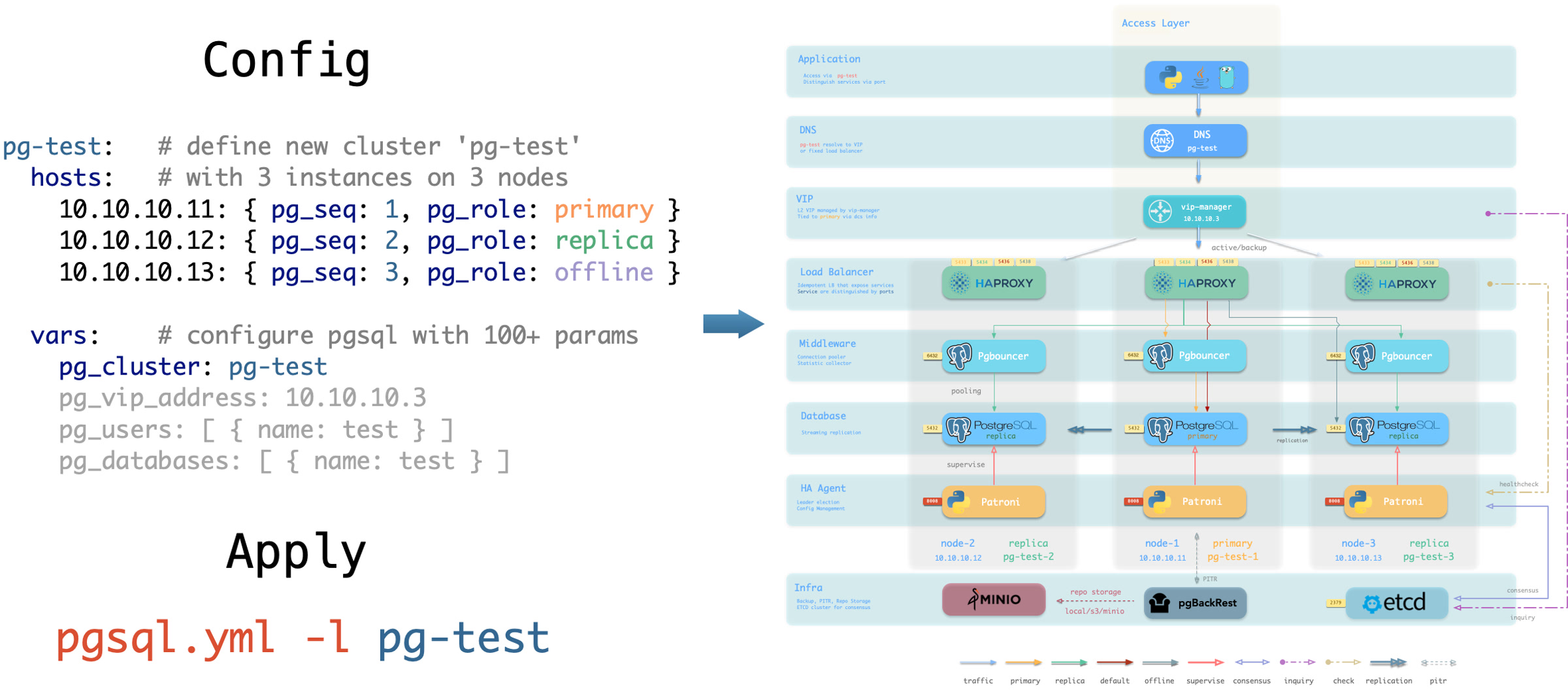
You can use different instance roles such as primary, replica, offline, delayed, sync standby; as well as different clusters: such as standby clusters, Citus clusters, and even Redis / MINIO (Silo) / Etcd clusters
Customize Cluster Content
Not only can you define clusters declaratively, but you can also define databases, users, services, and HBA rules within the cluster. For example, the following config file deeply customizes the content of the default pg-meta single-node database cluster:
Including: declaring six business databases and seven business users, adding an extra standby service (synchronous standby, providing read capability with no replication delay), defining some additional pg_hba rules, an L2 VIP address pointing to the cluster primary, and a customized backup strategy.
Declare Access Control
You can also customize Pigsty’s access control through declarative configuration. For example, the following config file provides deep security customization for the pg-meta cluster:
Uses the three-node core cluster template: crit.yml, to ensure data consistency is prioritized with zero data loss during failover.
Enables L2 VIP and restricts database and connection pool listening addresses to local loopback IP + internal network IP + VIP three specific addresses.
The template enables TLS for the Patroni API and PgBouncer, and requires SSL for database access through HBA.
It also enables $libdir/passwordcheck in pg_libs to enforce a password-strength policy.
Finally, a separate pg-meta-delay cluster is declared as pg-meta’s delayed replica from one hour ago, for emergency data deletion recovery.
Citus Distributed Cluster
Below is a declarative configuration for a four-node Citus distributed cluster:
Redis Clusters
Below are declarative configuration examples for Redis primary-replica cluster, sentinel cluster, and Redis Cluster:
ETCD Cluster
Below is a declarative configuration example for a three-node Etcd cluster:
MINIO (Silo) Cluster
Below is a declarative configuration example for a three-node Silo cluster. The inventory group and parameters retain the MINIO module’s compatibility names:
3.1 - Inventory
Every Pigsty deployment corresponds to an Inventory that describes key properties of the infrastructure and database clusters.
Configuration File
Pigsty uses Ansible YAML configuration format by default,
with a single YAML configuration file pigsty.yml as the inventory.
You can directly edit this configuration file to customize your deployment, or use the configure wizard script provided by Pigsty to automatically generate an appropriate configuration file.
Configuration Structure
The inventory uses standard Ansible YAML configuration format, consisting of two parts: global parameters (all.vars) and multiple groups (all.children).
You can define new clusters in all.children and describe the infrastructure using global variables: all.vars, which looks like this:
Cluster Definition
Each Ansible group may represent a cluster, which can be a node cluster, PostgreSQL cluster, Redis cluster, Etcd cluster, Silo cluster, etc.
A cluster definition consists of two parts: cluster members (hosts) and cluster parameters (vars).
You can define cluster members in <cls>.hosts and describe the cluster using configuration parameters in <cls>.vars.
Here’s an example of a 3-node high-availability PostgreSQL cluster definition:
Cluster-level vars (cluster parameters) override global parameters, and instance-level vars override both cluster parameters and global parameters.
Splitting Configuration
If your deployment is large or you want to better organize configuration files, you can split the inventory into multiple files for easier management and maintenance.
You can place cluster member definitions in the hosts.yml file and put cluster-level configuration parameters in corresponding files under the group_vars directory.
Switching Configuration
You can temporarily specify a different inventory file when running playbooks using the -i parameter.
Additionally, Ansible supports multiple configuration methods. You can use local yaml|ini configuration files, or use CMDB and any dynamic configuration scripts as configuration sources.
In Pigsty, we specify pigsty.yml in the same directory as the default inventory through ansible.cfg in the Pigsty home directory. You can modify it as needed.
Additionally, Pigsty supports using a CMDB metabase to store the inventory, facilitating integration with existing systems.
3.2 - Configure
Pigsty provides a configure script as a configuration wizard that automatically generates an appropriate pigsty.yml configuration file based on your current environment.
This is an optional script: if you already understand how to configure Pigsty, you can directly edit the pigsty.yml configuration file and skip the wizard.
Quick Start
Enter the pigsty source home directory and run ./configure to automatically start the configuration wizard. Without any arguments, it defaults to the meta single-node configuration template:
This command will use the selected template as a base, detect the current node’s IP address and region, and generate a pigsty.yml configuration file suitable for the current environment.
demo/configure.cast — /demo/configure.cast
Features
The configure script performs the following adjustments based on environment and input, generating pigsty.yml in the Pigsty directory by default.
- Detects the current node IP address; if multiple IPs exist, prompts the user to input a primary IP address as the node’s identity
- Uses the IP address to replace the placeholder
10.10.10.10in the configuration template and sets it as theadmin_ipparameter value - Detects the current region, setting
regiontodefault(global default repos) orchina(using Chinese mirror repos) - For micro instances (vCPU < 4), uses the
tinyparameter template fornode_tuneandpg_confto optimize resource usage - If
-vis specified, switchespg_versionandpg18-*package-group aliases in the template to that major version; fixed-kernel templatesmssql,polar, andpg19are excluded from this replacement - If
-gis specified, replaces default passwords recognized by the configuration wizard with randomly generated strong passwords; review uncovered values against the Default Credentials Checklist (strongly recommended) - When PG major version ≥ 17, prioritizes the built-in
C.UTF-8locale, or the OS-supportedC.UTF-8 - Checks if the core dependency
ansiblefor deployment is available in the current environment - Also checks if the deployment target node is SSH-reachable and can execute commands with sudo (
-sto skip)
Usage Examples
Command Arguments
Argument Details
| Argument | Description |
|---|---|
-c, --conf |
Generate config from conf/<template>.yml, supports subdirectories like ha/full |
-i, --ip |
Replace placeholder 10.10.10.10 in config template with specified IP |
-v, --version |
Specify PostgreSQL major version (14-19); PG19 is Beta, so prefer the dedicated pg19 template |
-r, --region |
Set software repo mirror region: default, china (Chinese mirrors), europe (European) |
-o, --output |
Output path, default pigsty.yml; relative paths use Pigsty home, absolute paths are used as given |
-s, --skip |
Skip IP probing, target SSH/Sudo checks, and effective IP replacement; keep 10.10.10.10 |
-x, --proxy |
Write current environment proxy variables (HTTP_PROXY, HTTPS_PROXY, ALL_PROXY, NO_PROXY) to config |
-n, --non-interactive |
Non-interactive mode; a single/demo IP is auto-selected, while ambiguous multi-IP hosts require -i |
-p, --port |
SSH port used by readiness checks only; it does not write ansible_port into the generated config |
-g, --generate |
Generate random values for passwords in config file, improving security (strongly recommended) |
Execution Flow
The configure script executes detection and configuration in the following order:
Automatic Behaviors
Region Detection
The script automatically detects the network environment to determine if you’re in mainland China (behind GFW):
- If Google is reachable, uses the
region: defaultrepositories - If Google is unreachable but
https://pigsty.ccis reachable, setsregion: china - If neither endpoint is reachable, falls back to
region: defaultand emits an internet-unreachable warning - Can manually specify region via
-rargument
IP Address Handling
The script determines the primary IP address in the following priority:
- Command line argument: If IP is specified via
-i, use it directly - Single IP detection: If the current node has only one IP, use it automatically
- Demo IP detection: If
10.10.10.10is detected, select it automatically (for sandbox environments) - Interactive input: When multiple IPs exist, prompt user to choose or input
Low-End Hardware Optimization
When fewer than 4 CPU cores are detected (1-3 cores), the script automatically adjusts configuration:
This ensures smooth operation on low-spec virtual machines.
Locale Settings
The script automatically enables C.UTF-8 as the default locale when:
- PostgreSQL version ≥ 17 (built-in Locale Provider support)
- Or the current system supports
C.UTF-8/C.utf8locale
China Region Special Handling
When region is set to china, the script automatically:
- Enables
docker_registry_mirrorsDocker mirror acceleration - Enables
PIP_MIRROR_URLPython mirror acceleration
Password Generation
When using the -g argument, the script generates 24-character random strings for the following passwords:
| Password Parameter | Description |
|---|---|
grafana_admin_password |
Grafana admin password |
pg_admin_password |
PostgreSQL admin password |
pg_monitor_password |
PostgreSQL monitor user password |
pg_replication_password |
PostgreSQL replication user password |
patroni_password |
Patroni API password |
haproxy_admin_password |
HAProxy admin password |
minio_secret_key |
Silo Root Secret |
etcd_root_password |
ETCD Root password |
It also replaces the following placeholder passwords:
DBUser.Meta→ random passwordDBUser.Viewer→ random passwordS3User.Backup→ random passwordS3User.Meta→ random passwordS3User.Data→ random passwordDBUser.Supa→ random passwordVibe.Coding→ random password
Configuration Templates
The script reads templates from conf/. The value of -c is a path relative to that directory without the .yml suffix, such as ha/full or app/immich.
Core Templates
| Template | Description |
|---|---|
meta |
Default template: Single-node installation with INFRA + NODE + ETCD + PGSQL |
rich |
Feature-rich version: Includes almost all extensions, Silo, local repo |
slim |
Minimal version: PostgreSQL + ETCD only, no monitoring infrastructure |
fat |
Complete version: rich base with more extensions installed |
pgsql |
Pure PostgreSQL template |
pg19 |
Single-node PostgreSQL 19 Beta evaluation template |
infra |
Pure infrastructure template |
HA Templates (ha/)
| Template | Description |
|---|---|
ha/dual |
2-node HA cluster |
ha/trio |
3-node HA cluster |
ha/full |
4-node complete sandbox environment |
ha/safe |
Security-hardened HA configuration |
ha/octo |
Compact 8-node HA simulation |
ha/simu |
20-node production simulation environment |
ha/citus |
13-node Citus distributed cluster |
Application Templates
| Template | Description |
|---|---|
supabase |
Supabase self-hosted configuration |
app/dify |
Dify AI platform configuration |
app/odoo |
Odoo ERP configuration |
app/electric |
Electric sync engine configuration |
app/insforge |
Insforge backend platform configuration |
app/hindsight |
Hindsight application configuration |
app/teable |
Teable table database configuration |
app/mattermost |
Mattermost collaboration platform configuration |
app/maybe |
Maybe finance application configuration |
app/registry |
Docker Registry configuration |
app/immich |
Immich photo and video management |
app/jumpserver |
JumpServer bastion host |
Special Kernel Templates
| Template | Description |
|---|---|
ivory |
IvorySQL: Oracle-compatible PostgreSQL |
mssql |
Babelfish: SQL Server-compatible PostgreSQL |
polar |
PolarDB: Alibaba Cloud open-source distributed PostgreSQL |
ha/citus |
Citus: Distributed PostgreSQL HA cluster |
mysql |
OpenHalo: MySQL protocol-compatible PostgreSQL |
pgtde |
Percona PostgreSQL Server: transparent encryption |
oriole |
OrioleDB: Next-generation storage engine |
agens |
AgensGraph: graph database kernel |
pgedge |
pgEdge: distributed PostgreSQL kernel |
mongo |
MongoDB-compatible stack template |
Demo and Build Templates
| Template | Description |
|---|---|
vibe |
Vibe Coding development environment |
docker |
Run Pigsty inside a Docker container |
demo/bare |
Minimal readable single-node example |
demo/el |
Full parameter example for EL distributions |
demo/debian |
Full parameter example for Debian/Ubuntu |
demo/demo |
Multi-module demo environment |
demo/kernel |
Ten-node database-kernel matrix |
demo/redis |
Redis replica, Sentinel, and native Cluster demo |
demo/minio |
Multi-node, multi-drive Silo demo (source default) |
demo/kafka |
Kafka KRaft development and secure-cluster demo |
demo/mysql |
Native MySQL 8.4 pilot demo |
demo/remote |
Remote PostgreSQL/RDS monitoring example |
demo/saas |
Legacy single-node SaaS component bundle |
demo/wool |
Small cloud-instance example for China |
build/oss |
Cross-distribution open-source package build env |
build/dev |
Three-node development and build environment |
Output Example
Environment Variables
The script supports the following environment variables:
| Environment Variable | Description | Default |
|---|---|---|
PIGSTY_HOME |
Pigsty installation directory | ~/pigsty |
METADB_URL |
Metabase connection URL | service=meta |
HTTP_PROXY |
HTTP proxy | - |
HTTPS_PROXY |
HTTPS proxy | - |
ALL_PROXY |
Universal proxy | - |
NO_PROXY |
Proxy whitelist | Built-in default |
Notes
-
Passwordless access: Before running
configure, ensure the current user has passwordless sudo privileges and passwordless SSH to localhost. This can be automatically configured via thebootstrapscript. -
IP address selection: Choose an internal IP as the primary IP address, not a public IP or
127.0.0.1. -
Password security: In production, always change default passwords in the configuration file. Use
-gto randomize recognized credentials, then review the Default Credentials Checklist for remaining values. -
Configuration review: After the script completes, it’s recommended to review the generated
pigsty.ymlfile to confirm the configuration meets expectations. -
Multiple executions: You can run
configuremultiple times to regenerate configuration; each run will overwrite the existingpigsty.yml. -
macOS limitations: When running on macOS, the script skips some Linux-specific checks and uses placeholder IP
10.10.10.10. macOS can only serve as an admin node.
FAQ
How to use a custom configuration template?
Place your configuration file in the conf/ directory, then specify it with the -c argument:
How to generate different configurations for multiple clusters?
Use the -o argument to specify different output files:
Then specify the configuration file when running playbooks:
How to handle multiple IPs in non-interactive mode?
You must explicitly specify the IP address using the -i argument:
How to keep the placeholder IP in the template?
Use the -s argument to skip IP replacement:
Related Documentation
- Inventory: Understand the Ansible inventory structure
- Parameters: Understand Pigsty parameter hierarchy and priority
- Templates: View all available configuration templates
- Installation: Understand the complete installation process
- Metabase: Use PostgreSQL as a dynamic configuration source
3.3 - Parameters
In the inventory, you can use various parameters to fine-tune Pigsty customization. These parameters cover everything from infrastructure settings to database configuration.
Parameter List
According to the current source and parameter reference pages, Pigsty’s 10 official modules expose 373 public parameters for fine-grained control. See Reference - Parameter List for the complete list. The native MySQL 8.4 pilot module exposes 13 additional public parameters that are listed separately and excluded from this total.
| Module | Groups | Params | Description |
|---|---|---|---|
| PGSQL | 9 | 124 | PostgreSQL high-availability cluster configuration |
| INFRA | 10 | 73 | Software repositories and Victoria observability infrastructure |
| NODE | 11 | 73 | Node initialization, system tuning, and operations baseline |
| ETCD | 2 | 13 | ETCD cluster and removal protection parameters |
| MINIO | 2 | 22 | Silo deployment, observability, and removal parameters |
| REDIS | 2 | 22 | Redis/Valkey deployment and removal parameters |
| DOCKER | 1 | 8 | Docker engine parameters |
| JUICE | 1 | 2 | JuiceFS instance and cache parameters |
| VIBE | 1 | 18 | Code/Jupyter/Node.js/Claude/Codex configuration |
| KAFKA | 2 | 18 | Kafka deployment and removal-protection parameters |
Parameter Form
Parameters are key-value pairs that describe entities. The Key is a string, and the Value can be one of five types: boolean, string, number, array, or object.
Parameter Priority
Parameters can be set at different levels with the following priority:
| Level | Location | Description | Priority |
|---|---|---|---|
| CLI | -e command line argument |
Passed via command line | Highest (5) |
| Host/Instance | <group>.hosts.<host> |
Parameters specific to a single host | Higher (4) |
| Group/Cluster | <group>.vars |
Parameters shared by hosts in group/cluster | Medium (3) |
| Global | all.vars |
Parameters shared by all hosts | Lower (2) |
| Default | <roles>/default/main.yml |
Role implementation defaults | Lowest (1) |
Here are some examples of parameter priority:
- Use command line parameter
-e grafana_clean=truewhen running playbooks to wipe Grafana data - Use instance-level parameter
pg_roleon host variables to override pg instance role - Use cluster-level parameter
pg_clusteron group variables to override pg cluster name - Use global parameter
node_ntp_serverson global variables to specify global NTP servers - If
pg_versionis not set, Pigsty will use the default value from thepgsqlrole implementation (default is18)
Except for identity parameters, every parameter has an appropriate default value, so explicit setting is not required.
Identity Parameters
Identity parameters are special parameters that serve as entity ID identifiers, therefore they have no default values and must be explicitly set.
| Module | Identity Parameters |
|---|---|
PGSQL |
pg_cluster, pg_seq, pg_role, … |
NODE |
nodename, node_cluster |
ETCD |
etcd_cluster, etcd_seq |
MINIO |
minio_cluster, minio_seq |
REDIS |
redis_cluster, redis_node, redis_instances |
INFRA |
infra_seq |
The exception is etcd_cluster, which still defaults to etcd.
Object storage minio_cluster no longer has a default and must be defined explicitly in each object-storage cluster’s variables.
Do not place it in all.vars, or every host will be marked as a MINIO module member.
3.4 - Conf Templates
In Pigsty, deployment blueprint details are defined by the inventory, which is the pigsty.yml configuration file. You can customize it through declarative configuration.
However, writing configuration files directly can be daunting for new users. To address this, we provide some ready-to-use configuration templates covering common usage scenarios.
Each template is a predefined pigsty.yml configuration file containing reasonable defaults suitable for specific scenarios.
You can choose a template as your customization starting point, then modify it as needed to meet your specific requirements.
Using Templates
Pigsty provides the configure script as an optional configuration wizard that generates an inventory with good defaults based on your environment and input.
Use ./configure -c <conf> to specify a configuration template, where <conf> is the path relative to the conf directory (the .yml suffix can be omitted).
If no template is specified, Pigsty defaults to the meta.yml single-node configuration template.
Template List
Main Templates
The following are single-node configuration templates for installing Pigsty on a single server:
| Template | Description |
|---|---|
meta.yml |
Default template, single-node PostgreSQL online installation |
rich.yml |
Feature-rich template with local repo, Silo, and more examples |
slim.yml |
Minimal template, PostgreSQL only without monitoring and infrastructure |
Database Kernel Templates
Templates for various database management systems and kernels:
| Template | Description |
|---|---|
pgsql.yml |
Native PostgreSQL kernel, basic features (14~18) |
pg19.yml |
PostgreSQL 19 Beta trial template |
mssql.yml |
Babelfish kernel, SQL Server protocol compatible (17/18) |
polar.yml |
PolarDB PG kernel, Aurora/RAC style (17) |
ivory.yml |
IvorySQL kernel, Oracle syntax compatible (18) |
mysql.yml |
OpenHalo kernel, MySQL compatible (14) |
pgtde.yml |
Percona PostgreSQL Server transparent encryption (18) |
oriole.yml |
OrioleDB kernel, OLTP enhanced (16~18) |
agens.yml |
AgensGraph graph database kernel (17) |
pgedge.yml |
pgEdge distributed database kernel (15~18, default 18) |
supabase.yml |
Supabase self-hosted configuration (15~18) |
You can add more nodes later or use HA templates to plan your cluster from the start.
HA Templates
You can configure Pigsty to run on multiple nodes, forming a high-availability (HA) cluster:
| Template | Description |
|---|---|
dual.yml |
2-node semi-HA deployment |
trio.yml |
3-node standard HA deployment |
full.yml |
4-node standard deployment |
safe.yml |
4-node security-enhanced deployment with delayed replica |
octo.yml |
Compact 8-node HA simulation |
simu.yml |
20-node production environment simulation |
ha/citus.yml |
Citus distributed HA PostgreSQL (14~18) |
Application Templates
You can use the following templates to run Docker applications/software:
| Template | Description |
|---|---|
supabase.yml |
Start single-node Supabase |
odoo.yml |
Start Odoo ERP system |
dify.yml |
Start Dify AI workflow system |
electric.yml |
Start Electric sync engine |
insforge.yml |
Start Insforge backend platform |
hindsight.yml |
Start Hindsight application |
mattermost.yml |
Start Mattermost collaboration platform |
teable.yml |
Start Teable spreadsheet database |
maybe.yml |
Start Maybe finance app |
registry.yml |
Start Docker Registry |
Demo Templates
Besides main templates, Pigsty provides a set of demo templates for different scenarios:
| Template | Description |
|---|---|
el.yml |
Full-parameter config file for EL 8/9 systems |
debian.yml |
Full-parameter config file for Debian/Ubuntu systems |
remote.yml |
Example config for monitoring remote PostgreSQL clusters or RDS |
redis.yml |
Redis cluster example configuration |
minio.yml |
4-node multi-drive Silo cluster example (source default) |
kafka.yml |
Kafka dynamic KRaft example with a single-node dev cluster and a three-node secure cluster |
mysql.yml |
Native MySQL 8.4 single-node/three-node pilot example; distinct from OpenHalo conf/mysql.yml |
demo.yml |
Configuration file for Pigsty public demo site |
fat.yml |
Single-node config with local repo and full feature set |
infra.yml |
Deploy only the infrastructure modules |
vibe.yml |
Vibe Coding / AI application development template |
mongo.yml |
FerretDB / MongoDB-compatible example |
docker.yml |
Docker application host template |
Build Templates
The following configuration templates are for development and testing purposes:
| Template | Description |
|---|---|
build/oss.yml |
Open source build config for EL 9/10, Debian 12/13, Ubuntu 22.04/24.04/26.04 |
build/dev.yml |
Development and testing build config |
3.5 - Use CMDB as Config Inventory
Pigsty allows you to use a PostgreSQL metabase as a dynamic configuration source, replacing static YAML configuration files for more powerful configuration management capabilities.
Overview
CMDB (Configuration Management Database) is a method of storing configuration information in a database for management.
In Pigsty, the default configuration source is a static YAML file pigsty.yml,
which serves as Ansible’s inventory.
This approach is simple and direct, but when infrastructure scales and requires complex, fine-grained management and external integration, a single static file becomes insufficient.
| Feature | Static YAML File | CMDB Metabase |
|---|---|---|
| Querying | Manual search/grep | SQL queries with any conditions, aggregation analysis |
| Versioning | Depends on Git or manual backup | Database transactions, audit logs, time-travel snapshots |
| Access Control | File system permissions, coarse-grained | PostgreSQL fine-grained access control |
| Concurrent Editing | Requires file locking or merge conflicts | Database transactions naturally support concurrency |
| External Integration | Requires YAML parsing | Standard SQL interface, easy integration with any language |
| Scalability | Difficult to maintain when file becomes too large | Scales to physical limits |
| Dynamic Generation | Static file, changes require manual application | Immediate effect, real-time configuration changes |
Pigsty provides the CMDB database schema in the sample database pg-meta.meta schema baseline definition.
How It Works
The core idea of CMDB is to replace the static configuration file with a dynamic script.
Ansible supports using executable scripts as inventory, as long as the script outputs inventory data in JSON format.
When you enable CMDB, Pigsty creates a dynamic inventory script named inventory.sh:
This script’s function is simple: every time Ansible needs to read the inventory, it queries configuration data from the PostgreSQL database’s pigsty.inventory view and returns it in JSON format.
The overall architecture is as follows:
flowchart LR
    conf["bin/inventory_conf"]
    tocmdb["bin/inventory_cmdb"]
    load["bin/inventory_load"]
    ansible["🚀 Ansible"]

    subgraph static["📄 Static Config Mode"]
        yml[("pigsty.yml")]
    end

    subgraph dynamic["🗄️ CMDB Dynamic Mode"]
        sh["inventory.sh"]
        cmdb[("PostgreSQL CMDB")]
    end

    conf -->|"switch"| yml
    yml -->|"load config"| load
    load -->|"write"| cmdb
    tocmdb -->|"switch"| sh
    sh --> cmdb

    yml --> ansible
    cmdb --> ansible
Data Model
The CMDB database schema is defined in files/cmdb.sql, with all objects in the pigsty schema.
Core Tables
| Table | Description | Primary Key |
|---|---|---|
pigsty.group |
Cluster/group definitions, corresponds to Ansible groups | cls |
pigsty.host |
Host definitions, belongs to a group | (cls, ip) |
pigsty.global_var |
Global variables, corresponds to all.vars |
key |
pigsty.group_var |
Group variables, corresponds to all.children.<cls>.vars |
(cls, key) |
pigsty.host_var |
Host variables, host-level variables | (cls, ip, key) |
pigsty.default_var |
Default variable definitions, stores parameter metadata | key |
pigsty.job |
Job records table, records executed tasks | id |
Table Structure Details
Cluster Table pigsty.group
Host Table pigsty.host
Global Variables Table pigsty.global_var
Group Variables Table pigsty.group_var
Host Variables Table pigsty.host_var
Core Views
CMDB provides a series of views for querying and displaying configuration data:
| View | Description |
|---|---|
pigsty.inventory |
Core view: Generates Ansible dynamic inventory JSON |
pigsty.raw_config |
Raw configuration in JSON format |
pigsty.global_config |
Global config view, merges defaults and global vars |
pigsty.group_config |
Group config view, includes host list and group vars |
pigsty.host_config |
Host config view, merges group and host-level vars |
pigsty.pg_cluster |
PostgreSQL cluster view |
pigsty.pg_instance |
PostgreSQL instance view |
pigsty.pg_database |
PostgreSQL database definition view |
pigsty.pg_users |
PostgreSQL user definition view |
pigsty.pg_service |
PostgreSQL service definition view |
pigsty.pg_hba |
PostgreSQL HBA rules view |
pigsty.pg_remote |
Remote PostgreSQL instance view |
pigsty.inventory is the core view that converts database configuration data to the JSON format required by Ansible:
Utility Scripts
Pigsty provides three convenience scripts for managing CMDB:
| Script | Function |
|---|---|
bin/inventory_load |
Load YAML configuration file into PostgreSQL database |
bin/inventory_cmdb |
Switch configuration source to CMDB (dynamic inventory script) |
bin/inventory_conf |
Switch configuration source to static config file pigsty.yml |
inventory_load
Parse and import YAML configuration file into CMDB:
The script performs the following operations:
- Clears existing data in the
pigstyschema - Parses the YAML configuration file
- Writes global variables to the
global_vartable - Writes cluster definitions to the
grouptable - Writes cluster variables to the
group_vartable - Writes host definitions to the
hosttable - Writes host variables to the
host_vartable
Environment Variables
PIGSTY_HOME: Pigsty installation directory, defaults to~/pigstyMETADB_URL: Database connection URL, defaults toservice=meta
inventory_cmdb
Switch Ansible to use CMDB as the configuration source:
The script performs the following operations:
- Creates dynamic inventory script
${PIGSTY_HOME}/inventory.sh - Modifies
ansible.cfgto setinventorytoinventory.sh
The generated inventory.sh contents:
inventory_conf
Switch back to using static YAML configuration file:
The script modifies ansible.cfg to set inventory back to pigsty.yml.
Usage Workflow
First-time CMDB Setup
- Initialize CMDB schema (usually done automatically during Pigsty installation):
- Load configuration to database:
- Switch to CMDB mode:
- Verify configuration:
Query Configuration
After enabling CMDB, you can flexibly query configuration using SQL:
Modify Configuration
You can modify configuration directly via SQL:
Changes take effect immediately without reloading or restarting any service.
Switch Back to Static Configuration
To switch back to static configuration file mode:
Advanced Usage
Export Configuration
Export CMDB configuration to YAML format:
Or use the ansible-inventory command:
Configuration Auditing
Track configuration changes using the mtime field:
Integration with External Systems
CMDB uses standard PostgreSQL, making it easy to integrate with other systems:
- Web Management Interface: Expose configuration data through REST API (e.g., PostgREST)
- CI/CD Pipelines: Read/write database directly in deployment scripts
- Monitoring & Alerting: Generate monitoring rules based on configuration data
- ITSM Systems: Sync with enterprise CMDB systems
Considerations
-
Data Consistency: After modifying configuration, you need to re-run the corresponding Ansible playbooks to apply changes to the actual environment
-
Backup: Configuration data in CMDB is critical, ensure regular backups
-
Permissions: Configure appropriate database access permissions for CMDB to avoid accidental modifications
-
Transactions: When making batch configuration changes, perform them within a transaction for rollback on errors
-
Connection Pooling: The
inventory.shscript creates a new connection on each execution; if Ansible runs frequently, consider using connection pooling
Summary
CMDB is Pigsty’s advanced configuration management solution, suitable for scenarios requiring large-scale cluster management, complex queries, external integration, or fine-grained access control. By storing configuration data in PostgreSQL, you can fully leverage the database’s powerful capabilities to manage infrastructure configuration.
| Feature | Description |
|---|---|
| Storage | PostgreSQL pigsty schema |
| Dynamic Inventory | inventory.sh script |
| Config Load | bin/inventory_load |
| Switch to CMDB | bin/inventory_cmdb |
| Switch to YAML | bin/inventory_conf |
| Core View | pigsty.inventory |
4 - High Availability
Overview
Pigsty’s PostgreSQL clusters come with out-of-the-box high availability, with core capabilities provided by Patroni, Etcd, and HAProxy.
When your PostgreSQL cluster has two or more instances, you automatically have self-healing database high availability without any additional configuration — as long as any instance in the cluster survives, the cluster can provide complete service. Clients only need to connect to any node in the cluster to get full service without worrying about primary-replica topology changes.
The default norm mode targets an RTO under 45 seconds. With asynchronous replication, pg_rpo=1MiB is Patroni’s sampled lag threshold for failover candidates, not a hard upper bound on actual data loss. Strict synchronous mode with crit.yml keeps acknowledged transactions at RPO = 0 during failover. These behaviors can be configured for your hardware and reliability requirements.
Pigsty includes built-in HAProxy load balancers for automatic traffic switching, providing DNS/VIP/LVS and other access methods for clients. Failover and switchover are almost transparent to the business side except for brief interruptions - applications don’t need to modify connection strings or restart. The minimal maintenance window requirements bring great flexibility and convenience: you can perform rolling maintenance and upgrades on the entire cluster without application coordination. The feature that hardware failures can wait until the next day to handle lets developers, operations, and DBAs sleep well during incidents.
Many large organizations and core institutions have been using Pigsty in production for extended periods. The largest deployment has 25K CPU cores and 220+ PostgreSQL ultra-large instances (64c / 512g / 3TB NVMe SSD). In this deployment case, dozens of hardware failures and various incidents occurred over five years, yet overall availability of over 99.999% was maintained.
What problems does High Availability solve?
- Elevates availability in the data security C/IA model: RPO ≈ 0, RTO < 45s.
- Gains seamless rolling maintenance capability, minimizing maintenance window requirements and bringing great convenience.
- Hardware failures can self-heal immediately without human intervention, allowing operations and DBAs to sleep well.
- Replicas can handle read-only requests, offloading primary load and fully utilizing resources.
What are the costs of High Availability?
- Infrastructure dependency: HA requires DCS (etcd/zk/consul) for consensus.
- Higher starting threshold: A meaningful HA deployment requires at least three nodes.
- Extra resource consumption: Each new replica consumes additional resources, though this is usually not a major concern.
- Significantly increased complexity: Backup costs increase significantly, requiring tools to manage complexity.
Limitations of High Availability
Since replication happens in real-time, all changes are immediately applied to replicas. Therefore, streaming replication-based HA solutions cannot handle data deletion or modification caused by human errors and software defects. (e.g., DROP TABLE or DELETE data)
Such failures require using delayed clusters or performing point-in-time recovery using previous base backups and WAL archives.
| Configuration Strategy | RTO | RPO |
|---|---|---|
| Standalone + Nothing | Data permanently lost, unrecoverable | All data lost |
| Standalone + Base Backup | Depends on backup size and bandwidth (hours) | Lose data since last backup (hours to days) |
| Standalone + Base Backup + WAL Archive | Depends on backup size and bandwidth (hours) | Lose unarchived data (tens of MB) |
| Primary-Replica + Manual Failover | ~10 minutes | Lose data in replication lag (~100KB) |
| Primary-Replica + Auto Failover | Within 1 minute | Lose data in replication lag (~100KB) |
| Primary-Replica + Auto Failover + Sync Commit | Within 1 minute | No data loss |
How It Works
In Pigsty, the high availability architecture works as follows:
- PostgreSQL uses standard streaming replication to build physical replicas; replicas take over when the primary fails.
- Patroni manages PostgreSQL server processes and handles high availability matters.
- Etcd provides distributed configuration storage (DCS) capability and is used for leader election after failures.
- Patroni relies on Etcd to reach cluster leader consensus and provides health check interfaces externally.
- HAProxy exposes cluster services externally and uses Patroni health check interfaces to automatically distribute traffic to healthy nodes.
- vip-manager provides an optional Layer 2 VIP, retrieves leader information from Etcd, and binds the VIP to the node where the cluster primary resides.
When the primary fails, a new round of leader election is triggered. The healthiest replica in the cluster (highest LSN position, minimum data loss) wins and is promoted to the new primary. After the winning replica is promoted, read-write traffic is immediately routed to the new primary. The impact of primary failure is brief write service unavailability: write requests will be blocked or fail directly from primary failure until new primary promotion, with unavailability typically lasting 15 to 30 seconds, usually not exceeding 1 minute.
When a replica fails, read-only traffic is routed to other replicas. Only when all replicas fail will read-only traffic ultimately be handled by the primary. The impact of replica failure is partial read-only query interruption: queries currently running on that replica will abort due to connection reset and be immediately taken over by other available replicas.
Failure detection is performed jointly by Patroni and Etcd. The cluster leader holds a lease; if it fails to renew the lease within its TTL (30 seconds in the default norm mode), the lease expires, triggering a Failover and a new election.
Even without any failures, you can proactively change the cluster primary through Switchover. In this case, write queries on the primary will experience a brief interruption and be immediately routed to the new primary. This operation is typically used for rolling maintenance/upgrades of database servers.
4.1 - RPO Trade-offs
RPO (Recovery Point Objective) defines the maximum amount of data loss allowed when the primary fails.
For scenarios where data integrity is critical, such as financial transactions, RPO = 0 is typically required, meaning no data loss is allowed.
However, stricter RPO targets come at a cost: higher write latency, reduced system throughput, and the risk that replica failures may cause primary unavailability. For typical scenarios, some data loss is acceptable in exchange for higher availability and performance.
Trade-offs
In asynchronous replication scenarios, there is typically some replication lag between replicas and the primary (depending on network and throughput, normally in the range of 10KB-100KB / 100µs-10ms). This means when the primary fails, replicas may not have fully synchronized with the latest data. If a failover occurs, the new primary may lose some unreplicated data.
The pg_rpo parameter is written to Patroni’s maximum_lag_on_failover and defaults to 1048576 (1MiB). It is the sampled lag threshold that permits a replica to participate as a failover candidate, not a hard upper bound on actual data loss.
When the cluster primary fails, if any replica has replication lag within this threshold, Pigsty will automatically promote that replica to be the new primary. However, when all replicas exceed this threshold, Pigsty will refuse [automatic failover] to prevent data loss. Manual intervention is then required to decide whether to wait for the primary to recover (which may never happen) or accept the data loss and force-promote a replica.
Because the primary’s WAL position is not sampled continuously, the worst-case loss under asynchronous replication can also include WAL generated during the most recent ttl window (on average, roughly another loop_wait/2 of WAL). Configure this threshold with your workload’s write rate in mind. Increasing it improves the chance of automatic failover but also broadens candidate eligibility.
When you set pg_rpo = 0, Pigsty enables synchronous replication, ensuring the primary only returns write success after at least one replica has persisted the data.
This configuration ensures zero replication lag but introduces significant write latency and reduces overall throughput.
flowchart LR
    A([Primary Failure]) --> B{Synchronous<br/>Replication?}

    B -->|No| C{Lag < RPO?}
    B -->|Yes| D{Sync Replica<br/>Available?}

    C -->|Yes| E[Lossy Auto Failover<br/>Sampled candidate lag is within threshold]
    C -->|No| F[Refuse Auto Failover<br/>Wait for Primary Recovery<br/>or Manual Intervention]

    D -->|Yes| G[Lossless Auto Failover<br/>RPO = 0]
    D -->|No| H{Strict Mode?}

    H -->|No| C
    H -->|Yes| F

    style A fill:#dc3545,stroke:#b02a37,color:#fff
    style E fill:#F0AD4E,stroke:#146c43,color:#fff
    style G fill:#198754,stroke:#146c43,color:#fff
    style F fill:#BE002F,stroke:#565e64,color:#fff
Protection Modes
Pigsty provides three protection modes to help users make trade-offs under different RPO requirements, similar to Oracle Data Guard protection modes.
- Default mode, asynchronous replication, transactions commit with only local WAL persistence, no waiting for replicas, replica failures are completely transparent to the primary
- Primary failure may lose unsent/unreceived WAL. The default sampled candidate-lag threshold is 1MiB, but this is not a hard upper bound on actual loss
- Optimized for performance, suitable for typical business scenarios that tolerate minor data loss during failures
- Configured with
pg_rpo = 0, enables Patroni synchronous commit mode:synchronous_mode: true - Under normal conditions, waits for at least one replica confirmation, achieving zero data loss. When all sync replicas fail, automatically degrades to async mode to continue service
- Balances data safety and service availability, recommended configuration for production critical business
- Uses
crit.ymltemplate, enables Patroni strict synchronous mode:synchronous_mode: true/synchronous_mode_strict: true - When all sync replicas fail, primary refuses writes to prevent data loss, transactions must be persisted on at least one replica before returning success
- Suitable for financial transactions, medical records, and other scenarios with extremely high data integrity requirements
| Name | Maximum Performance | Maximum Availability | Maximum Protection |
|---|---|---|---|
| Replication | Asynchronous | Synchronous | Strict Synchronous |
| Data Loss | Possible (replication lag) | Zero normally, minor when degraded | Zero |
| Write Latency | Lowest | Medium (+1 network RTT) | Medium (+1 network RTT) |
| Throughput | Highest | Reduced | Reduced |
| Replica Failure Impact | None | Auto degrade, service continues | Primary stops writes |
| RPO | Possible loss; 1MiB default candidate threshold | = 0 normally / possible loss after degradation | = 0 |
| Use Case | Typical business, performance first | Critical business, safety first | Financial core, compliance first |
| Configuration | Default config | pg_rpo = 0 |
pg_conf: crit.yml |
Implementation
The three protection modes differ in how two core Patroni parameters are configured: synchronous_mode and synchronous_mode_strict:
synchronous_mode: Whether Patroni enables synchronous replication. If enabled, check ifsynchronous_mode_strictenables strict synchronous mode.synchronous_mode_strict = false: Default configuration, allows degradation to async mode when replicas fail, primary continues service (Maximum Availability)synchronous_mode_strict = true: Degradation forbidden, primary stops writes until sync replica recovers (Maximum Protection)
| Mode | synchronous_mode |
synchronous_mode_strict |
Replication Mode | Replica Failure Behavior |
|---|---|---|---|---|
| Max Performance | false |
- | Async | No impact |
| Max Availability | true |
false |
Synchronous | Auto degrade to async |
| Max Protection | true |
true |
Strict Synchronous | Primary refuses writes |
Typically, you only need to set the pg_rpo parameter to 0 to enable the synchronous_mode switch, activating Maximum Availability mode.
If you use pg_conf = crit.yml template, it additionally enables the synchronous_mode_strict strict mode switch, activating Maximum Protection mode.
Additionally, you can enable watchdog to fence the primary directly during node/Patroni freeze scenarios instead of degrading, achieving behavior equivalent to Oracle Maximum Protection mode.
You can also directly configure these Patroni parameters as needed. Refer to Patroni and PostgreSQL documentation to achieve stronger data protection, such as:
- Specify the synchronous replica list, configure more sync replicas to improve disaster tolerance, use quorum synchronous commit, or even require all replicas to perform synchronous commit.
- Configure
synchronous_commit:'remote_apply'to strictly ensure primary-replica read-write consistency. (Oracle Maximum Protection mode is equivalent toremote_write)
Recommendations
Maximum Performance mode (asynchronous replication) is the default mode used by Pigsty and is sufficient for the vast majority of workloads.
It tolerates some loss during a failure in exchange for higher throughput and availability.
In this mode, pg_rpo adjusts the sampled lag threshold for failover candidates; actual worst-case loss also depends on write rate, ttl, and sampling timing.
Maximum Availability mode (synchronous replication) is suitable for scenarios with high data-integrity requirements. Acknowledged transactions have zero loss while a synchronous replica is healthy, but the cluster can degrade when all synchronous replicas are unavailable.
In this mode, a minimum of two-node PostgreSQL cluster (one primary, one replica) is required.
Set pg_rpo to 0 to enable this mode.
Maximum Protection mode (strict synchronous replication) is suitable for financial transactions, medical records, and other scenarios with extremely high data integrity requirements. We recommend using at least a three-node cluster (one primary, two replicas), because with only two nodes, if the replica fails, the primary will stop writes, causing service unavailability, which reduces overall system reliability. With three nodes, if only one replica fails, the primary can continue to serve.
4.2 - Failure Model
Patroni failures can be classified into 10 categories by failure target, and further consolidated into five categories based on detection path, which are detailed in this section.
| # | Failure Scenario | Description | Final Path |
|---|---|---|---|
| 1 | PG process crash | crash, OOM killed | Active Detection |
| 2 | PG connection refused | max_connections | Active Detection |
| 3 | PG zombie | Process alive but unresponsive | Active Detection (timeout) |
| 4 | Patroni process crash | kill -9, OOM | Passive Detection |
| 5 | Patroni zombie | Process alive but stuck | Watchdog |
| 6 | Node down | Power outage, hardware failure | Passive Detection |
| 7 | Node zombie | IO hang, CPU starvation | Watchdog |
| 8 | Primary ↔ DCS network failure | Firewall, switch failure | Network Partition |
| 9 | Storage failure | Disk failure, disk full, mount failure | Active Detection or Watchdog |
| 10 | Manual switchover | Switchover/Failover | Manual Trigger |
However, for RTO calculation purposes, all failures ultimately converge to two paths. This section explores the upper bound, lower bound, and average RTO for these two scenarios.
- Passive election triggered after Patroni loses contact
- Patroni actively detects failure and triggers switchover
flowchart LR
    A([Primary Failure]) --> B{Patroni<br/>Detected?}

    B -->|PG Crash| C[Attempt Local Restart]
    B -->|Node Down| D[Wait TTL Expiration]

    C -->|Success| E([Local Recovery])
    C -->|Fail/Timeout| F[Release Leader Lock]

    D --> F
    F --> G[Replica Election]
    G --> H[Execute Promote]
    H --> I[HAProxy Detects]
    I --> J([Service Restored])

    style A fill:#dc3545,stroke:#b02a37,color:#fff
    style E fill:#198754,stroke:#146c43,color:#fff
    style J fill:#198754,stroke:#146c43,color:#fff
4.2.1 - Model of Patroni Passive Failure
infographic list-row-simple-horizontal-arrow
data

  desc Lease Expiration Stages
  items
    - label Lease Expiration
    - label Replica Detect
    - label Elect & Promote
    - label Haproxy Up
theme light
  palette antv
RTO Timeline
tooltip: { trigger: axis, axisPointer: { type: shadow }, formatter: $fn:fmt }
legend: { top: 0, itemGap: 12, data: [Lease Expiration, Replica Detection, Lock Contest & Promote, Health Check] }
grid: { left: 64, right: 24, bottom: 32, top: 40 }
xAxis: { type: value, name: Seconds, nameLocation: end, max: 160, axisLine: { show: true }, axisTick: { show: true }, splitLine: { show: true, lineStyle: { type: dashed, opacity: 0.5 } }, minorTick: { show: true, splitNumber: 5 }, minorSplitLine: { show: true, lineStyle: { type: dotted, opacity: 0.2 } } }
yAxis: { type: category, axisLine: { show: true }, axisTick: { show: true }, splitLine: { show: false }, axisLabel: { fontSize: 10, fontFamily: monospace }, data: [wide-max, wide-avg, wide-min, "", safe-max, safe-avg, safe-min, "", norm-max, norm-avg, norm-min, "", fast-max, fast-avg, fast-min] }
series:
  - { name: Lease Expire, type: bar, stack: main, barWidth: 20, z: 2, emphasis: { focus: series }, itemStyle: { color: "#e15759" }, data: [120, 110, 100, "-", 60, 55, 50, "-", 30, 27, 25, "-", 20, 17, 15] }
  - { name: Replica Detect, type: bar, stack: main, z: 2, emphasis: { focus: series }, itemStyle: { color: "#edc949" }, data: [20, 10, 0, "-", 10, 5, 0, "-", 5, 3, 0, "-", 5, 3, 0] }
  - { name: Elect & Promote, type: bar, stack: main, z: 2, emphasis: { focus: series }, itemStyle: { color: "#59a14f" }, data: [2, 1, 0, "-", 2, 1, 0, "-", 2, 1, 0, "-", 2, 1, 0] }
  - { name: HAProxy Check, type: bar, stack: main, z: 2, emphasis: { focus: series }, itemStyle: { color: "#4e79a7" }, data: [8, 6, 4, "-", 6, 5, 3, "-", 4, 3, 2, "-", 2, 2, 1] }
  - { name: Total RTO, type: bar, barGap: "-100%", barWidth: 20, z: 1, itemStyle: { color: "#888", opacity: 0 }, emphasis: { itemStyle: { opacity: 0 } }, data: [150, 127, 104, "-", 78, 66, 53, "-", 41, 34, 27, "-", 29, 23, 16] }
  - { name: RTO Budget, type: bar, barGap: "-100%", barWidth: 20, z: 0, itemStyle: { color: "rgba(0,0,0,0.08)" }, emphasis: { itemStyle: { color: "rgba(0,0,0,0.12)" } }, data: [150, 150, 150, "-", 90, 90, 90, "-", 45, 45, 45, "-", 30, 30, 30] }
Failure Model
| Phase | Best | Worst | Average | Description |
|---|---|---|---|---|
| Lease Expiration | ttl - loop |
ttl |
ttl - loop/2 |
Best: crash just before refresh Worst: crash right after refresh |
| Replica Detect | 0 |
loop |
loop / 2 |
Best: exactly at check point Worst: just missed check point |
| Election Promote | 0 |
2 |
1 |
Best: direct lock and promote Worst: API timeout + Promote |
| HAProxy Check | (rise-1) × fastinter |
(rise-1) × fastinter + inter |
(rise-1) × fastinter + inter/2 |
Best: state change before check Worst: state change right after check |
Key Difference Between Passive and Active Failover:
| Scenario | Patroni Status | Lease Handling | Primary Wait Time |
|---|---|---|---|
| Active Failover (PG crash) | Alive, healthy | Actively tries to restart PG, releases lease on timeout | primary_start_timeout |
| Passive Failover (Node crash) | Dies with node | Cannot actively release, must wait for TTL expiration | ttl |
In passive failover scenarios, Patroni dies along with the node and cannot actively release the Leader Key. The lease in DCS can only trigger cluster election after TTL naturally expires.
Timeline Analysis
Phase 1: Lease Expiration
The Patroni primary refreshes the Leader Key every loop_wait cycle, resetting TTL to the configured value.
- Best case: Failure occurs just before lease refresh (elapsed
loopsince last refresh), remaining TTL =ttl - loop - Worst case: Failure occurs right after lease refresh, must wait full
ttl - Average case:
ttl - loop/2
Phase 2: Replica Detection
Replicas wake up on loop_wait cycles and check the Leader Key status in DCS.
- Best case: Replica happens to wake when lease expires, wait
0 - Worst case: Replica just entered sleep when lease expires, wait
loop - Average case:
loop/2
Phase 3: Lock Contest & Promote
When replicas detect Leader Key expiration, they start the election process. The replica that acquires the Leader Key executes pg_ctl promote to become the new primary.
- Via REST API, parallel queries to check each replica’s replication position, typically 10ms, hardcoded 2s timeout.
- Compare WAL positions to determine the best candidate, replicas attempt to create Leader Key (CAS atomic operation)
- Execute
pg_ctl promoteto become primary (very fast, typically negligible)
- Best case: Single replica or immediate lock acquisition and promotion, constant overhead
0.1s - Worst case: DCS API call timeout:
2s - Average case:
1sconstant overhead
Phase 4: Health Check
HAProxy detects the new primary online, requiring rise consecutive successful health checks.
- Best case: New primary promoted just before check,
(rise-1) × fastinter - Worst case: New primary promoted right after check,
(rise-1) × fastinter + inter - Average case:
(rise-1) × fastinter + inter/2
RTO Formula
Sum all phase times to get total RTO:
Best Case
Average Case
Worst Case
Model Calculation
Substitute the four RTO model parameters into the formulas above:
Four Mode Calculation Results (unit: seconds, format: min / avg / max)
| Phase | fast | norm | safe | wide |
|---|---|---|---|---|
| Lease Expiration | 15 / 17 / 20 |
25 / 27 / 30 |
50 / 55 / 60 |
100 / 110 / 120 |
| Replica Detection | 0 / 3 / 5 |
0 / 3 / 5 |
0 / 5 / 10 |
0 / 10 / 20 |
| Lock Contest & Promote | 0 / 1 / 2 |
0 / 1 / 2 |
0 / 1 / 2 |
0 / 1 / 2 |
| Health Check | 1 / 2 / 2 |
2 / 3 / 4 |
3 / 5 / 6 |
4 / 6 / 8 |
| Total | 16 / 23 / 29 |
27 / 34 / 41 |
53 / 66 / 78 |
104 / 127 / 150 |
4.2.2 - Model of Patroni Active Failure
infographic list-row-simple-horizontal-arrow
data
  desc When Patroni is healthy but PostgreSQL crashes
  items
    - label Crash Found
    - label Restart Timeout
    - label Replica Detect
    - label Elect Promote
    - label HAProxy Check
theme light
  palette antv
RTO Timeline
tooltip: { trigger: axis, axisPointer: { type: shadow }, formatter: $fn:fmt }
legend: { top: 0, itemGap: 12, data: [ Crash Found, Restart Timeout, Replica Detection, Elect Promote, HAProxy Check] }
grid: { left: 64, right: 24, bottom: 32, top: 40 }
xAxis: { type: value, name: Seconds, nameLocation: end, max: 160, axisLine: { show: true }, axisTick: { show: true }, splitLine: { show: true, lineStyle: { type: dashed, opacity: 0.5 } }, minorTick: { show: true, splitNumber: 5 }, minorSplitLine: { show: true, lineStyle: { type: dotted, opacity: 0.2 } } }
yAxis: { type: category, axisLine: { show: true }, axisTick: { show: true }, splitLine: { show: false }, axisLabel: { fontSize: 10, fontFamily: monospace }, data: [wide-max, wide-avg, wide-min, "", safe-max, safe-avg, safe-min, "", norm-max, norm-avg, norm-min, "", fast-max, fast-avg, fast-min] }
series:
  - { name: Crash Found, type: bar, stack: main, barWidth: 20, z: 2, emphasis: { focus: series }, itemStyle: { color: "#b07aa1" }, data: [20, 10, 0, "-", 10, 5, 0, "-", 5, 3, 0, "-", 5, 3, 0] }
  - { name: Restart Timeout, type: bar, stack: main, z: 2, emphasis: { focus: series }, itemStyle: { color: "#f28e2c" }, data: [95, 95, 0, "-", 45, 45, 0, "-", 25, 25, 0, "-", 15, 15, 0] }
  - { name: Replica Detect, type: bar, stack: main, z: 2, emphasis: { focus: series }, itemStyle: { color: "#edc949" }, data: [20, 10, 0, "-", 10, 5, 0, "-", 5, 3, 0, "-", 5, 3, 0] }
  - { name: Elect Promote, type: bar, stack: main, z: 2, emphasis: { focus: series }, itemStyle: { color: "#59a14f" }, data: [2, 1, 0, "-", 2, 1, 0, "-", 2, 1, 0, "-", 2, 1, 0] }
  - { name: HAProxy Check, type: bar, stack: main, z: 2, emphasis: { focus: series }, itemStyle: { color: "#4e79a7" }, data: [8, 6, 4, "-", 6, 5, 3, "-", 4, 3, 2, "-", 2, 2, 1] }
  - { name: RTO Total, type: bar, barGap: "-100%", barWidth: 20, z: 1, itemStyle: { color: "#888", opacity: 0 }, emphasis: { itemStyle: { opacity: 0 } }, data: [145, 122, 4, "-", 73, 61, 3, "-", 41, 35, 2, "-", 29, 24, 1] }
  - { name: RTO Budget, type: bar, barGap: "-100%", barWidth: 20, z: 0, itemStyle: { color: "rgba(0,0,0,0.08)" }, emphasis: { itemStyle: { color: "rgba(0,0,0,0.12)" } }, data: [150, 150, 150, "-", 90, 90, 90, "-", 45, 45, 45, "-", 30, 30, 30] }
Failure Model
| Item | Best | Worst | Average | Description |
|---|---|---|---|---|
| Crash Found | 0 |
loop |
loop/2 |
Best: PG crashes right before check Worst: PG crashes right after check |
| Restart Timeout | 0 |
start |
start |
Best: PG recovers instantly Worst: Wait full start timeout before releasing lease |
| Replica Detect | 0 |
loop |
loop/2 |
Best: Right at check point Worst: Just missed check point |
| Elect Promote | 0 |
2 |
1 |
Best: Acquire lock and promote directly Worst: API timeout + Promote |
| HAProxy Check | (rise-1) × fastinter |
(rise-1) × fastinter + inter |
(rise-1) × fastinter + inter/2 |
Best: State changes before check Worst: State changes right after check |
Key Difference Between Active and Passive Failure:
| Scenario | Patroni Status | Lease Handling | Main Wait Time |
|---|---|---|---|
| Active Failure (PG crash) | Alive, healthy | Actively tries to restart PG, releases lease after timeout | primary_start_timeout |
| Passive Failure (node down) | Dies with node | Cannot actively release, must wait for TTL expiry | ttl |
In active failure scenarios, Patroni remains alive and can actively detect PG crash and attempt restart. If restart succeeds, service self-heals; if timeout expires without recovery, Patroni actively releases the Leader Key, triggering cluster election.
Timing Analysis
Phase 1: Failure Detection
Patroni checks PostgreSQL status every loop_wait cycle (via pg_isready or process check).
- Best case: PG crashes right before Patroni check, detected immediately, wait
0 - Worst case: PG crashes right after check, wait for next cycle, wait
loop - Average case:
loop/2
Phase 2: Restart Timeout
After Patroni detects PG crash, it attempts to restart PostgreSQL. This phase has two possible outcomes:
Path A: Self-healing Success (Best case)
- PG restarts successfully, service recovers
- No failover triggered, extremely short RTO
- Wait time:
0(relative to Failover path)
Path B: Failover Required (Average/Worst case)
- PG still not recovered after
primary_start_timeout - Patroni actively releases Leader Key
- Wait time:
start
Note: Average case assumes failover is required. If PG can quickly self-heal, overall RTO will be significantly lower.
Phase 3: Standby Detection
Standbys wake up on loop_wait cycle and check Leader Key status in DCS. When primary Patroni releases the Leader Key, standbys discover this and begin election.
- Best case: Standby wakes right when lease is released, wait
0 - Worst case: Standby just went to sleep when lease released, wait
loop - Average case:
loop/2
Phase 4: Lock & Promote
After standbys discover Leader Key vacancy, election begins. The standby that acquires the Leader Key executes pg_ctl promote to become the new primary.
- Via REST API, parallel queries to check each standby’s replication position, typically 10ms, hardcoded 2s timeout.
- Compare WAL positions to determine best candidate, standbys attempt to create Leader Key (CAS atomic operation)
- Execute
pg_ctl promoteto become primary (very fast, typically negligible)
- Best case: Single standby or direct lock acquisition and promote, constant overhead
0.1s - Worst case: DCS API call timeout:
2s - Average case:
1sconstant overhead
Phase 5: Health Check
HAProxy detects new primary online, requires rise consecutive successful health checks.
- Best case: New primary comes up right at check time,
(rise-1) × fastinter - Worst case: New primary comes up right after check,
(rise-1) × fastinter + inter - Average case:
(rise-1) × fastinter + inter/2
RTO Formula
Sum all phase times to get total RTO:
Best Case (PG instant self-healing)
Average Case (Failover required)
Worst Case
Model Calculation
Substituting the four RTO model parameters into the formulas above:
Calculation Results for Four Modes (unit: seconds, format: min / avg / max)
| Phase | fast | norm | safe | wide |
|---|---|---|---|---|
| Failure Detection | 0 / 3 / 5 |
0 / 3 / 5 |
0 / 5 / 10 |
0 / 10 / 20 |
| Restart Timeout | 0 / 15 / 15 |
0 / 25 / 25 |
0 / 45 / 45 |
0 / 95 / 95 |
| Standby Detection | 0 / 3 / 5 |
0 / 3 / 5 |
0 / 5 / 10 |
0 / 10 / 20 |
| Lock & Promote | 0 / 1 / 2 |
0 / 1 / 2 |
0 / 1 / 2 |
0 / 1 / 2 |
| Health Check | 1 / 2 / 2 |
2 / 3 / 4 |
3 / 5 / 6 |
4 / 6 / 8 |
| Total | 1 / 24 / 29 |
2 / 35 / 41 |
3 / 61 / 73 |
4 / 122 / 145 |
Comparison with Passive Failure
| Phase | Active Failure (PG crash) | Passive Failure (node down) | Description |
|---|---|---|---|
| Detection Mechanism | Patroni active detection | TTL passive expiry | Active detection discovers failure faster |
| Core Wait | start |
ttl |
start is usually less than ttl, but requires additional failure detection time |
| Lease Handling | Active release | Passive expiry | Active release is more timely |
| Self-healing Possible | Yes | No | Active detection can attempt local recovery |
RTO Comparison (Average case):
| Mode | Active Failure (PG crash) | Passive Failure (node down) | Difference |
|---|---|---|---|
| fast | 24s | 23s | +1s |
| norm | 35s | 34s | +1s |
| safe | 61s | 66s | -5s |
| wide | 122s | 127s | -5s |
Analysis: In
fastandnormmodes, active failure RTO is slightly higher than passive failure because it waits forprimary_start_timeout(start); but insafeandwidemodes, sincestart < ttl - loop, active failure is actually faster. However, active failure has the possibility of self-healing, with potentially extremely short RTO in best case scenarios.
4.2.3 - Network Partition
infographic list-row-simple-horizontal-arrow
data
  title Network Partition Failover Flow
  desc Primary partitioned from DCS, Patroni proactively demotes to prevent split-brain, waits for TTL expiration before switchover
  items
    - label Primary Demote
      desc Patroni demotes PG after retry timeout
      icon mingcute/shield-fill
    - label Lease Expiration
      desc Leader Key TTL expires
      icon mingcute/close-circle-fill
    - label Replica Detection
      desc Replica detects lease expiration, starts election
      icon mingcute/key-2-fill
    - label Lock & Promote
      desc Replica acquires lock and promotes to new primary
      icon mingcute/radar-fill
    - label Health Check
      desc HAProxy detects new primary online
      icon mingcute/arrow-up-circle-fill
theme light
  palette antv
RTO Timeline
tooltip: { trigger: axis, axisPointer: { type: shadow }, formatter: $fn:fmt }
legend: { top: 0, itemGap: 12, data: [Primary Demote, Lease Expiration, Replica Detection, Lock & Promote, Health Check] }
grid: { left: 64, right: 24, bottom: 32, top: 40 }
xAxis: { type: value, name: sec, nameLocation: end, max: 160, axisLine: { show: true }, axisTick: { show: true }, splitLine: { show: true, lineStyle: { type: dashed, opacity: 0.5 } }, minorTick: { show: true, splitNumber: 5 }, minorSplitLine: { show: true, lineStyle: { type: dotted, opacity: 0.2 } } }
yAxis: { type: category, axisLine: { show: true }, axisTick: { show: true }, splitLine: { show: false }, axisLabel: { fontSize: 10, fontFamily: monospace }, data: [wide-max, wide-avg, wide-min, "", safe-max, safe-avg, safe-min, "", norm-max, norm-avg, norm-min, "", fast-max, fast-avg, fast-min] }
series:
  - { name: Primary Demote, type: bar, stack: main, barWidth: 20, z: 2, emphasis: { focus: series }, itemStyle: { color: "#76b7b2" }, data: [50, 40, 30, "-", 30, 25, 20, "-", 15, 13, 10, "-", 10, 8, 5] }
  - { name: Lease Expiration, type: bar, stack: main, z: 2, emphasis: { focus: series }, itemStyle: { color: "#e15759" }, data: [70, 70, 70, "-", 30, 30, 30, "-", 15, 15, 15, "-", 10, 10, 10] }
  - { name: Replica Detection, type: bar, stack: main, z: 2, emphasis: { focus: series }, itemStyle: { color: "#edc949" }, data: [20, 10, 0, "-", 10, 5, 0, "-", 5, 3, 0, "-", 5, 3, 0] }
  - { name: Lock & Promote, type: bar, stack: main, z: 2, emphasis: { focus: series }, itemStyle: { color: "#59a14f" }, data: [2, 1, 0, "-", 2, 1, 0, "-", 2, 1, 0, "-", 2, 1, 0] }
  - { name: Health Check, type: bar, stack: main, z: 2, emphasis: { focus: series }, itemStyle: { color: "#4e79a7" }, data: [8, 6, 4, "-", 6, 5, 3, "-", 4, 3, 2, "-", 2, 2, 1] }
  - { name: RTO Total, type: bar, barGap: "-100%", barWidth: 20, z: 1, itemStyle: { color: "#888", opacity: 0 }, emphasis: { itemStyle: { opacity: 0 } }, data: [150, 127, 104, "-", 78, 66, 53, "-", 41, 34, 27, "-", 29, 23, 16] }
  - { name: RTO Budget, type: bar, barGap: "-100%", barWidth: 20, z: 0, itemStyle: { color: "rgba(0,0,0,0.08)" }, emphasis: { itemStyle: { color: "rgba(0,0,0,0.12)" } }, data: [150, 150, 150, "-", 90, 90, 90, "-", 45, 45, 45, "-", 30, 30, 30] }
Failure Model
| Phase | Best | Worst | Average | Notes |
|---|---|---|---|---|
| Demote | retry |
loop + retry |
loop/2 + retry |
Patroni retries after detecting partition, demotes after timeout |
| Lease Expiration | ttl - loop - retry |
ttl - loop - retry |
ttl - loop - retry |
Remaining TTL time after demotion (approximately constant) |
| Replica Detection | 0 |
loop |
loop/2 |
Best: Right at detection point Worst: Just missed detection |
| Lock & Promote | 0 |
2 |
1 |
Best: Direct lock and promote Worst: API timeout + Promote |
| Health Check | (rise-1) × fastinter |
(rise-1) × fastinter + inter |
(rise-1) × fastinter + inter/2 |
Best: State changes before check Worst: State changes right after check |
Key difference between network partition and node crash:
| Scenario | Patroni State | PostgreSQL State | Lease Handling | Split-brain Risk |
|---|---|---|---|---|
| Node Crash (Expire) | Dies with node | Completely unavailable | Passive wait for TTL expiration | None |
| Network Partition (This scenario) | Alive but cannot access DCS | May still be running (needs active demotion) | Passive wait for TTL expiration | Yes, needs protection |
In network partition scenarios, the primary PostgreSQL may still be running and accepting writes, causing split-brain issues. Patroni solves this through active demotion: when unable to refresh Leader Key, proactively demotes PostgreSQL to read-only or shuts it down.
Timeline Analysis
Phase 1: Primary Demotion
When primary Patroni is network-partitioned from DCS, it cannot refresh Leader Key and starts retrying.
- Detection delay: After partition occurs, must wait for next
loop_waitcycle to detect - Retry phase: Patroni continuously retries DCS operations during
retry_timeout - Active demotion: After retry timeout, Patroni proactively demotes PostgreSQL (prevents split-brain)
Key design: Patroni requires constraint loop_wait + 2 × retry_timeout ≤ ttl to ensure primary demotes before TTL expires.
Phase 2: Lease Expiration
After primary demotion, Leader Key still exists in DCS, must wait for TTL to naturally expire.
Since the primary has demoted, waiting time during this phase is the remaining TTL time. Since partition detection and remaining TTL are negatively correlated (earlier partition means slower detection but longer remaining TTL), their sum is constant:
Note: Primary demotion + lease expiration total time still approximately equals ttl, same as expire failure.
Phase 3: Replica Detection
Replica wakes up in loop_wait cycle and checks Leader Key status in DCS.
- Best case: Replica wakes right when lease expires, wait
0 - Worst case: Replica just entered sleep when lease expires, wait
loop - Average case:
loop/2
Phase 4: Lock & Promote
After replica discovers Leader Key expired, it starts the election process.
- Best case: Single replica or directly acquires lock and promotes,
≈ 0 - Worst case: DCS API call timeout,
2s - Average case:
1s
Phase 5: Health Check
HAProxy detects new primary coming online, requires rise consecutive successful health checks.
- Best case:
(rise-1) × fastinter - Worst case:
(rise-1) × fastinter + inter - Average case:
(rise-1) × fastinter + inter/2
RTO Formula
Sum all phase times to get total RTO.
Since primary demotion + lease expiration ≈ ttl, network partition RTO formula is same as expire failure:
Best Case
Average Case
Worst Case
Model Calculation
Substituting the four RTO model parameters into the formulas:
Patroni constraint validation (loop + 2×retry ≤ ttl):
| Mode | loop | retry | TTL | loop + 2×retry | Meets constraint? |
|---|---|---|---|---|---|
| fast | 5 | 5 | 20s | 15s | ✓ Safe |
| norm | 5 | 10 | 30s | 25s | ✓ Safe |
| safe | 10 | 20 | 60s | 50s | ✓ Safe |
| wide | 20 | 30 | 120s | 80s | ✓ Safe |
Four mode calculation results (seconds, format: min / avg / max)
| Phase | fast | norm | safe | wide |
|---|---|---|---|---|
| Primary Demote | 5 / 8 / 10 |
10 / 13 / 15 |
20 / 25 / 30 |
30 / 40 / 50 |
| Lease Expiration | 10 |
15 |
30 |
70 |
| Replica Detection | 0 / 3 / 5 |
0 / 3 / 5 |
0 / 5 / 10 |
0 / 10 / 20 |
| Lock & Promote | 0 / 1 / 2 |
0 / 1 / 2 |
0 / 1 / 2 |
0 / 1 / 2 |
| Health Check | 1 / 2 / 2 |
2 / 3 / 4 |
3 / 5 / 6 |
4 / 6 / 8 |
| Total | 16 / 23 / 29 |
27 / 34 / 41 |
53 / 66 / 78 |
104 / 127 / 150 |
Conclusion: Network partition RTO is same as expire failure (node crash), as the bottleneck is TTL expiration time.
Split-brain Protection
The biggest risk of network partition is split-brain: old primary may still be running and accepting writes. Patroni provides multiple protection mechanisms:
1. Primary Self-Demotion
Patroni’s core protection mechanism: when unable to refresh Leader Key, proactively demotes PostgreSQL.
2. Linux Watchdog
If Patroni process hangs and cannot execute demotion, Linux watchdog will force system restart.
3. Fencing Mechanism
Can configure fencing scripts to forcibly isolate old primary (e.g., disable network interface, stop service, etc.).
Special Scenarios
Scenario A: Primary partitioned from DCS, replicas normal
This is the most common network partition scenario, the main focus of this article.
- Primary Patroni cannot refresh Leader Key → Active demotion
- Replica normally detects TTL expiration → Elected as new primary
- RTO ≈ Expire failure RTO
Scenario B: Primary normal, replica partitioned from DCS
- Primary normally refreshes Leader Key
- Replica cannot participate in election (but replication can continue)
- No failover triggered, service continues normally
Scenario C: All nodes partitioned from DCS
- Primary demotes, replica cannot elect
- Cluster completely unavailable
- Requires manual intervention to restore DCS connectivity
Comparison with Other Failures
| Failure Type | Primary State | Lease Handling | RTO | Split-brain Risk |
|---|---|---|---|---|
| Expire Failure | Node crash | Passive wait TTL expiration | 16s ~ 150s | None |
| Crash Failure | PG crash, Patroni alive | Release after restart timeout | 1s ~ 111s | None |
| Network Partition | Alive but isolated from DCS | Passive wait TTL expiration | 16s ~ 150s | Yes, needs protection |
| Manual Switchover | Normal or failed | Direct release/acquire | 1s ~ 11s | None |
Key Insight: Network partition RTO is same as expire failure, but requires additional split-brain protection mechanisms.
Ensuring loop_wait + 2 × retry_timeout ≤ ttl constraint is the key design to prevent split-brain.
4.3 - RTO Trade-offs
RTO (Recovery Time Objective) defines the maximum time required for the system to restore write capability when the primary fails.
For critical transaction systems where availability is paramount, the shortest possible RTO is typically required, such as under one minute.
However, shorter RTO comes at a cost: increased false failover risk. Network jitter may be misinterpreted as a failure, leading to unnecessary failovers. For cross-datacenter/cross-region deployments, RTO requirements are typically relaxed (e.g., 1-2 minutes) to reduce false failover risk.
Trade-offs
The upper limit of unavailability during failover is controlled by the pg_rto parameter. Pigsty provides four preset RTO modes:
fast, norm, safe, wide, each optimized for different network conditions and deployment scenarios. The default is norm mode (~45 seconds).
When the primary fails, the entire recovery process involves multiple phases: Patroni detects the failure, DCS lock expires, new primary election, promote execution, HAProxy detects the new primary. Reducing RTO means shortening the timeout for each phase, which makes the cluster more sensitive to network jitter, thereby increasing false failover risk.
You need to choose the appropriate mode based on actual network conditions, balancing recovery speed and false failover risk. The worse the network quality, the more conservative mode you should choose; the better the network quality, the more aggressive mode you can choose.
flowchart LR
    A([Primary Failure]) --> B{Patroni<br/>Detected?}

    B -->|PG Crash| C[Attempt Local Restart]
    B -->|Node Down| D[Wait TTL Expiration]

    C -->|Success| E([Local Recovery])
    C -->|Fail/Timeout| F[Release Leader Lock]

    D --> F
    F --> G[Replica Election]
    G --> H[Execute Promote]
    H --> I[HAProxy Detects]
    I --> J([Service Restored])

    style A fill:#dc3545,stroke:#b02a37,color:#fff
    style E fill:#198754,stroke:#146c43,color:#fff
    style J fill:#198754,stroke:#146c43,color:#fff
Four Modes
Pigsty provides four RTO modes to help users make trade-offs under different network conditions.
| Name | fast | norm | safe | wide |
|---|---|---|---|---|
| Use Case | Same rack | Same datacenter (default) | Same region, cross-DC | Cross-region/continent |
| Network | < 1ms, very stable | 1-5ms, normal | 10-50ms, cross-DC | 100-200ms, public network |
| Target RTO | 30s | 45s | 90s | 150s |
| False Failover Risk | Higher | Medium | Lower | Very Low |
| Configuration | pg_rto: fast |
pg_rto: norm |
pg_rto: safe |
pg_rto: wide |
- Suitable for scenarios with extremely low network latency (< 1ms) and very stable networks, such as same-rack or same-switch deployments
- Average RTO: 14s, worst case: 29s, TTL only 20s, check interval 5s
- Highest network quality requirements, any jitter may trigger failover, higher false failover risk
- Default mode, suitable for same-datacenter deployment, network latency 1-5ms, normal quality, reasonable packet loss rate
- Average RTO: 21s, worst case: 43s, TTL is 30s, provides reasonable tolerance window
- Balances recovery speed and stability, suitable for most production environments
- Suitable for same-region/same-area cross-datacenter deployment, network latency 10-50ms, occasional jitter possible
- Average RTO: 43s, worst case: 91s, TTL is 60s, longer tolerance window
- Primary restart wait time is longer (60s), gives more local recovery opportunities, lower false failover risk
- Suitable for cross-region or even cross-continent deployment, network latency 100-200ms, possible public-network-level packet loss
- Average RTO: 92s, worst case: 207s, TTL is 120s, very wide tolerance window
- Sacrifices recovery speed for extremely low false failover rate, suitable for geo-disaster recovery scenarios
RTO Timeline
Patroni / PG HA has two key failure paths: active failure detection (Patroni detects a PG crash and attempts restart) and passive lease expiration (node down waits for TTL expiration to trigger election).
tooltip: { trigger: axis, axisPointer: { type: shadow }, formatter: $fn:fmt }
legend: { top: 0, itemGap: 10, data: [Lease Expiration, Failure Detection, Restart Timeout, Replica Detection, Lock & Promote, Health Check] }
grid: { left: 110, right: 24, bottom: 32, top: 40 }
xAxis: { type: value, name: Seconds, nameLocation: end, max: 160, axisLine: { show: true }, axisTick: { show: true }, splitLine: { show: true, lineStyle: { type: dashed, opacity: 0.5 } }, minorTick: { show: true, splitNumber: 5 }, minorSplitLine: { show: true, lineStyle: { type: dotted, opacity: 0.2 } } }
yAxis: { type: category, axisLine: { show: true }, axisTick: { show: true }, splitLine: { show: false }, axisLabel: { fontSize: 9, fontFamily: monospace }, data: [wide-passive-max, wide-passive-avg, wide-passive-min, wide-active-max, wide-active-avg, wide-active-min, "", safe-passive-max, safe-passive-avg, safe-passive-min, safe-active-max, safe-active-avg, safe-active-min, "", norm-passive-max, norm-passive-avg, norm-passive-min, norm-active-max, norm-active-avg, norm-active-min, "", fast-passive-max, fast-passive-avg, fast-passive-min, fast-active-max, fast-active-avg, fast-active-min] }
series:
  - { name: Lease Expiration, type: bar, stack: main, barWidth: 16, z: 2, emphasis: { focus: series }, itemStyle: { color: "#e15759" }, data: [120, 110, 100, "-", "-", "-", "-", 60, 55, 50, "-", "-", "-", "-", 30, 27, 25, "-", "-", "-", "-", 20, 17, 15, "-", "-", "-"] }
  - { name: Failure Detection, type: bar, stack: main, z: 2, emphasis: { focus: series }, itemStyle: { color: "#b07aa1" }, data: ["-", "-", "-", 20, 10, 0, "-", "-", "-", "-", 10, 5, 0, "-", "-", "-", "-", 5, 3, 0, "-", "-", "-", "-", 5, 3, 0] }
  - { name: Restart Timeout, type: bar, stack: main, z: 2, emphasis: { focus: series }, itemStyle: { color: "#f28e2c" }, data: ["-", "-", "-", 95, 95, 0, "-", "-", "-", "-", 45, 45, 0, "-", "-", "-", "-", 25, 25, 0, "-", "-", "-", "-", 15, 15, 0] }
  - { name: Replica Detection, type: bar, stack: main, z: 2, emphasis: { focus: series }, itemStyle: { color: "#edc949" }, data: [20, 10, 0, 20, 10, 0, "-", 10, 5, 0, 10, 5, 0, "-", 5, 3, 0, 5, 3, 0, "-", 5, 3, 0, 5, 3, 0] }
  - { name: Lock & Promote, type: bar, stack: main, z: 2, emphasis: { focus: series }, itemStyle: { color: "#59a14f" }, data: [2, 1, 0, 2, 1, 0, "-", 2, 1, 0, 2, 1, 0, "-", 2, 1, 0, 2, 1, 0, "-", 2, 1, 0, 2, 1, 0] }
  - { name: Health Check, type: bar, stack: main, z: 2, emphasis: { focus: series }, itemStyle: { color: "#4e79a7" }, data: [8, 6, 4, 8, 6, 4, "-", 6, 5, 3, 6, 5, 3, "-", 4, 3, 2, 4, 3, 2, "-", 2, 2, 1, 2, 2, 1] }
  - { name: RTO Total, type: bar, barGap: "-100%", barWidth: 16, z: 1, itemStyle: { color: "#888", opacity: 0 }, emphasis: { itemStyle: { opacity: 0 } }, data: [150, 127, 104, 145, 122, 4, "-", 78, 66, 53, 73, 61, 3, "-", 41, 34, 27, 41, 35, 2, "-", 29, 23, 16, 29, 24, 1] }
  - { name: RTO Budget, type: bar, barGap: "-100%", barWidth: 16, z: 0, itemStyle: { color: "rgba(0,0,0,0.08)" }, emphasis: { itemStyle: { color: "rgba(0,0,0,0.12)" } }, data: [150, 150, 150, 150, 150, 150, "-", 90, 90, 90, 90, 90, 90, "-", 45, 45, 45, 45, 45, 45, "-", 30, 30, 30, 30, 30, 30] }
Implementation
The four RTO modes differ in how the following 10 Patroni and HAProxy HA-related parameters are configured.
| Component | Parameter | fast | norm | safe | wide | Description |
|---|---|---|---|---|---|---|
patroni |
ttl |
20 | 30 | 60 | 120 | Leader lock TTL (seconds) |
loop_wait |
5 | 5 | 10 | 20 | HA loop check interval (seconds) | |
retry_timeout |
5 | 10 | 20 | 30 | DCS operation retry timeout (seconds) | |
primary_start_timeout |
15 | 25 | 45 | 95 | Primary restart wait time (seconds) | |
safety_margin |
5 | 5 | 10 | 15 | Watchdog safety margin (seconds) | |
haproxy |
inter |
1s | 2s | 3s | 4s | Normal state check interval |
fastinter |
500ms | 1s | 1500ms | 2s | State transition check interval | |
downinter |
1s | 2s | 3s | 4s | DOWN state check interval | |
rise |
3 | 3 | 3 | 3 | Consecutive successes to mark UP | |
fall |
3 | 3 | 3 | 3 | Consecutive failures to mark DOWN |
Patroni Parameters
ttl: Leader lock TTL. Primary must renew within this time, otherwise lock expires and triggers election. Directly determines passive failure detection delay.loop_wait: Patroni main loop interval. Each loop performs one health check and state sync, affects failure discovery timeliness.retry_timeout: DCS operation retry timeout. During network partition, Patroni retries continuously within this period; after timeout, primary actively demotes to prevent split-brain.primary_start_timeout: Wait time for Patroni to attempt local restart after PG crash. After timeout, releases Leader lock and triggers failover.safety_margin: Watchdog safety margin. Ensures sufficient time to trigger system restart during failures, avoiding split-brain.
HAProxy Parameters
inter: Health check interval in normal state, used when service status is stable.fastinter: Check interval during state transition, uses shorter interval to accelerate confirmation when state change detected.downinter: Check interval in DOWN state, uses this interval to probe recovery after service marked DOWN.rise: Consecutive successes required to mark UP. After new primary comes online, must passriseconsecutive checks before receiving traffic.fall: Consecutive failures required to mark DOWN. Service must failfallconsecutive times before being marked DOWN.
Key Constraint
Patroni core constraint: Ensures primary can complete demotion before TTL expires, preventing split-brain.
Data Summary
Recommendations
fast mode is suitable for scenarios with extremely high RTO requirements, but requires sufficiently good network quality (latency < 1ms, very low packet loss). Recommended only for same-rack or same-switch deployments, and should be thoroughly tested in production before enabling.
norm mode (default) is Pigsty’s default configuration, sufficient for the vast majority of same-datacenter deployments. In the model used by this page, the passive and active paths average about 34 and 35 seconds, while still providing a reasonable tolerance window against false failovers caused by network jitter.
safe mode is suitable for same-city cross-datacenter deployments with higher network latency or occasional jitter. The longer tolerance window effectively prevents false failovers from network jitter, making it the recommended configuration for cross-datacenter disaster recovery.
wide mode is suitable for cross-region or even cross-continent deployments with high network latency and possible public-network-level packet loss. In such scenarios, stability is more important than recovery speed, so an extremely wide tolerance window ensures very low false failover rate.
| Mode | Target RTO | Passive RTO | Active RTO | Scenario |
|---|---|---|---|---|
fast |
30 |
16 / 23 / 29 |
1 / 24 / 29 |
Same switch, high-quality network |
norm |
45 |
27 / 34 / 41 |
2 / 35 / 41 |
Default, same DC, standard network |
safe |
90 |
53 / 66 / 78 |
3 / 61 / 73 |
Same-city active-active / cross-DC DR |
wide |
150 |
104 / 127 / 150 |
4 / 122 / 145 |
Geo-DR / cross-country |
default |
326 |
22 / 34 / 46 |
2 / 314 / 326 |
Patroni default params |
Typically you only need to set pg_rto to the mode name, and Pigsty will automatically configure Patroni and HAProxy parameters.
The current template looks up pg_rto with pg_rto in pg_rto_plan; a numeric or unknown key falls back directly to norm. Do not treat that fallback as a supported “RTO in seconds” configuration.
The mode configuration actually loads the corresponding parameter set from pg_rto_plan. You can modify or override this configuration to implement custom RTO strategies.
4.4 - Service Access
Split read and write operations, route traffic correctly, and deliver PostgreSQL cluster capabilities reliably.
Service is an abstraction: it represents the form in which database clusters expose their capabilities externally, encapsulating underlying cluster details.
Services are crucial for stable access in production environments, showing their value during automatic failover in high availability clusters. Personal users typically don’t need to worry about this concept.
Personal Users
The concept of “service” is for production environments. Personal users with single-node clusters can skip the complexity and directly use instance names or IP addresses to access the database.
For example, Pigsty’s default single-node pg-meta.meta database can be connected directly using three different users:
Service Overview
In real-world production environments, we use primary-replica database clusters based on replication. Within a cluster, one and only one instance serves as the leader (primary) that can accept writes. Other instances (replicas) continuously fetch change logs from the cluster leader to stay synchronized. Replicas can also handle read-only requests, significantly offloading the primary in read-heavy, write-light scenarios. Therefore, distinguishing write requests from read-only requests is a common practice.
Additionally, for production environments with high-frequency, short-lived connections, we pool requests through connection pool middleware (Pgbouncer) to reduce connection and backend process creation overhead. However, for scenarios like ETL and change execution, we need to bypass the connection pool and directly access the database. Meanwhile, high-availability clusters may undergo failover during failures, causing cluster leadership changes. Therefore, high-availability database solutions require write traffic to automatically adapt to cluster leadership changes. These varying access needs (read-write separation, pooled vs. direct connections, failover auto-adaptation) ultimately lead to the abstraction of the Service concept.
Typically, database clusters must provide this most basic service:
- Read-write service (primary): Can read from and write to the database
For production database clusters, at least these two services should be provided:
- Read-write service (primary): Write data: Can only be served by the primary.
- Read-only service (replica): Read data: Can be served by replicas; falls back to primary when no replicas are available
Additionally, depending on specific business scenarios, there may be other services, such as:
- Default direct service (default): Allows (admin) users to bypass the connection pool and directly access the database
- Offline replica service (offline): Dedicated replica not serving online read traffic, used for ETL and analytical queries
- Sync replica service (standby): Read-only service with no replication delay, handled by synchronous standby/primary for read queries
- Delayed replica service (delayed): Access data from the same cluster as it was some time ago, handled by delayed replicas
Access Services
Pigsty’s service delivery boundary stops at the cluster’s HAProxy. Users can access these load balancers through various means.
The typical approach is to use DNS or VIP access, binding them to all or any number of load balancers in the cluster.
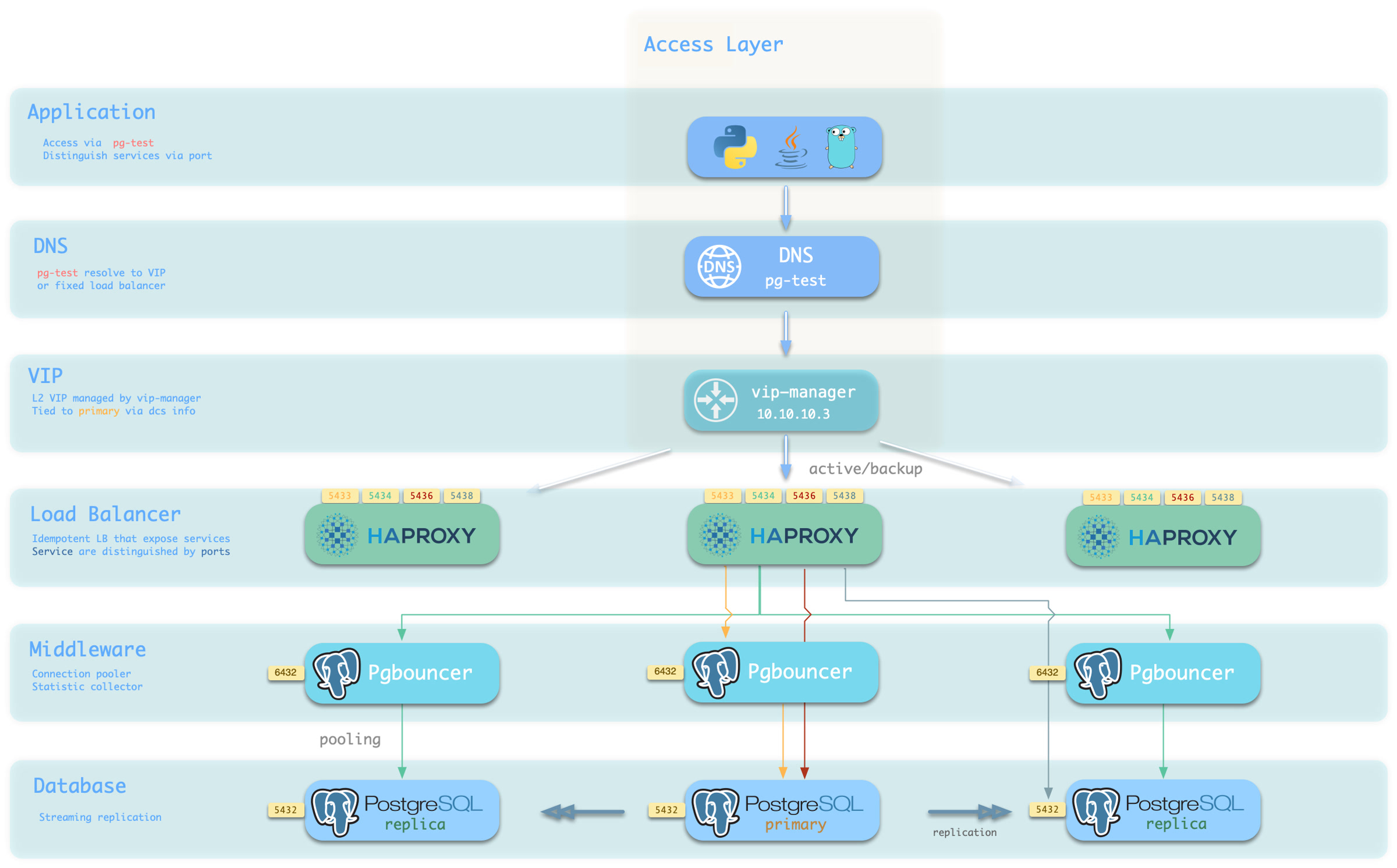
You can use different host & port combinations, which provide PostgreSQL service in different ways.
Host
| Type | Sample | Description |
|---|---|---|
| Cluster Domain Name | pg-test |
Resolved by dnsmasq on INFRA nodes; with pg_dns_target: auto, points to the VIP when enabled, otherwise to the primary IP |
| Cluster VIP Address | 10.10.10.3 |
When pg_vip_enabled is enabled, an L2 VIP managed by vip-manager and bound to the primary node |
| Instance Hostname | pg-test-1 |
Access via any instance hostname (resolved by dnsmasq @ infra nodes) |
| Instance IP Address | 10.10.10.11 |
Access any instance’s IP address |
Port
Pigsty uses different ports to distinguish pg services
| Port | Service | Type | Description |
|---|---|---|---|
| 5432 | postgres | Database | Direct access to postgres server |
| 6432 | pgbouncer | Middleware | Access postgres through connection pool middleware |
| 5433 | primary | Service | Access primary pgbouncer (or postgres) |
| 5434 | replica | Service | Access replica pgbouncer (or postgres) |
| 5436 | default | Service | Access primary postgres |
| 5438 | offline | Service | Access offline postgres |
Combinations
5 - Point-in-Time Recovery — A Time Machine for PostgreSQL
If data, a table, or even a database is deleted accidentally, Point-in-Time Recovery (PITR) can return the cluster to an earlier state.
This capability, once treated as specialist DBA work, is enabled by Pigsty’s standard PostgreSQL configuration.
Replication Is Not Backup
High availability can fail over to another instance when hardware fails. It has a natural blind spot, however: replication is not backup.
Streaming replication faithfully sends every primary change to every replica within milliseconds, including a DELETE without a WHERE clause or a DROP TABLE issued against the wrong database. Failover handles a broken machine; when the data itself is wrong, every replica can contain the same error.
Database disasters therefore fall into two broad classes. Redundancy handles physical service failure through multiple copies and automatic failover. Logical errors require history: a base backup plus continuous WAL archives from which PostgreSQL can reconstruct a state before the mistake.
| Threat | High Availability | Delayed Cluster | PITR |
|---|---|---|---|
| Hardware or instance failure | ✔ Automatic failover | ✘ | ✔, with a longer RTO |
| Accidental DML, table drop, or database drop | ✘ The error is replicated | ✔ Within the delay | ✔ At any recoverable point |
| Defective software corrupts data over time | ✘ The error is replicated | ✔ Within the delay | ✔ Try different recovery targets |
| Entire cluster or site is lost | ✘ | ✘ | ✔ Only if the repository survives that failure domain |
These mechanisms complement one another: HA restores service quickly, a delayed cluster provides a short undo window, and PITR is the final historical recovery path.
How the Time Machine Works
A database can be viewed as a state machine. A base backup is a complete physical snapshot at one point, while WAL (Write-Ahead Log) records every subsequent state change. With a snapshot and an unbroken WAL history starting from it, PostgreSQL can replay the database to any target covered by that history. The backup determines how far back recovery can start; the latest archived WAL determines how close to the present it can reach.
Base backup + WAL archive = point-in-time recovery
Pigsty orchestrates both inputs. Cluster initialization attempts an initial full backup by default, and the primary continuously sends completed WAL segments to the selected repository. See How PITR Works for the complete model of backups, archives, targets, and timelines.
Available Out of the Box
PITR is enabled in Pigsty’s standard PostgreSQL configuration. Each cluster is prepared with a backup repository, WAL archiving, and recovery tooling powered by pgBackRest. The policy remains declarative and can be customized with a few parameters:
The default local method stores backups under /pg/backup and retains two full backups. With one successful full backup per day, the resulting window is roughly 24–48 hours. Selecting the remote minio preset places the repository in Silo or compatible S3 storage, enables AES-256-CBC repository encryption, and uses time-based retention. With a 14-day retention setting and weekly full backups, the steady-state recovery window is roughly 14–21 days. Treat both ranges as policy estimates: actual coverage starts at the oldest usable backup and ends at the latest WAL that reached the repository.
Recovery is declarative too: specify a target, then let the playbook stop the cluster, restore files, replay WAL, and rebuild HA. An operator must still verify the recovered business state.
This follows Pigsty’s declarative configuration model: backup policy is part of the cluster definition, and a recovery target is another declared parameter.
Benefits and Costs
PITR materially improves data integrity and availability:
- RPO (maximum data loss) is usually reduced to minutes, bounded by WAL that had not reached a surviving repository.
- RTO (time to restore service) becomes tens of minutes to hours rather than permanent loss, depending on backup size, WAL replay distance, and disk or network throughput.
| Standalone strategy | Event | RTO | RPO |
|---|---|---|---|
| No backup | Host and local data are lost | Permanent loss | All data |
| Base backups only | Host and local data are lost | Backup size and bandwidth, often hours | Changes since the latest backup |
| Base backups + WAL archives | Host and local data are lost | Backup size, replay distance, and bandwidth | WAL not yet present in the surviving repository |
The costs fall mainly into three areas:
- Confidentiality: backups are another copy of business data and need encryption and access control. Pigsty’s remote preset enables repository encryption, but its default password must be changed.
- Resources: backups consume storage and archiving consumes bandwidth. Compression, bundling, and block incremental backup reduce this cost but do not eliminate capacity planning.
- Operations: backup status must be monitored and recovery must be rehearsed. A green backup job alone is not proof that the data can be restored within the required RTO.
PITR by itself does not replace HA. A production design normally combines HA for physical failures with PITR for logical errors and site-level recovery.
Next Steps
- How PITR Works: snapshots, WAL history, recovery windows, targets, and timelines
- PITR Architecture: pgBackRest, repository selection, archive flow, scheduling, and failover behavior
- PITR Tradeoffs: failure domains, capacity, retention, and backup frequency
- Declarative Recovery: the
pg_pitrparameter,pgsql-pitr.yml, andpig pitr - PITR Scenarios: accidental deletion, bad releases, investigation, and site loss
For the operational runbooks, see PGSQL Backup and Recovery.
5.1 - How PITR Works
If a database is a state machine, WAL (Write-Ahead Log) is its ordered change history. PostgreSQL records each modification in WAL before applying it to data files. Save a physical snapshot at one point, preserve all later WAL, and PostgreSQL can replay that history to a selected consistent state.
PITR is therefore the combination of three simple elements: a snapshot (base backup), history (WAL archive), and a target (where replay should stop).
Snapshot: Base Backup
A base backup is a physical snapshot of the whole PostgreSQL cluster and supplies a starting point for recovery. Pigsty uses pgBackRest to create and manage three backup types:
| Type | Contents | Recovery characteristics |
|---|---|---|
| Full | All database-cluster files | Self-contained, shortest chain, largest backup |
| Differential | Changes since the latest full backup | Restore uses the full plus the differential |
| Incremental | Changes since the latest backup of any type | Smallest backup, restore depends on its complete chain |
The wrapper pg-backup [full|diff|incr] triggers a backup. With no argument it requests incr; pgBackRest creates a full backup instead when no valid full exists. pg_crontab declares recurring jobs and installs them in the postgres user’s crontab.
Backup frequency affects recovery time: the newer the usable backup, the less WAL must be replayed to reach a given target. See PITR Tradeoffs.
WAL History
A snapshot reaches only its own state. WAL archiving preserves every later change needed to advance beyond it. Pigsty’s standard Patroni templates enable archiving and ask PostgreSQL to hand each completed WAL segment to pgBackRest:
Two implementation details matter:
archive_timeout: 300: on a low-write cluster, PostgreSQL can force a segment switch after five minutes so a partially filled segment does not wait indefinitely. This normally keeps the right edge of the recovery window within minutes when WAL is being generated; it is not a promise that every commit is already remote.- Asynchronous archive: pgBackRest uses
/pg/spoolwitharchive-async=yto batch transfers. Pigsty setsarchive-push-queue-max=4GiB; if repository failure lets the queue cross that bound, pgBackRest can drop the queued WAL to protect local disk. That creates an archive gap, so a new full backup is required to establish a fresh recoverable chain.
Expiration is automatic. When old backups expire under the repository policy, pgBackRest also expires archived WAL that no remaining backup needs, unless archive retention is overridden explicitly.
Recovery Window
The backup and its continuous WAL history form a recovery window:
- Left boundary: the start of the oldest usable remaining backup chain. In practical time-based descriptions, this is usually summarized by the oldest retained full backup’s time.
- Right boundary: the latest WAL successfully archived to a repository that survives the incident.
The window moves forward as new backups arrive and old chains expire. Pigsty’s local preset keeps two full backups; with one successful full per day, coverage is roughly one to two days. The minio preset uses retention_full_type: time with retention_full: 14; with weekly full backups, the oldest retained chain normally yields roughly 14–21 days of steady-state coverage. These are estimates, not SLAs: missed backups, archive gaps, explicit archive-retention overrides, or repository loss change the actual window. Verify it with pig pb info and restore drills.
See PITR Tradeoffs and Backup Policy.
Targets: Where Replay Stops
PostgreSQL supports several ways to locate a state inside the recovery window. Pigsty exposes six target types through pg_pitr:
pg_pitr type |
Meaning | Typical use |
|---|---|---|
default |
Replay through all WAL available from the repository | Restore the newest archived state after total loss |
time |
Stop at a timestamp | Recover from accidental DML or DDL |
xid |
Stop at a transaction ID | Exclude a precisely identified bad transaction |
lsn |
Stop at a WAL location | Low-level exact targeting |
name |
Stop at a restore point created with pg_create_restore_point() |
Planned change checkpoint |
immediate |
Stop as soon as the selected backup becomes consistent | Validate or expose the selected backup state quickly |
The set field is different: it chooses which backup set pgBackRest restores as the starting snapshot; it is not itself a replay stop target.
Boundary Semantics
Targets are inclusive by default: the transaction at the target is retained. To stop immediately before a known bad target, set exclusive: true, which maps to recovery_target_inclusive = false.
Transactions remain atomic. Committed transactions before the effective target survive; transactions not committed at that point are rolled back. Recovery produces a consistent database state rather than half of a transaction.
Timelines
Restoring to the past and accepting new writes creates a fork in history. PostgreSQL uses a timeline to distinguish each branch. PITR promotion, replica promotion, and failover can all create a new timeline; new WAL does not overwrite the old timeline’s files.
gitGraph
    commit id: "Full backup"
    commit id: "Normal writes"
    commit id: "Bad change"
    commit id: "More writes"
    branch Timeline-2
    checkout Timeline-2
    commit id: "PITR before bad change"
    commit id: "New writes"
Keeping the old history allows another attempt if the first target was wrong. The timeline field can select a timeline; Pigsty’s recovery declaration defaults to latest.
Continue with PITR Architecture to see how these concepts map to Pigsty components and configuration.
5.2 - PITR Architecture
The PITR principle is compact; the engineering is not. WAL archiving must not stall production writes, object-storage backups need encryption, backup jobs must follow the primary after failover, shared repositories must isolate clusters, and large numbers of small objects can limit throughput.
Pigsty uses pgBackRest as its backup engine and ships production-oriented defaults for those concerns. This page describes the engine, repository abstraction, archive path, scheduler, and primary-aware execution model.
Backup Engine: pgBackRest
Pigsty uses pgBackRest for three responsibilities: create base backups with backup, receive WAL with archive-push, and restore data with restore plus archive-get.
Relevant capabilities include:
- Parallelism: backup, archive, and restore operations can use multiple processes.
- Backup chains: full, differential, incremental, and block incremental backups reduce repeated transfer and storage.
- Compression and encryption: zstd compression and AES-256-CBC repository encryption are built in.
- Repository backends: POSIX filesystems, S3-compatible services such as Silo and MinIO, Azure, GCS, and SFTP are supported by pgBackRest.
- Bundling: small files can be packed into larger repository objects, reducing object-storage overhead.
pgBackRest separates cluster histories using a stanza. Pigsty maps the stanza name directly to pg_cluster, allowing multiple clusters to share one storage service without sharing a backup identity:
Repository Abstraction
Two parameters define repository selection. pgbackrest_method chooses one repository name, and pgbackrest_repo is a dictionary of candidate definitions. Pigsty v4.5.0 renders only the selected pgbackrest_repo[pgbackrest_method] entry as pgBackRest repo1; listing both local and minio does not enable two active repositories.
The presets intentionally differ. local favors simplicity and fast local restore; it is unencrypted, unbundled, and retained by full-backup count. minio targets a remote Silo or compatible S3 repository, enabling encryption, bundles, block incremental backup, and time-based retention.
Rendering is mechanical: underscores in the chosen repository’s keys become hyphens and each key gets a repo1- prefix in /etc/pgbackrest/pgbackrest.conf. A custom cloud repository can therefore use pgBackRest options directly:
See Backup Repository for Silo, external S3-compatible storage, versioning, object locking, TLS, and credential details.
Archiving and Scheduling
When pgbackrest_enabled is true, as it is by default, the Patroni templates configure:
Base backups enter the system in two ways:
- Initial backup: after bootstrapping a top-level primary, Pigsty attempts a backup when
pgbackrest_init_backupis true. The task ignores backup failure and writes/etc/pgbackrest/initial.doneonly after success, so the marker means “completed,” not merely “attempted.” - Scheduled backup:
pg_crontabinstalls jobs in the database superuser’s crontab. Its role default is an empty list; standard example configurations usually add a daily 01:00 full backup.
pg-backup [full|diff|incr] is a small wrapper around pgbackrest backup. With no argument it requests an incremental backup, which pgBackRest promotes to a full backup if no usable full exists.
Backups Follow the Primary
pgBackRest and the same scheduled job are installed on every PostgreSQL node, but pg-backup checks /pg/bin/pg-role and only proceeds on the current primary. Replicas fail fast rather than writing a competing backup.
That design decouples the backup schedule from the HA topology:
- all members receive the same repository configuration and crontab;
- after failover, the new primary becomes eligible for subsequent backups and WAL archiving without rewriting the schedule;
- one current primary owns the authoritative write flow to a stanza.
With a non-local repository, Pigsty also adds pgBackRest after basebackup in Patroni’s create_replica_methods. Patroni tries basebackup first; if that method fails, it can restore a replica from the repository with pgbackrest --delta restore, shifting the copy load away from the primary.
Performance Defaults
The shipped pgBackRest template favors light production overhead and aggressive restore throughput:
| Setting | v4.5.0 behavior | Rationale |
|---|---|---|
| Compression | compress-type=zst |
Balance compression ratio and throughput |
| Backup/archive workers | One quarter of CPU, clamped to 2–4 | Limit competition with the database |
| Restore workers | All detected CPU, capped at 8 | Minimize restore time |
| Asynchronous archive | archive-async=y, spool under /pg/spool |
Batch transfer without synchronous object-store latency |
| Archive queue limit | archive-push-queue-max=4GiB |
Bound local spool growth |
| Fast backup start | start-fast=y |
Request an immediate checkpoint |
| Incremental restore | delta=y |
Reuse destination files that already match |
The 4 GiB queue is a safety tradeoff: if the repository remains unavailable and the queue exceeds the limit, pgBackRest can discard queued archive files. PostgreSQL continues running, but the WAL archive becomes incomplete and a new full backup is needed to establish a new recovery chain. See How PITR Works.
Observability
When both backup and exporter settings are enabled, pgbackrest_exporter runs on each PostgreSQL node and exposes metrics on port 9854. The monitoring stack uses those metrics for backup age, type, size, duration, and error visibility.
Useful diagnostic entry points include:
| Entry | Purpose |
|---|---|
pb info |
Shell helper for pgbackrest info using the configured stanza |
/pg/log/pgbackrest/ |
pgBackRest backup, archive, and restore logs |
| `pg-backup full | diff |
See Backup Administration for operational checks, then PITR Tradeoffs for policy design.
5.3 - PITR Tradeoffs
A backup is an insurance policy. Its premium is storage, network traffic, and operational work; its benefit is how much data can be recovered and how quickly service can return. There is no universal free policy: more history normally needs more capacity, while a shorter RTO normally needs newer backups and tested procedures.
Designing a policy means answering three questions: where is the repository, how long is history retained, and how often are backups taken?
Where: Choose the Failure Domain
Repository location is the most important decision because it defines which disasters the backup survives.
A local repository (pgbackrest_method: local) stores backups on the primary’s local filesystem. It is simple, fast, and has no remote service dependency. But data and backup normally share one host failure domain: loss of the machine, disk, or filesystem can destroy both. Local backup protects well against logical errors, but not total host loss unless /pg/backup is deliberately placed on independent storage.
An object-storage repository (pgbackrest_method: minio or a custom S3 definition) sends backups to Silo or S3. It becomes an independent disaster-recovery copy only when deployed outside the database host or site failure domain. Pigsty’s minio preset also enables AES-256-CBC repository encryption, bundling, and block incremental backup. Recovery throughput then depends on the network and storage service, and that service adds operational responsibility.
| Scenario | Recommended repository | Reason |
|---|---|---|
| Development, test, demo | local |
Minimal dependencies; rebuild is acceptable |
| Production | Dedicated Silo or compatible S3 storage | Independent failure domain and encrypted repository |
| Cloud deployment | Managed S3-compatible or cloud object storage supported by pgBackRest | Independent storage and lower operational burden |
| Ransomware/compliance | Versioned storage plus correctly configured object lock/retention | Prevent privileged database-host access from deleting protected versions |
The backup repository is itself sensitive business data. Change the default access keys and cipher_pass, restrict access, protect credentials separately from the database hosts, and verify any object-lock policy. See Backup Repository.
How Long: Capacity and Recovery Window
Longer retained history generally consumes more storage, but compression, deduplication, block incremental backup, database change rate, and the mix of full/differential/incremental backups determine the actual amount. Measure real backup and WAL growth instead of relying on a fixed multiplier.
For an illustrative 100 GB database changing by 10 GB per day, before compression:
- Daily full, retain two (
localpreset policy): about 200 GB of full backups plus WAL, commonly giving roughly a one-to-two-day window when every job succeeds. - Weekly full, daily incremental, retain full history by 14 days (
miniopreset policy): the oldest surviving weekly chain commonly produces roughly 14–21 days of coverage. Capacity must include multiple full backups, their incrementals, archived WAL, and transient retention-plus-one behavior during expiration.
The precise window is not the configuration number alone. It runs from the oldest usable backup chain to the newest WAL present in the surviving repository. pgBackRest’s time retention removes an old full only when another qualifying full can satisfy the period, and related incrementals and WAL follow the retained full chains. Check pig pb info, monitor archive health, and prove coverage with a restore.
Choose a window long enough to cover the delay between an error occurring and being detected. A dropped table may be noticed in minutes; slow corruption or a month-end reconciliation failure can take weeks to surface.
How Often: Backup Frequency and RTO
Restore time has two main components: restore a backup chain, then replay WAL to the target. Backup size and storage throughput shape the first; the distance between the chosen backup and target shapes the second.
WAL replay is largely serial. On a write-heavy database, restoring from a weekly full immediately before the next full can require nearly a week of replay. Daily incremental backups reduce that replay distance while transferring only changes since the previous backup. They still depend on a valid chain, so monitor and test the entire chain rather than only the newest file.
A useful rule is: within the available backup window and production load budget, take backups often enough that measured restore time meets the RTO.
Pigsty Presets
Pigsty provides two candidate repository definitions, but pgbackrest_method selects one for the generated repo1 configuration.
Standard policy: local repository and daily full backup. It is simple and restores through local I/O, making it suitable for development or environments where host-level disaster recovery is provided separately:
Production policy: remote Silo/S3 repository, weekly full, daily incremental. It separates the repository failure domain and uses the encrypted minio preset:
Do not describe the default pgbackrest_repo dictionary as a “dual-repository” setup: it contains alternative definitions, and the template renders only pgbackrest_repo[pgbackrest_method] as repo1. A real multi-repository pgBackRest design requires explicit advanced configuration and an independently tested backup, expiration, and restore workflow; the two Pigsty presets alone do not create it.
Use Backup Policy for capacity modelling and schedule details.
A Backup Is Proven by Restore
Monitoring a successful backup job is necessary but insufficient. Add clone restore drills to routine operations so you can answer:
- Is the chain usable? Restore it end to end and validate data.
- What is the measured RTO? Database size and WAL volume change over time.
- Can the on-call operator execute the runbook? The first full exercise should not happen during an incident.
A clone recovery leaves the source cluster online but overwrites the designated destination cluster, so verify the exact target and use disposable infrastructure. See Declarative Recovery for the recovery interface.
5.4 - Declarative Recovery
The value of a backup system is realized at restore time, often during an incident when every minute matters. A traditional PITR procedure requires a long sequence of coupled manual steps: pause HA, stop PostgreSQL, prepare recovery settings, restore the backup, replay WAL, validate the target, rebuild metadata, and start the cluster again.
Pigsty applies the same approach used by declarative configuration to recovery: declare the recovery target, then let the orchestration tools stop the cluster, restore the data, replay WAL, and return control to the operator.
Declare a Recovery Target
Describe the target with the pg_pitr parameter and execute it with pgsql-pitr.yml.
The most common form restores a cluster to a specific time:
The six recovery target types and the rest of the recovery behavior are expressed through fields in this parameter:
See Restore Operations for the complete field reference and examples.
What the Playbook Does
pgsql-pitr.yml turns the manual recovery workflow into six stages and supports Ansible tags for staged execution:
| Stage | Action |
|---|---|
| Print the source cluster, target, and restore command; this stage reports the plan and does not prompt for confirmation | |
| pause | Run patronictl pause so Patroni does not intervene during maintenance |
| stop | Stop Patroni and PostgreSQL on replicas, then on the primary |
| pitr | Render recovery settings, run an incremental pgBackRest restore, start PostgreSQL to replay WAL, wait for consistency, and print control data |
| etcd | Remove stale cluster metadata from etcd so old and new timelines are not mixed |
| start | Start Patroni again, resume HA management, and rebuild replicas |
Several details are important:
- Incremental restore: pgBackRest uses
delta, so it rewrites only files that differ from the backup. For large databases, this can reduce RTO substantially. - Verification, not assumption: the playbook prints checkpoint LSN, timeline, and NextXID data from
pg_controldata; an operator must still verify that the recovered business state is correct. - Rollback copy: with
backup: true, the original data directory is moved to/pg/data-backupbefore recovery. A later run withbackup: trueremoves an existing/pg/data-backup, so this is not a versioned snapshot store. - Staged execution: run
-t down,-t pitr, and-t upseparately when you want an operator checkpoint between phases. Completion of thepitrphase means PostgreSQL reached a consistent recovery state; for a time, XID, LSN, or named target, also confirm WAL replay reached that target.
The action field controls what happens at the target: promote opens a new timeline, pause waits at the target for inspection, and shutdown stops PostgreSQL there.
A targeted recovery defaults to pause when action is omitted. To preserve a manual gate for pause or shutdown, run the stages separately; a one-shot recovery should choose promote explicitly.
The playbook performs the mechanical workflow, but it cannot decide whether the recovered data is correct.
Command-Line Recovery with pig
The pig CLI provides single-instance PITR orchestration directly on a database node, without requiring the management node or an Ansible environment:
pig pitr validates the target, stanza, and available backups; stops Patroni and PostgreSQL; performs the restore; optionally starts PostgreSQL; and prints post-recovery instructions.
For a Patroni-managed data directory, Patroni remains stopped afterward. Validate the data, then use pig pt start to return the instance to HA management.
This single-node workflow does not clear etcd, rebuild replicas, or automatically rejoin the cluster, and it refuses destructive forced shutdown unless --force-stop is supplied explicitly.
The lower-level pig pb commands wrap pgBackRest: pb info lists backups, pb backup creates a backup, and pb restore performs a raw restore.
There is a deliberate safety boundary: pig pb restore refuses to run while Patroni still manages the instance, because Patroni could restart PostgreSQL during the restore.
Use pig pitr or pgsql-pitr.yml for Patroni-managed instances.
In-Place and Clone Recovery
The same mechanism supports two different workflows:
| Dimension | In-place recovery | Clone recovery |
|---|---|---|
| Method | Roll the production cluster back | Restore a source backup into a different cluster |
| Downtime | Required during recovery | The source production cluster remains online |
| Effect | Discards all writes after the target | Does not affect the source; the destination is overwritten and can be retried |
| Best for | Whole-cluster corruption or disaster recovery | Recovering deleted objects, audit work, and recovery drills |
For a clone recovery, the cluster field names the source backup stanza.
This example restores the historical state of pg-meta into pg-test without stopping the source cluster:
Exporting an accidentally deleted table from the clone and importing it into production is generally safer than rolling the entire production cluster back. See Clone a Database Cluster for the complete workflow and cleanup steps.
After Recovery
Recovery completion is not the end of the incident. Include these steps in the closeout checklist:
- New timeline, new backup: after promotion, create a full backup with
pg-backup fullso a recoverable window exists on the new timeline. - Archiving state: if an exploratory restore used
archive: false, restore normal archiving as described in Post-Recovery. - Clone cleanup: a clone’s cluster identity and source backup stanza do not match. Recreate the destination stanza before enabling its own backups; see Clone a Database Cluster.
The tools execute the procedure; operators still decide the target, whether to restore in place or into a clone, and whether the recovered data is correct. Continue with PITR Scenarios for that decision framework.
5.5 - PITR Scenarios
During an incident, the most expensive resource is often decision time. Pigsty can orchestrate the mechanical recovery steps, but an operator must still answer three questions: what is the target, should recovery be in place or into a clone, and how will the result be validated?
Read and rehearse this framework before an incident.
Decision Framework
| Scenario | Typical problem | Recommended workflow | Target |
|---|---|---|---|
| Accidental DML | DELETE or UPDATE affects the wrong rows |
Clone, validate, then copy back data | time / xid |
| Dropped table, schema, or database | DROP or an incorrect migration |
Clone, validate, then copy back objects | time / name |
| Defective release or batch corruption | Software writes incorrect data for a period | Clone and compare before choosing repair or cutover | time / xid |
| Audit, investigation, or forensics | Inspect historical state | Clone and hold at the target for inspection | time / lsn |
| Whole-cluster or site loss | Hosts or storage are gone or encrypted | Recover in place on replacement infrastructure | default / time |
Two principles apply throughout:
- Stop the damage first. Pause the defective application or remove its write access before choosing a target. The window is moving, but a rushed restore to the wrong cluster can cause a second incident.
- Prefer a clone while production is usable. It leaves the source untouched, supports repeated target selection, and allows validation before export or cutover. It does overwrite the designated destination cluster. In-place recovery is appropriate when the whole cluster is unusable or the business has explicitly accepted rolling every database back.
flowchart TD
    A["Data error detected"] --> B["Contain the source of bad writes"]
    B --> C{"Can production still serve?"}
    C -->|Yes| D["Clone recovery<br/>validate and copy back or cut over"]
    C -->|No| E["In-place recovery<br/>or rebuild on new infrastructure"]
    D --> F["Validate, take a new backup, review the incident"]
    E --> F
Accidental DML
A DELETE without WHERE, an incorrect UPDATE, or a defective batch job is the most common PITR use case.
First locate the error using application logs, PostgreSQL logs, metrics, or audit records. A timestamp is usually sufficient. If the exact transaction ID is known, xid plus exclusive: true can stop immediately before that transaction.
Validate the recovered rows, then copy only the required data back with pg_dump, COPY, or an application-specific reconciliation procedure. If a configured delayed cluster is still inside its delay window, reading from it may be faster than PITR.
Dropped Objects
The same approach applies to DROP TABLE, DROP DATABASE, or a migration executed in the wrong environment, with an even stronger preference for a clone. Rolling the entire production cluster back to recover one object also discards every legitimate write after the target.
Restore a separate destination to before the DDL, validate the object, export it with pg_dump, and import it into production. For planned high-risk changes, create a named restore point with pg_create_restore_point() beforehand; a name target then removes timestamp ambiguity.
Defective Release or Batch Corruption
When a faulty release corrupts data for hours, the challenge is usually identifying the last clean state and the full impact. A clone provides a clean comparison set. Restore repeatedly to candidate times, compare it with production, and decide whether to copy back corrected rows or cut over to a recovered cluster.
This decision needs application-owner validation: a successful PostgreSQL restore proves consistency at a target, not that the target represents correct business state.
Audit and Investigation
Questions such as “what was this balance at month end?” require historical state. Restore into a separate destination, stop at a time, LSN, XID, or named restore point, and inspect without altering the source.
action: pause is the targeted-restore default and holds recovery at the target for inspection; it does not itself configure read-only access or create a separate cluster. The inventory limit and cluster source field determine the destination workflow. Run -t down, -t pitr, and -t up separately when you need an operator gate before promotion, and enforce read-only access explicitly if the investigation requires it. immediate means “stop at the first consistent point,” not “choose a historical timestamp.”
Site Loss
If every database host is destroyed or encrypted, HA cannot help. Recovery requires a repository and the other control-plane assets to have survived outside that failure domain. That survivor can be Silo/S3, another protected host or filesystem, or another tested pgBackRest backend; a remote object store is recommended but the essential property is independent failure-domain survival.
Rebuild hosts, restore the declarative inventory, credentials, and PKI, point the cluster at the surviving repository, then restore through the end of archived WAL:
Inventory and backup data are necessary but not sufficient. Preserve installation media or package repositories, repository credentials and encryption passwords, CA material, custom files, DNS dependencies, and an independently accessible runbook. Keep secrets encrypted and separate from both the database hosts and ordinary source control.
Make Recovery a Routine Drill
The first end-to-end execution of any of these workflows should not occur during a production incident. Use a disposable destination to rehearse clone recovery regularly and after material architecture changes. Measure three outcomes:
- Usability: can the backup and complete WAL chain be restored and validated?
- RTO: how long does the actual restore and replay take now?
- Operator readiness: can the on-call engineer identify source and destination, select a target, and follow the safety gates?
See Restore Operations and Clone a Database Cluster for the task-level runbooks.
6 - Monitoring System
Pigsty’s monitoring system has three pillars—metrics, logs, and alerting—and is available out of the box. Logs and alerts are also important inputs for audit and traceability. It can monitor clusters managed by Pigsty, existing PostgreSQL clusters, and external RDS services.
Monitoring Targets
Pigsty monitoring covers these core targets:
- PostgreSQL clusters and instances (SQL performance, connections, replication, transactions, checkpoints, WAL)
- Infrastructure components (Grafana, VictoriaMetrics, Alertmanager, Nginx, etc.)
- Host nodes (CPU, memory, disk, network, kernel)
- Key middleware (ETCD, MINIO, REDIS, JUICE, VIBE, etc.)
Technology Stack
| Component | Purpose |
|---|---|
| Grafana | Visualization dashboards, unified entry point, alert views |
| VictoriaMetrics | Time-series metric ingestion, storage, and query |
| VictoriaLogs | Structured log ingestion, indexing, and search |
| VMAlert + Alertmanager | Alert rule evaluation and notification delivery |
| Exporter / Agent | Database/system metric exposure and log forwarding |
Onboarding Modes
Pigsty supports three monitoring onboarding modes:
| Mode | Use Case | Entry |
|---|---|---|
FULL |
Database is deployed and managed directly by Pigsty | PGSQL Monitoring System |
MANAGED |
Existing PostgreSQL cluster with SSH-manageable nodes | Monitor Existing Cluster |
RDS |
Cloud database accessible only by connection string | Monitor RDS |
Continue Reading
- PGSQL Monitoring System: Database metrics, logs, alerting, and dashboards
- INFRA Monitoring & Alerting: Health of the monitoring stack itself
- NODE Monitoring & Alerting: Host resource and system health
- ETCD Monitoring & Alerting: Consistency and availability monitoring
- MINIO Monitoring & Alerting: Object storage cluster monitoring
- REDIS Monitoring & Alerting: Cache cluster runtime monitoring
7 - Security and Compliance
The database is usually the most sensitive component in an information system: it stores the most valuable data, so attacks and failures can have the most serious consequences. Database security is not a feature that can be enabled with one switch. It is the combined answer to a series of questions: Who can connect? What can they do after connecting? Can traffic be intercepted? Are operations recorded? Can damaged, lost, or deleted data be recovered?
Pigsty turns these answers into an out-of-the-box security baseline and manages it through declarative configuration: HBA rules, roles and privileges, certificates, encryption, backups, and audit policies are declared as parameters in the inventory, then rendered and applied by idempotent playbooks.
This Security as Code approach is itself an important security practice. Policies can be versioned, reviewed, and traced, while one inventory provides a consistent baseline across many instances. When an auditor asks who can access a database, you can start from a readable YAML declaration, then verify the generated HBA rules and database grants against the running system.
Security as Code
In traditional operations, security settings are often scattered across the environment: pg_hba.conf on one server, a GRANT statement executed manually by a DBA, or a firewall rule opened temporarily during an incident.
Over time, documentation and actual state can drift, making it difficult to determine which rule set each instance is using.
Pigsty takes a different approach: security policy is part of the cluster definition and lives alongside other cluster properties.
Users, privileges, and HBA rules are described declaratively, and playbooks apply them idempotently to every cluster instance.
New instances inherit the same policy, and Git history records security configuration changes. Manual GRANT statements, runtime parameter changes, and edits to node files can still cause drift, so production environments should compare declared and actual state regularly.
Default Security Baseline
Reasonable defaults reduce omissions. The following capabilities are enabled in the default Pigsty configuration:
| Capability | Default Behavior | Related Parameter |
|---|---|---|
| Password hashing | New or updated PostgreSQL passwords use SCRAM-SHA-256 | pg_pwd_enc |
| Data checksums | Page checksums are enabled during cluster initialization to detect silent corruption | pg_checksum |
| Server-side TLS | PostgreSQL server certificates are installed and ssl is enabled, so TLS connections are accepted |
— |
| Local CA | A self-signed CA is created automatically for managed component certificates | ca_create |
| etcd encryption and authentication | TLS for client and peer traffic, plus RBAC password authentication | etcd_root_password |
| MINIO object storage HTTPS | Silo backup traffic uses HTTPS by default | minio_https |
| Nginx HTTPS | Web ingress listens on both ports 80 and 443 by default | nginx_sslmode |
| HBA rules | Layered access: local ident, intranet password authentication, and SSL required for public administrator access | pg_default_hba_rules |
| Roles and privileges | A four-tier role model and default privilege templates provide a least-privilege baseline | pg_default_roles |
| Backup and recovery | pgBackRest is enabled by default, with two full backups retained in the local repository | pgbackrest_enabled |
| Firewall | Zone mode trusts intranet CIDRs and exposes only required ports to public networks | node_firewall_mode |
| Restricted sudo | Sudo access for the database OS user is limited to the required command set | pg_dbsu_sudo |
Hardening with Trade-offs
The default configuration targets deployments on a trusted intranet. Some controls require explicit enablement because they impose performance or compatibility costs, or require decisions from the operator:
- Default configurations and examples contain publicly documented default passwords for quick starts and local testing. Before production deployment, use
./configure -gto randomize the credentials it recognizes, then check the pgBackRest encryption passphrase, Silo users inha/safe, and all custom values. - TLS is disabled by default for the Patroni REST API and PgBouncer (
patroni_ssl_enabled,pgbouncer_sslmode); enable it explicitly with the certificates already issued. - Password strength checks (
passwordcheck) and the audit extension (pgaudit) are disabled by default. Confirm package availability, then configure preloading and policy before use. - SELinux defaults to
permissive. Demo configurations also expose port5432through the firewall; remove that exception in production. - The local backup repository is not encrypted by default. The remote
miniorepository preset uses AES-256 encryption by default, but its default encryption passphrase must be changed.
The ha/safe hardening template combines TLS, certificate authentication, password checks, and backup encryption.
Together with the consistency-first CRIT parameter template, it provides a practical starting point. Public credentials, audit extensions, and the failure model still require explicit review.
See the Security Model for the complete upgrade path.
This Chapter
| Section | Question Answered |
|---|---|
| Security Model | Where is the root of trust? How many defensive layers exist? How should the baseline be hardened? |
| Authentication | Who can connect? How is identity proven? How are HBA rules declared and applied? |
| Access Control | What can a connected user do? How does least privilege become the default? |
| Encrypted Communication | How is traffic encrypted? Who issues, distributes, and rotates certificates? |
| Data Security | How is data kept intact, recoverable, confidential, and traceable? |
| Compliance | How do security capabilities map to MLPS and SOC 2 controls? |
Related Topics
Beyond the conceptual model, these pages provide operational security guidance:
- 🔰 Security Recommendations: minimum hardening for a quick single-node deployment
- 🛡️ Security Considerations: production hardening checklist
- 📄
ha/safeTemplate: complete hardening configuration reference - 🔑 HBA Rules: detailed PGSQL HBA configuration
- 👤 Access Control: role and privilege parameter reference
- ♾️ High Availability: business continuity
- ⏰ Backup and Recovery: PITR and disaster recovery
7.1 - Security Model
Before examining individual security features, answer two more fundamental questions: Where is the root of trust? and How many defensive layers exist? The first determines what deserves the strongest protection. The second determines what remains when one layer fails.
Trust Boundaries
Pigsty is an Ansible-based declarative deployment system. Like other control-plane systems, its admin node is the control plane and the node that requires the strongest protection.
| Role | Assets and Privileges |
|---|---|
| Admin node | The pigsty.yml inventory, which normally contains system and application credentials; the CA private key; SSH administration access to every node |
| INFRA nodes | Monitoring and alerts, DNS, Nginx ingress, and software repositories |
| Database nodes | Database instances, local dbsu, and restricted sudo |
| Clients | Database credentials or client certificates; access through service ports, HBA, and authentication |
These roles hold different capabilities; they do not form a simple linear hierarchy. Three assets are especially important:
- The
pigsty.ymlinventory contains component passwords and credentials. Strictly control access to the admin node and to the configuration repository when Git is used. - The CA private key,
files/pki/ca/ca.key, is the trust anchor for the deployment. Anyone holding it can issue an arbitrary trusted certificate. The file uses mode0600inside a0700directory; keep an offline backup. - The administration user’s SSH private key lets the admin node manage every enrolled node with passwordless sudo. It is effectively root access to the managed fleet.
Pigsty’s security policy states this boundary explicitly: an attack that requires admin-node access, or possession of both pigsty.yml and the CA private key, is not treated as a product vulnerability.
These are high-trust control-plane assets by design and must be protected accordingly.
Seven Defensive Layers
Defense in depth does not ask one mechanism to solve every problem. It combines controls so that one failure does not remove all protection. Pigsty’s security capabilities can be summarized as seven layers:
| # | Layer | Mechanisms | Details |
|---|---|---|---|
| 1 | Network boundary | Firewall zones, constrained listen addresses, centralized ingress | This page |
| 2 | Transport encryption | Local CA and TLS between components | Encrypted Communication |
| 3 | Authentication | HBA rules, SCRAM passwords, client certificates | Authentication |
| 4 | Access control | Role model, default privileges, database isolation | Access Control |
| 5 | Host security | SELinux, restricted sudo, dedicated OS users | This page |
| 6 | Data security | Checksums, backup and encryption, PITR, deletion safeguards | Data Security |
| 7 | Audit trail | DDL and connection logs, audit extensions, centralized logs | Data Security |
Layers 2, 3, 4, 6, and 7 have dedicated chapters. The following sections cover the network and host layers.
Network Boundaries
Pigsty enables a firewall during node provisioning (node_firewall_mode defaults to zone), using firewalld or ufw according to the operating system.
Intranet CIDRs (10.0.0.0/8, 172.16.0.0/12, and 192.168.0.0/16, defined by node_firewall_intranet) enter the trusted zone.
Public networks can reach only ports declared in node_firewall_public_port, which defaults to 22 for SSH and 80/443 for web traffic.
The default demo inventory,
pigsty.yml, also exposes port5432for local evaluation. Remove it in production. If direct database access is required, restrict sources to explicit CIDRs with security groups, host firewalls, and HBA.
PostgreSQL listens on all addresses by default (pg_listen: 0.0.0.0). The effective access boundary is the combination of listen addresses, firewall rules, and HBA. Stricter environments can constrain the listener:
The default firewall does not expose Grafana, VictoriaMetrics, or other web infrastructure directly to public networks. External web access normally enters through the Nginx portal. Database traffic enters through HAProxy service ports. Fewer entry points are easier to harden and audit.
Host Security
The central host-level rule is: each OS user receives only the privileges required for its job.
- The database superuser
postgres(pg_dbsu) has no password by default and can enter the database only through localidentauthentication.pg_dbsu_sudodefaults tolimit, allowing passwordlesssystemctloperations for database services and log viewing rather than unrestricted root access. - The administration user (
node_admin_username, defaultdba) is used by operators and playbooks and receives passwordless sudo (nopass) by default. Security-sensitive environments can setnode_admin_sudotoall, which requires a sudo password, orlimit, which restricts the command set. node_selinux_modedefaults SELinux topermissive: violations are logged but not blocked, providing a baseline before moving toenforcing.
Pigsty does not manage the SSH server configuration. Disabling password login, restricting remote root login, and similar operating-system hardening belong in your host security baseline.
Hardening Levels
Security does not have to jump to its final state in one step. Pigsty provides an upgrade path in which each level builds on the previous one:
Level 1: default baseline. Out-of-the-box controls include SCRAM passwords, data checksums, a local CA and component certificates, layered HBA, a four-tier role model, default backups, and firewall zones. This level suits development, testing, and evaluation on a trusted intranet. Production still requires credential review, network-boundary review, and client verification.
Level 2: randomized credentials. Default passwords are documented publicly and must be changed in every network-exposed deployment. Add -g when generating configuration to randomize built-in parameters and example credentials recognized by the configuration wizard:
This option does not replace the pgBackRest cipher_pass, every Silo example credential in ha/safe, or user-defined values. See the Default Credentials Checklist for the complete scope.
Level 3: policy hardening with the ha/safe template. conf/ha/safe.yml combines several controls into a starting point for further customization:
- TLS and certificate authentication: the main TCP HBA rules use
ssl, public administrator access uses a client certificate, PgBouncer usesrequire, and the Patroni API uses HTTPS. Localidentand selected localhost password rules remain. - Password policy:
passwordcheckis preloaded explicitly, and built-in users declareexpire_in. Example passwords in the template still require review and replacement. - Reduced attack surface: listen addresses are limited to
${ip},${vip},${lo}, and public connection-pool access by monitoring and administration accounts is denied explicitly. - Backup encryption: pgBackRest uses the remote
miniorepository preset with AES-256-CBC.pgBR.${pg_cluster}is a predictable example value and must be replaced. - Security extensions:
passwordcheck,credcheck,pgaudit,pgsodium,anonymizer, and related extensions are installed. Installation does not preload, create, or configure an extension.
Level 4: database hardening with the crit.yml parameter template. The safe template selects the CRIT parameter template for consistency-first workloads. Compared with the general oltp template, it:
- forces data checksums regardless of
pg_checksum; - enables strict synchronous replication (
synchronous_mode_strict), blocking writes that require synchronous acknowledgment when no synchronous replica is available; - logs connection and disconnection events; PostgreSQL 18 also separates connection receipt, authentication, and authorization stages;
- configures watchdog as
automatic, which activates only when a usable device exists.
Strict synchronous mode targets preservation of acknowledged transactions, but still depends on synchronous_commit, synchronous replica state, and failover eligibility. Validate RPO with failure exercises on the target topology.
You can also select individual controls instead of adopting the complete template:
Next
- 🔑 Authentication: HBA rules and password policy
- 👤 Access Control: roles and least privilege
- 🔐 Encrypted Communication: local CA and TLS
- 🔒 Data Security: integrity, backup, and audit
- ✅ Compliance: MLPS and SOC 2 mapping
7.2 - Authentication
PostgreSQL uses pg_hba.conf for Host-Based Authentication: who may connect, from where, to which database, and how they must prove their identity.
The mechanism is powerful, but expensive to maintain manually across a cluster. Primary and replica instances may require different rules, and every instance stores its own configuration in the data directory. Without a common declaration and refresh process, rules can drift between instances.
Pigsty applies the same declarative configuration model here: HBA rules are part of the inventory and are rendered and distributed consistently by playbooks.
HBA as Code
Cluster HBA policy combines two parameter groups: the global defaults in pg_default_hba_rules and cluster-specific additions in pg_hba_rules.
The PgBouncer connection pool has two independent counterparts: pgb_default_hba_rules and pgb_hba_rules.
A rule can use either of two forms. The recommended alias form keeps one semantic rule on one line:
The raw form supplies a literal pg_hba.conf line for cases the aliases cannot express.
In addition to user, address, database, and authentication method, each rule has two control fields:
order: render order. HBA uses first-match semantics, so order is priority. By convention,0-99is reserved for high-priority user rules,100-999for defaults, and rules withoutordercome last.role: instance-role filter.commonanddefaultapply to every instance;primary,replica,offline,standby, anddelayedapply only to matching instances. Arole: offlinerule is also rendered on instances marked withpg_offline_query. The same declaration therefore produces the appropriate rules for each instance role without maintaining primary and replica files manually.
After editing the declaration, apply it with the wrapper script. The rules are rendered again and reloaded:
pg_hba_rules appends rules; it does not automatically narrow broader defaults. To establish a stricter boundary, review pg_default_hba_rules as well, then inspect the generated pg_hba.conf on every instance.
Address and Authentication Aliases
The alias form gives common cases semantic names. Values in addr expand into concrete address blocks:
| Alias | Expands To | Meaning |
|---|---|---|
local |
Unix socket | Local socket only |
localhost |
Unix socket, 127.0.0.1/32, and ::1/128 |
Local host |
admin |
<admin_ip>/32 |
Admin node |
infra |
/32 address of each INFRA node |
Infrastructure nodes |
cluster |
/32 address of every cluster member |
Cluster-internal traffic |
intra |
10.0.0.0/8, 172.16.0.0/12, 192.168.0.0/16 |
Intranet CIDRs, customizable with node_firewall_intranet |
world |
0.0.0.0/0 and ::/0 |
Any address |
| CIDR | Unchanged | Custom network |
Values in auth select the authentication method and whether TLS is mandatory:
| Alias | Authentication Method | Notes |
|---|---|---|
deny |
reject |
Explicit rejection |
trust |
trust |
Unconditional access; use with care |
pwd |
scram-sha-256 or md5 |
Follows pg_pwd_enc; SCRAM by default |
sha |
scram-sha-256 |
Force SCRAM |
md5 |
md5 |
Compatibility for legacy clients |
ssl |
hostssl with password authentication |
Password authentication over mandatory TLS |
ssl-sha |
hostssl with scram-sha-256 |
Mandatory TLS and SCRAM |
cert |
hostssl with cert |
Client certificate authentication |
ident, os |
ident (peer in PgBouncer) |
OS user mapping |
peer |
peer |
Local OS user |
The user field supports four placeholders, replaced with actual user names during rendering: ${dbsu} (superuser), ${repl} (replication user), ${monitor} (monitoring user), and ${admin} (administration user).
A +role prefix matches all members of that role.
Do not confuse transport enforcement with server verification: auth: ssl requires TLS but does not require the client to verify the server identity. Security-sensitive clients should also use sslmode=verify-full with a trusted CA; see Encrypted Communication.
Default Rules Explained
Pigsty’s default HBA policy follows a simple rule: the farther the source, the stronger the requirement. These are the PostgreSQL defaults from the source configuration:
Layer by layer:
- Local access is most trusted:
postgrescan enter only through a local Unix socket withident. No password is required, but remote login is impossible. This is why dbsu has no password by default. - The intranet comes next: replication and application accounts use SCRAM password authentication on the intranet. Remote monitoring and administration access primarily originates from INFRA nodes.
- Public sources are strictest: only the administrator may connect from any address by default, and the connection requires both a password and TLS.
PgBouncer defaults are more restrictive: public access for monitoring and administration accounts is explicitly denied, while application users are limited to localhost and intranet sources.
The default +dbrole_offline rule does not set role and therefore applies to every instance. To restrict offline users to pg_role: offline or instances with pg_offline_query: true, add role: offline explicitly to the corresponding HBA rule.
This default policy favors usability: application accounts can connect from the intranet with password authentication.
The ha/safe template changes the main TCP rules to ssl and requires administrators outside the intranet to present a client certificate (cert); local ident and selected localhost password rules remain.
Password Policy
Pigsty uses PostgreSQL’s recommended scram-sha-256 password storage by default (pg_pwd_enc). Downgrade to md5 only for legacy client compatibility.
Before executing ALTER USER ... PASSWORD, the password workflow temporarily disables statement logging (SET log_statement TO 'none') to keep passwords out of PostgreSQL logs.
Plaintext passwords still appear in the inventory, and rendered user SQL is written to /pg/tmp/pg-user-<name>.sql with mode 0640. The related Ansible tasks do not use no_log consistently. Restrict access to the admin node, configuration repository, and automation output, and avoid --diff on tasks containing credentials.
Password strength is not enforced by default. If required, preload passwordcheck or the more configurable credcheck:
The ha/safe template sets this pg_libs value explicitly. Selecting the CRIT parameter template alone does not load passwordcheck.
Declare account lifetime with expire_in (days after creation) or expire_at (absolute date), then combine it with the organization’s rotation process:
Certificate Authentication
Passwords can be phished, reused, or guessed. For privileged accounts such as administrators, use auth: cert in HBA to require client certificate authentication.
The client must present a certificate signed by the local CA whose CN matches the database user name. When the HBA rule accepts only cert, a leaked password alone cannot authenticate.
Issue client certificates with the built-in cert.yml playbook:
The certificate and key are stored in files/pki/misc/<cn>.crt and files/pki/misc/<cn>.key. Deliver the private key through a controlled channel. The client should still use verify-full to authenticate the database server; see Encrypted Communication.
Connection Pool and Component APIs
The database is not the only authenticated entry point.
The PgBouncer connection pool uses an independent HBA policy and user list. pgbouncer_auth_query is disabled by default, so only users declared with pgbouncer: true are written to userlist.txt and can authenticate through the pool. Re-evaluate the login scope before enabling dynamic authentication queries.
The Patroni REST API carries high-availability control operations such as restart, switchover, and configuration reload. Write operations require HTTP Basic authentication (patroni_username and patroni_password) and are restricted by source-address allowlists.
When patroni_ssl_enabled is enabled, the API uses HTTPS throughout.
Credentials for Grafana, the HAProxy administration interface, the object-storage backend selected by the MINIO module, etcd, and other components are also declared in the inventory. See the Default Credentials Checklist for the full list and update guidance.
Next
- 📖 Complete HBA reference: HBA Rules
- 👤 Access Control: authorization after authentication
- 🔐 Encrypted Communication: TLS and client certificate infrastructure
7.3 - Access Control
Authentication answers “Who are you?” Authorization answers “What may you do?”
Privilege failures rarely result from a lack of mechanisms—PostgreSQL GRANT and REVOKE are sufficiently precise. The usual problem is the absence of conventions that are applied by default:
an application account is made the owner at launch, temporary superuser access is not revoked after troubleshooting, or grants are missed when new tables are created and cause failures in production.
Pigsty provides an out-of-the-box access control model as a starting point: four role tiers, default privileges, and database isolation. It reduces per-database manual grants, but operators must still assign roles according to business boundaries and review effective privileges regularly.
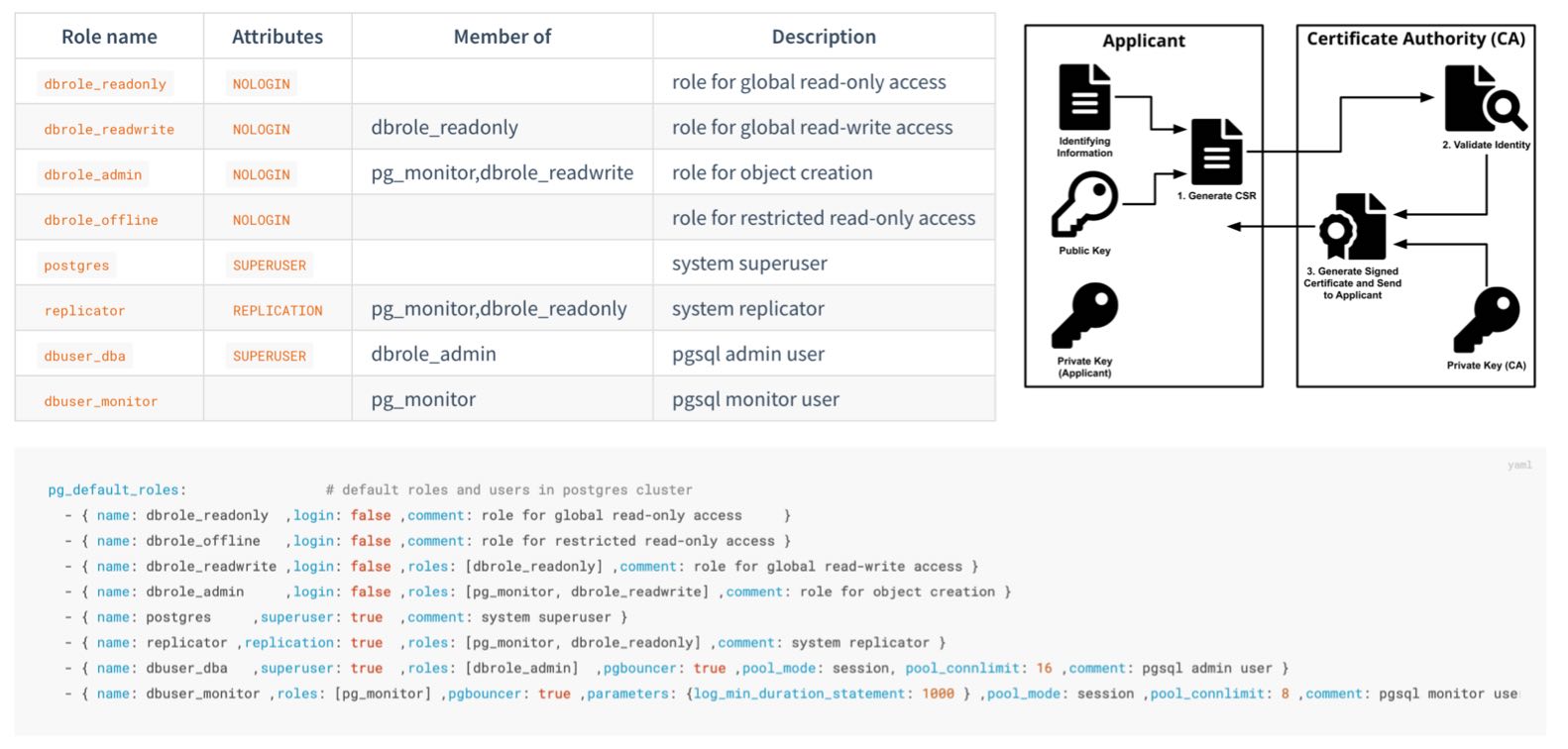
Role System
Pigsty creates four business roles by default. They cannot log in and are used as privilege groups:
| Role | Attribute | Inherits | Purpose |
|---|---|---|---|
dbrole_readonly |
NOLOGIN |
— | Global read-only access |
dbrole_readwrite |
NOLOGIN |
dbrole_readonly |
Global DML access; the default choice for application accounts |
dbrole_admin |
NOLOGIN |
dbrole_readwrite, pg_monitor |
Object creation and DDL for administration and release workflows |
dbrole_offline |
NOLOGIN |
— | Independent read-only role that can be restricted to offline instances through HBA |
Pigsty also creates four system users, each with a specific responsibility:
| User | Attribute | Purpose |
|---|---|---|
postgres |
SUPERUSER |
Database superuser; no password and local ident login only |
replicator |
REPLICATION |
Streaming replication and backup, with pg_monitor and read-only privileges |
dbuser_dba |
SUPERUSER |
Routine administration user that inherits dbrole_admin |
dbuser_monitor |
— | Monitoring user with only pg_monitor and read-only privileges |
Application accounts join role groups through the roles field and inherit their privileges:
The role system is itself declarative (pg_default_roles) and can be customized.
This parameter is a complete list. Preserve all required system users and default roles when changing it, and check references from HBA rules, default privileges, and scripts at the same time.
Default Privileges
Roles answer “Who receives a privilege?” The other half of the problem is: How do newly created objects receive the correct privileges automatically?
PostgreSQL provides ALTER DEFAULT PRIVILEGES. Pigsty declares these rules through pg_default_privileges:
The read-only role receives query and function execution privileges, the read-write role adds DML, and the administrator role adds the supporting privileges required for object management.
Ownership Convention
Default privileges have an often-missed prerequisite: they apply only to objects created by identities for which those defaults were configured. Pigsty configures default privileges for:
- the database OS user
pg_dbsu, which defaults topostgres; - the administration user
pg_admin_username, which defaults todbuser_dba; dbrole_admin;- each database owner declared in
pg_databases.
Application DDL should normally run as the declared database owner. Platform administration and release workflows can use dbuser_dba or first execute SET ROLE dbrole_admin. Objects created directly by other users do not enter this default privilege model unless ALTER DEFAULT PRIVILEGES is also configured for those users.
This is PostgreSQL behavior, not a Pigsty limitation: default privileges follow the object creator; they do not automatically propagate from the database or the session login name.
Database Isolation
PostgreSQL grants CONNECT on databases to PUBLIC by default. If HBA also permits a connection, a login role may enter a database it does not own. This default is particularly important to tighten when several applications share a cluster.
Set revokeconn in a database definition to revoke public connection access:
When enabled, CONNECT is revoked from PUBLIC and granted explicitly to the replication, monitoring, and administration users and to the database owner.
The owner receives GRANT OPTION and can decide who else may connect. Without additional grants or inherited roles, the app_a account cannot connect to app_b.
Cluster initialization also revokes CREATE from PUBLIC on the database and the public schema:
Ordinary users can no longer create objects freely in public databases or schemas, reducing risks from unsafe search_path settings and object shadowing.
PostgreSQL 15 tightened the default CREATE privilege on the public schema; Pigsty applies the same boundary consistently across all supported major versions.
Offline Role and Instance Isolation
dbrole_offline provides an independent set of read-only privileges for ETL, reporting, and ad hoc queries. The role controls object privileges only; it does not automatically restrict which instance a user may connect to.
In the current default HBA rules, the intranet rule for +dbrole_offline does not set role and therefore applies to every instance. To restrict it to a dedicated pg_role: offline instance, or to a regular replica marked with pg_offline_query: true, modify that rule in the complete pg_default_hba_rules list:
Defining pg_default_hba_rules replaces the entire default list; the example rule cannot be used alone. Expensive queries are limited to offline instances only when HBA filters by instance role and the user does not inherit another role allowed by broader rules. Resource isolation should also use a dedicated service endpoint, connection limits, and query resource controls.
Beyond the Database
Least privilege also applies at the host level:
- The
postgressuperuser has no password and can log in only through localident. Its sudo access defaults to a restricted set of database service and log commands (pg_dbsu_sudo:limit). - The monitoring user
dbuser_monitorholdspg_monitor, the read-only role, and privileges on the dedicatedmonitorschema; it cannot write business tables by default. - The replication user
replicatorreceives only the directory function privileges required for backup and recovery instead of broad superuser access.
Next
- 📖 Complete role and privilege reference: Access Control Configuration
- 🔑 Authentication: the first gate before authorization
- 🔒 Data Security: protection beyond privileges
7.4 - Encrypted Communication
TLS can provide three separate protections: transport encryption, server authentication, and client authentication. Each must be configured independently. Enabling server-side TLS does not mean the client verifies the server identity, nor does it mean the server requires a client certificate.
The main operational cost of TLS is not the encryption algorithm but certificate issuance, distribution, trust, and rotation. Without centralized management, internal services often encrypt traffic while skipping certificate verification—or remain on plaintext connections.
Pigsty brings PKI under declarative management. During deployment it creates a local self-signed CA, issues certificates for managed components, and distributes trust so TLS is ready for use after installation.
Local CA
During the first deployment, Pigsty checks for a CA on the admin node and creates one when required:
| File | Description | Permissions |
|---|---|---|
files/pki/ca/ca.key |
CA private key and root of trust for the deployment; protect it carefully | 0600, with directory mode 0700 |
files/pki/ca/ca.crt |
CA root certificate; safe to distribute | 0644 |
ca_createcontrols CA behavior. An existing private key and certificate are reused unchanged; if the certificate is missing but the private key exists, that key is used to issue a replacement certificate.ca_create: falseonly prevents creation of a missing CA private key. Deployment stops ifca.keyis absent, preventing an unexpected trust root. Always back up and restoreca.keyandca.crttogether.ca_cnsets the CA certificate CN, which defaults topigsty-ca. The key is RSA 4096.- The root CA is valid for 100 years, while component certificates default to 20 years (
cert_validity:7300d). The browser-facing Nginx certificate is an exception and currently defaults to 397 days.
Long default lifetimes reduce the initial maintenance burden for private infrastructure; they do not remove the need for production rotation. Organizations with an established certificate policy should shorten lifetimes and monitor expiration.
Trust Distribution
Issuing a certificate is only half of PKI. Every node must trust it. When a node is managed, Pigsty distributes the CA certificate to /etc/pki/ca.crt and links it into the operating system trust store:
- EL family (RHEL, Rocky, Alma): link under
/etc/pki/ca-trust/source/anchors/and runupdate-ca-trust - Debian and Ubuntu: link under
/usr/local/share/ca-certificates/and runupdate-ca-certificates
Clients that use the OS trust store, such as curl, can then verify certificates signed by the Pigsty CA.
The CA certificate is also published as ca.crt at the site root of the Nginx portal for browsers and external clients.
PostgreSQL libpq clients require special attention: by default they look for ~/.postgresql/root.crt and use sslmode=prefer, so they do not directly use the operating system trust store to verify the server identity.
Server Identity Verification
Security-sensitive PostgreSQL clients should use sslmode=verify-full and specify the Pigsty CA:
verify-full validates both the certificate chain and the connection host name. The DNS name or IP address used by the client must therefore appear in the server certificate SAN. External clients must install ca.crt or specify it with sslrootcert.
Certificate Matrix
The local CA issues certificates for the following components and places them under one trust chain:
| Component | Certificate Identity (CN) | Deployment Path | Encryption State |
|---|---|---|---|
| PostgreSQL | <cluster>-<sequence> |
/pg/cert/server.{crt,key} |
Server-side SSL enabled by default; HBA determines whether it is mandatory |
| PgBouncer | Reuses the PostgreSQL certificate | /pg/cert/ |
TLS disabled by default (pgbouncer_sslmode) |
| Patroni | Reuses the PostgreSQL certificate | /pg/cert/ |
API HTTPS disabled by default (patroni_ssl_enabled) |
| etcd | <instance-name> |
/etc/etcd/server.{crt,key} |
TLS for client and peer traffic |
| Silo | <node-name> |
~minio/.minio/certs/ |
Silo HTTPS is enabled by default (minio_https) |
| Kafka | <cluster>-<sequence> |
/etc/kafka/pki/kafka.pem |
SASL_SSL/SSL with kafka_security: scram; defaults to plaintext |
| MySQL | <instance-name> |
/etc/mysql/pki/server.{crt,key} |
Secure transport enforced; clients and group replication verify the certificate chain |
| Nginx | pigsty, with portal domains in SAN |
/etc/nginx/conf.d/cert/ |
HTTPS enabled by default (nginx_sslmode) |
| INFRA node | <node-name> |
/etc/pki/infra.{crt,key} |
Available to infrastructure components |
The encryption-state column reflects deliberate defaults:
- Enabled at deployment: PostgreSQL accepts SSL connections; etcd uses TLS for client and peer traffic.
- Encrypted by default: Object-storage backup traffic through the MINIO module and Nginx web traffic use HTTPS.
- Disabled by default, available on demand: TLS for the Patroni REST API and PgBouncer is disabled by default, but certificates are already present. Enable it through the corresponding parameters; both are enabled in the
ha/safetemplate.
Keep three states distinct: server-side SSL support does not force clients to use SSL, and neither state proves that the client verifies the server identity.
HBA rules enforce encryption with auth: ssl or cert. Client sslmode and trust settings control server verification. The default rules require TLS only for administrator connections from arbitrary sources. The safe template changes the main TCP rules to ssl or cert while retaining local ident and selected localhost password rules.
Client Certificates
The built-in cert.yml playbook issues client certificates. The certificate CN represents the database user name for HBA cert authentication:
Results are stored in files/pki/misc/<cn>.key and files/pki/misc/<cn>.crt. Deliver private keys through a controlled channel and make them readable only by the corresponding user. The client certificate lets the server authenticate the client; the client must still use verify-full to authenticate the database server.
Using an Enterprise CA
If the organization already operates a PKI, Pigsty can issue certificates from that CA, or from an intermediate signed by the enterprise root. Place the certificate and private key at the expected paths; playbooks do not regenerate a CA when one already exists:
Also set ca_create: false. Deployment will then fail explicitly if the private key is missing instead of creating an unexpected trust root. This setting does not stop the role from reissuing the CA certificate when the private key exists but the certificate is missing, so verify and restore both files together.
Key Protection and Rotation
- The CA private key exists only on the admin node. Together with
pigsty.yml, it is one of the highest-trust assets in the deployment; see Trust Boundaries. Keep an offline backup. - If the CA private key is compromised, establish a new trust root and reissue every component and client certificate. Plan an overlap period in which both old and new CAs are trusted to avoid interrupting all connections at once.
- Component certificate sources are stored under
files/pki/<component>/on the admin node; node certificates are deployment copies. Deleting only a node copy restores the same certificate rather than issuing a new one. To rotate, update or remove the corresponding source on the admin node, rerun the relevant playbook, then reload or roll the component as required.
Next
- 🔑 Authentication: use HBA to decide who must use SSL or client certificates
- 🔒 Data Security: encryption for stored data and backups
- ✅ Compliance: evidence for certificate management
7.5 - Data Security
Network boundaries, authentication, and access control reduce the likelihood of an incident. When hardware fails, credentials leak, or an operator makes a mistake, data-layer controls must limit the impact and support recovery.
Data security answers four questions: Is the data intact? Can it be recovered? If copied, does it remain confidential? Can you determine what happened?
Integrity
Bad disk sectors, memory bit flips, and storage firmware defects can cause silent data corruption: the data is damaged without an immediate error.
Pigsty enables page checksums by default (pg_checksum: true).
The cluster is initialized with data-checksums, so PostgreSQL calculates a checksum when writing a page and verifies it when reading.
Page checksums primarily detect corruption in storage media, the I/O path, or pages after they were written. They do not detect every memory error, logical error, or incorrect application write, and they do not replace backups.
The CRIT parameter template goes further: checksums are mandatory regardless of the parameter, and strict synchronous replication (synchronous_mode_strict) blocks writes that require synchronous acknowledgment when no synchronous replica is available.
This mode targets preservation of acknowledged transactions, but it still assumes clients have not reduced synchronous_commit, a synchronous replica participates in the commit, and failover selects only a node containing the required WAL. Validate RPO through failure exercises on the target topology.
Recoverability
Replicas primarily handle node failures; backups handle accidental deletion, logical errors, cluster corruption, and broader disasters. High availability can shorten an interruption after primary failure, but replication also copies an accidental deletion to every replica. Backups are therefore indispensable.
Pigsty enables pgBackRest by default (pgbackrest_enabled).
Base backups plus continuous WAL archiving provide Point-in-Time Recovery (PITR), allowing recovery to a target time within the retained backup and WAL window.
Select the backup repository with pgbackrest_method:
| Repository | Location | Default Retention | Encryption |
|---|---|---|---|
local (default) |
Local /pg/backup directory |
Latest 2 full backups | None |
minio |
Silo or external S3-compatible object storage | 14 days | AES-256-CBC |
Two additional controls reduce damage from accidental deletion:
- Delayed replica: declare a
pg_delay: 1hreplica for a critical cluster. Before an erroneous operation is replayed, pause replication and extract the required data. A delayed replica eventually catches up and does not replace a backup. - Removal safeguards: when
pg_safeguardoretcd_safeguardis enabled, the corresponding removal playbook refuses to run, reducing the risk of accidental cluster removal.
Having a backup is not the same as being able to restore. Recovery exercises should be routine; see Backup and Recovery for mechanisms and procedures.
Confidentiality
Protect data at rest at three layers:
Backup encryption. pgbackrest_method: minio denotes an S3-compatible repository. It can be provided by Silo deployed through the MINIO module, or independently managed MinIO, RustFS, and external S3 services. The preset uses AES-256-CBC by default, but the public pgBackRest passphrase must be changed in production.
The ha/safe template derives an example passphrase from the cluster name:
pgBR.${pg_cluster} is predictable, and configure -g does not replace it. Use a unique random passphrase in production and store it separately from the backup. Losing the passphrase makes the backup unrecoverable.
The local backup repository is not encrypted by default. Encryption reduces disclosure if backup files or media are copied separately, but offers limited protection when the key and backup remain on the same host.
Transport encryption. Backup uploads to Silo or external S3 services use HTTPS. PostgreSQL client and replication traffic can require SSL through HBA. Clients should also verify the server certificate; see Encrypted Communication.
Encryption at rest. Upstream PostgreSQL currently has no general built-in transparent data encryption (TDE). Pigsty provides two practical options:
use the pg_tde extension with Percona Distribution for PostgreSQL for table-level transparent encryption (see the pgtde configuration template);
or use security extensions such as pgsodium, pgcrypto, and anonymizer for column-level encryption and masking. The safe template installs this extension category.
Full-disk encryption such as LUKS or dm-crypt protects against stolen media at the operating-system layer and complements database-level controls.
Audit and Traceability
After an incident, you must be able to answer who did what and when. Pigsty provides layered logging:
Default baseline: all DDL is logged (log_statement: ddl), and statements taking longer than 100 ms are logged (log_min_duration_statement: 100).
PostgreSQL 18 and later also record connection authorization events.
CRIT template: connection and disconnection events are recorded with log_connections and log_disconnections. PostgreSQL 18 can distinguish connection receipt, authentication, and authorization stages.
pgaudit extension: for fine-grained statement auditing such as object reads and writes or role-based audit classes, install pgaudit and add it to pg_libs for preloading.
The safe template installs the extension, but loading and audit policy must be declared explicitly.
When INFRA logging is enabled and Vector is configured, PostgreSQL logs are sent to VictoriaLogs for centralized storage. The default retention is 15 days and can be adjusted for compliance. Logs and metrics support search, alerts, and incident reconstruction, but incident classification, response, and evidence preservation still require an operational process.
Next
- ⏰ Backup and Recovery: PITR principles and practice
- ♾️ High Availability: replicas and backups as complementary safeguards
- ✅ Compliance: audit logs as compliance evidence
7.6 - Compliance
Compliance is not a product you can buy. It is a state that must be demonstrated continuously through three elements:
- Configuration: whether security controls are enabled. Pigsty directly provides this part.
- Process: access approval, change management, recovery exercises, and related procedures. The organization must establish these.
- Evidence: records showing that configuration and process remain effective. Pigsty’s inventory, runtime logs, and monitoring system can provide part of this evidence.
This page begins with a pre-launch hardening checklist and then maps Pigsty security capabilities to common compliance frameworks. The mappings support architecture and gap analysis; they are not an MLPS assessment conclusion, a SOC 2 audit opinion, or legal advice.
Default Credentials Checklist
Pigsty default credentials are public in the documentation and source code. They are intended only for demonstrations and local development. Change every applicable default before any production or network-exposed deployment goes live:
| Scope | Example Default | configure -g |
|---|---|---|
| Grafana administrator and viewer | pigsty, DBUser.Viewer |
Yes |
| HAProxy administration interface | pigsty |
Yes |
| PostgreSQL administration, monitoring, and replication users | DBUser.DBA, DBUser.Monitor, DBUser.Replicator |
Yes |
| Patroni REST API | Patroni.API |
Yes |
| etcd root | Etcd.Root |
Yes |
| MINIO module object-storage root | S3User.MinIO |
Yes |
| Object-storage backup and example application users | S3User.Backup, S3User.Meta, S3User.Data |
Yes |
| Example database users | DBUser.Meta, DBUser.Supa, Vibe.Coding |
Yes |
| pgBackRest encryption passphrase | cipher_pass: pgBackRest |
No |
Silo users and pgBR.${pg_cluster} in ha/safe |
Template example values | No |
| User-defined credentials | Custom values | No |
Use -g while generating configuration to randomize built-in parameters and example strings recognized by the configuration wizard:
The wizard prints generated passwords to the terminal, so protect terminal history and automation logs as sensitive data. After generation, inspect the configuration and replace pgBackRest cipher_pass, MINIO module example values in ha/safe that were not covered, and all custom credentials.
Launch Hardening Checklist
Before deployment:
- Define the network boundary: do not expose database ports publicly, and remove the demo firewall exception for
5432 - Select a certificate policy: use the built-in CA or integrate enterprise PKI; see Using an Enterprise CA
- Plan client verification: configure database clients with
sslmode=verify-fulland a trusted CA - Design the account model: assign application accounts through the four-tier roles and declare
expire_in - Plan the backup repository, retention, encryption passphrase, and off-site copies
- Decide whether to use the
ha/safetemplate and the CRIT parameter template
After deployment:
- Confirm that credentials covered by
configure -gand uncovered backup, object-storage, and custom credentials have all been changed - Review the effective HBA rules in
/pg/data/pg_hba.confagainst the declaration and intended boundary - Query effective users, roles, default privileges, and database
CONNECTgrants, and compare them with the inventory - Run one full backup and a recovery exercise to validate the backup path
- Confirm log collection, monitoring alerts, and notification channels
Periodically:
- Audit privileges: compare
pg_usersdeclarations with effective grants, and remove expired or departed-user accounts - Rotate credentials and certificates
- Exercise recovery and failover
- Track security updates for Pigsty and upstream components
Compliance Evidence
Declarative configuration provides a stable starting point for audit evidence. Retain runtime state as well to show that the configuration was applied and remains effective.
| Evidence | Source |
|---|---|
| Security baseline and change history | The pigsty.yml inventory and Git history |
| Access-control matrix | pg_default_roles, pg_users, and pg_hba_rules declarations |
| Effective authentication policy | Rendered pg_hba.conf on each instance, compared with declarations to detect drift |
| Effective users and privileges | PostgreSQL catalogs, database ACLs, \du+, and \ddp+ |
| Operation and connection logs | PostgreSQL DDL, slow-query, and connection logs retained in VictoriaLogs |
| Backup records | pgBackRest information and monitoring dashboards |
| Security incidents and alerts | Monitoring alert history |
| Certificate inventory | files/pki/ and deployed component certificates |
MLPS Level 3 Mapping
The following maps database-related Pigsty capabilities to controls in the “secure computing environment” section of GB/T 22239-2019 Level 3:
| Control | Pigsty Capability | Additional Requirement |
|---|---|---|
| Unique identity | Independent accounts and SCRAM-SHA-256 password storage | Real-name account management process |
| Password complexity and rotation | passwordcheck, credcheck, and expire_in |
Enable extensions and establish a rotation process |
| Login failure handling | Can be implemented with credcheck and related extensions |
Enable and configure as required |
| Access control and least privilege | Four-tier roles, default privileges, and database isolation | Privilege approval workflow |
| Security audit | DDL, connection, and slow-query logs; pgaudit; centralized retention |
CRIT or manual connection logging; required retention period |
| Communication confidentiality | Local CA and TLS; HBA-enforced ssl or cert |
Enforce TLS, client verify-full, and certificate rotation |
| Data integrity | Page checksums by default and strict synchronous replication with CRIT | Storage protection, defined failure model, and exercises |
| Data confidentiality | AES-encrypted backup plus TDE and column-encryption options | Enable as required |
| Backup and recovery | pgBackRest, PITR, and a remote S3-compatible repository | Recovery exercise process |
| Residual information protection | — | Media destruction and erasure process |
MLPS also covers physical security, communication networks, and management systems beyond the scope of a database distribution. Pigsty can support database-related technical controls in a secure computing environment; facilities, network devices, and governance must be addressed in the overall system.
SOC 2 Mapping
Database-related controls in the SOC 2 Trust Services Criteria (TSC) include:
| Criterion | Pigsty Capability | Additional Requirement |
|---|---|---|
| CC6.1 Logical access security | HBA, RBAC, default privileges, and database isolation | Privilege design, approval, and periodic review |
| CC6.2 User registration and authorization | Declarative users, roles, and expiration | Joiner, mover, leaver, and identity-verification process |
| CC6.3 Access changes and revocation | pg_users, role changes, REVOKE, and expiration |
Tickets, approval evidence, and timely revocation |
| CC6.6 External boundary threats | Firewalls, listen addresses, HBA, and restricted management ingress | Network architecture, boundary devices, and continuous validation |
| CC6.7 Information transmission and movement | TLS, client verification, and backup encryption | Policies for exports, media, and third-party transfer |
| CC7.2 System monitoring | Victoria observability stack with extensive metrics and alerts | Alert-response process |
| CC7.3 Incident traceability | Centralized logs and audit extensions | Log-review process |
| A1.2 Availability and recovery | High Availability and PITR | Exercise records and RTO/RPO objectives |
Supply Chain and Vulnerability Response
Compliance reviews increasingly cover the software supply chain. Pigsty provides the following distribution and response controls:
Package integrity: RPM and DEB packages in the Pigsty repositories (repo.pigsty.io and repo.pigsty.cc) are GPG-signed.
The public-key fingerprint is 9592 A7BC 7A68 2E73 3337 6E09 E793 5D8D B9BD 8B20 (B9BD8B20) and can be verified before trust is established. Repository definitions written during deployment and the local repository on the INFRA node do not enforce signature verification for every package by default; review package-manager repository trust and signature settings in production.
Vulnerability response: report security issues privately through GitHub private vulnerability reporting or email, as documented in SECURITY.md. The project targets acknowledgment within three business days and an initial assessment within seven days.
Version support: security fixes ship with the latest stable release. Staying current is the standard way to receive them. Users who must remain on a version for longer can obtain extended support through subscription services.
Next
- 🛡️ Security Model: from the default baseline to hardening levels
- 🔰 Security Recommendations: minimum hardening for quick-start deployments
- 📄
ha/safeTemplate: hardening configuration example