This is the multi-page printable view of this section. .
Extensions
- 1: Quick Start
- 2: Introduction
- 3: Packages
- 4: Download
- 5: Install
- 6: Config
- 7: Create
- 8: Update
- 9: Remove
- 10: Default Extensions
- 11: Repository
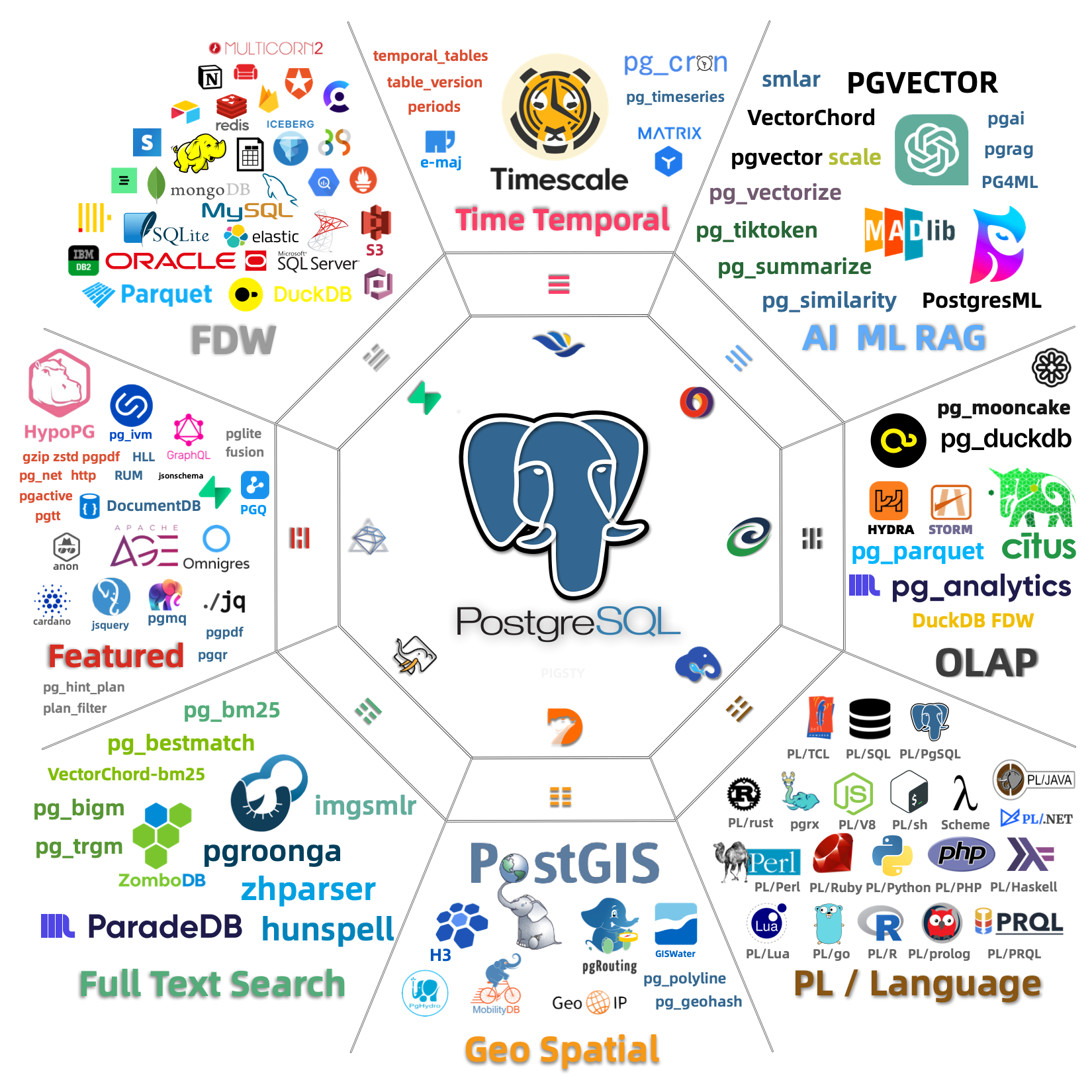
Pigsty provides 575 packaged extensions, covering 16 major categories including time-series, geospatial, vector, full-text search, analytics, and feature enhancements, ready to use out-of-the-box.
Using extensions in Pigsty involves four core steps: Download, Install, Config/Load, and Create.
1 - Quick Start
Using extensions in Pigsty requires four steps: Download, Install, Config, and Create.
- Download: Download extension packages to the local repository (the default local repository only guarantees the base kernel and
pgsql-mainpackage set) - Install: Install extension packages on cluster nodes
- Config: Some extensions need to be preloaded or configured with parameters
- Create: Execute
CREATE EXTENSIONin the database to create the extension
Declarative Configuration
Declare extensions in the Pigsty configuration manifest, and they will be automatically installed and created during cluster initialization:
After executing ./pgsql.yml to initialize the cluster, the three extensions postgis, timescaledb, and vector will be available in the meta database.
Imperative Operations
For existing clusters, you can add extensions using command-line methods:
You can also use the pig package manager to install extension packages, then run CREATE EXTENSION inside the database:
Process Quick Reference
| Step | Parameter/Command | Description |
|---|---|---|
| Download | repo_extra_packages |
Specify extension packages to download to local repository |
| Install | pg_extensions |
Specify extension packages to install on cluster |
| Config | pg_libs |
Preload extensions to shared_preload_libraries |
| Create | pg_databases.extensions |
Automatically execute CREATE EXTENSION in database |
For detailed instructions, please refer to each subsection: Download, Install, Config, Create
2 - Introduction
Extensions are the soul of PostgreSQL. Pigsty includes 575 pre-compiled, out-of-the-box extension plugins, fully unleashing PostgreSQL’s potential.
What are Extensions
PostgreSQL extensions are a modular mechanism that allows enhancing database functionality without modifying the core code. An extension typically consists of three parts:
- Control file (
.control): Required, contains extension metadata - SQL scripts (
.sql): Optional, defines functions, types, operators, and other database objects - Dynamic library (
.so): Optional, provides high-performance functionality implemented in C
Extensions can add to PostgreSQL: new data types, index methods, functions and operators, foreign data access, procedural languages, performance monitoring, security auditing, and more.
Core Extensions
Among the extensions included in Pigsty, the following are most representative:
| Extension | Description |
|---|---|
| PostGIS | Geospatial data types and indexes, de facto GIS standard |
| TimescaleDB | Time-series database with continuous aggregates, columnar storage, auto-compression |
| PGVector | Vector data type with HNSW/IVFFlat indexes, essential for AI applications |
| Citus | Distributed database with horizontal sharding capabilities |
| pg_duckdb | Embedded DuckDB analytical engine for OLAP acceleration |
| pg_search | ParadeDB search extension, providing BM25 and full-text search capabilities |
| Apache AGE | Graph database supporting OpenCypher query language |
| pg_graphql | Native GraphQL query support |
Most extensions can coexist and even be combined, creating synergistic effects far greater than the sum of their parts.
Extension Categories
Pigsty organizes extensions into 16 categories:
| Category | Alias | Description | Typical Extensions |
|---|---|---|---|
| Time-series | time |
Time-series data processing | timescaledb, pg_cron, periods |
| Geospatial | gis |
Geospatial data | postgis, h3, pgrouting |
| Vector | rag |
Vector retrieval and AI | pgvector, vchord, pg_vectorize |
| Search | fts |
Full-text search | pgroonga, zhparser, pg_bigm |
| Analytics | olap |
OLAP and analytics | pg_duckdb, pg_mooncake, citus |
| Feature | feat |
Feature enhancements | age, pg_graphql, hll, rum |
| Language | lang |
Procedural languages | plpython3u, pljava, plv8 |
| Type | type |
Data types | hstore, ltree, ip4r |
| Utility | util |
Utility tools | http, pg_net, pgjwt |
| Function | func |
Function libraries | pg_uuidv7, topn, tdigest |
| Admin | admin |
Operations management | pg_repack, pg_squeeze, pgagent |
| Stat | stat |
Monitoring statistics | pg_stat_statements, pg_qualstats, auto_explain |
| Security | sec |
Security auditing | pgaudit, pgsodium, pg_tde |
| FDW | fdw |
Foreign data access | postgres_fdw, mysql_fdw, oracle_fdw |
| Compatibility | sim |
Database compatibility | orafce, babelfish |
| ETL | etl |
Data synchronization | pglogical, wal2json, decoderbufs |
You can batch install an entire category of extensions using category aliases, for example: pg_extensions: [ pgsql-gis, pgsql-rag ].
Predefined Extension Stacks
Pigsty provides several predefined extension stacks for convenient scenario-based selection:
| Stack | Included Extensions |
|---|---|
gis-stack |
postgis, pgrouting, pointcloud, h3, q3c, ogr_fdw |
rag-stack |
pgvector, vchord, pgvectorscale, pg_similarity, pg_tiktoken |
fts-stack |
pgroonga, pg_bigm, zhparser, hunspell |
olap-stack |
pg_duckdb, pg_mooncake, timescaledb, pg_partman, plproxy |
feat-stack |
age, hll, rum, pg_graphql, pg_jsonschema, jsquery |
stat-stack |
pg_show_plans, pg_stat_kcache, pg_qualstats, pg_wait_sampling |
supa-stack |
pg_graphql, pg_jsonschema, wrappers, pgvector, pgsodium, vault |
Simply use these names in pg_extensions to install the entire stack.
Extension Resources
- Extension Catalog: Browse detailed information about all available extensions
- Extension Repository: Pigsty extension software repository
- pig Package Manager: Command-line extension management tool
- GitHub Pigsty: Pigsty source code repository
3 - Packages
Pigsty uses a package alias mechanism to simplify extension installation and management.
Package Alias Mechanism
Managing extensions involves multiple layers of name mapping:
| Layer | Example pgvector |
Example postgis |
|---|---|---|
| Extension Name | vector |
postgis, postgis_topology, … |
| Package Alias | pgvector |
postgis |
| RPM Package Name | pgvector_18 |
postgis36_18* |
| DEB Package Name | postgresql-18-pgvector |
postgresql-18-postgis-3* |
Pigsty provides a package alias abstraction layer, so users don’t need to worry about specific RPM/DEB package names:
Pigsty automatically translates to the correct package names based on the operating system and PostgreSQL version.
CREATE EXTENSION uses the extension name (for example, vector), not the package alias (pgvector).
Category Aliases
All extensions are organized into 16 categories, which can be batch installed using category aliases:
Except for the olap category, all category extensions can be installed simultaneously. Within the olap category, there are conflicts: pg_duckdb and pg_mooncake are mutually exclusive.
Category List
| Category | Description | Typical Extensions |
|---|---|---|
time |
Time-series | timescaledb, pg_cron, periods |
gis |
Geospatial | postgis, h3, pgrouting |
rag |
Vector/RAG | pgvector, pgml, vchord |
fts |
Full-text Search | pg_trgm, zhparser, pgroonga |
olap |
Analytics | citus, pg_duckdb, pg_mooncake |
feat |
Feature | age, pg_graphql, rum |
lang |
Language | plpython3u, pljava, plv8 |
type |
Data Type | hstore, ltree, citext |
util |
Utility | http, pg_net, pgjwt |
func |
Function | pgcrypto, uuid-ossp, pg_uuidv7 |
admin |
Admin | pg_repack, pgagent, pg_squeeze |
stat |
Statistics | pg_stat_statements, pg_qualstats, auto_explain |
sec |
Security | pgaudit, pgcrypto, pgsodium |
fdw |
Foreign Data Wrapper | postgres_fdw, mysql_fdw, oracle_fdw |
sim |
Compatibility | orafce, babelfishpg_tds |
etl |
Data/ETL | pglogical, wal2json, decoderbufs |
Browse Extension Catalog
You can browse detailed information about all available extensions on the Pigsty Extension Catalog website, including:
- Extension name, description, version
- Supported PostgreSQL versions
- Supported OS distributions
- Installation methods, preloading requirements
- License, source repository
4 - Download
Before installing extensions, ensure that extension packages are downloaded to the local repository or available from upstream.
Default Behavior
Pigsty downloads the base PostgreSQL 18 kernel packages to the local software repository by default. The default extra download set is repo_extra_packages_default: [ pgsql-main ], which includes the PostgreSQL kernel, client, procedural languages, and basic extension packages such as pg_repack, wal2json, and pgvector.
If you need other extensions from the 575-extension catalog, explicitly add them to repo_extra_packages. Pigsty does not download every extension to the local repository by default.
Benefits of using a local repository:
- Accelerated installation, avoiding repeated downloads
- Reduced network traffic consumption
- Improved delivery reliability
- Ensured version consistency
Download New Extensions
To download additional extensions, add them to repo_extra_packages and rebuild the repository:
Using Upstream Repositories
You can also install directly from internet upstream repositories without pre-downloading:
This approach is suitable for:
- Quick testing of latest versions
- Installing rare extensions
- Environments with good network conditions
But may face:
- Network instability affecting installation
- Version inconsistency risks
Extension Sources
Extension packages come from two main sources:
| Repository | Description |
|---|---|
| PGDG | PostgreSQL official repository, providing core extensions |
| Pigsty | Pigsty supplementary repository, providing additional extensions |
The Pigsty repository only includes extensions not present in the PGDG repository. Once an extension enters the PGDG repository, the Pigsty repository will remove it or keep it consistent.
Repository URLs:
- PGDG YUM: https://download.postgresql.org/pub/repos/yum/
- PGDG APT: https://apt.postgresql.org/pub/repos/apt/
- Pigsty YUM: https://repo.pigsty.io/yum/
- Pigsty APT: https://repo.pigsty.io/apt/
For detailed repository configuration, see Extension Repository.
5 - Install
Pigsty uses the operating system’s package manager (yum/apt) to install extension packages.
Related Parameters
Two parameters are used to specify extensions to install:
| Parameter | Purpose | Default Behavior |
|---|---|---|
pg_packages |
Global common packages | Ensure present (no upgrade) |
pg_extensions |
Cluster-specific extensions | Install latest version |
pg_packages is typically used to specify base components needed by all clusters (PostgreSQL kernel, Patroni, pgBouncer, etc.) and essential extensions.
pg_extensions is used to specify extensions needed by specific clusters.
Install During Cluster Initialization
Declare extensions in cluster configuration, and they will be automatically installed during initialization:
When executing ./pgsql.yml to initialize the cluster, extensions will be automatically installed.
Install Extensions on Existing Cluster
For initialized clusters, there are multiple ways to install extensions:
Using Pigsty Playbook
Using pig Package Manager
Using Package Manager Directly
Using Package Aliases
Pigsty supports using standardized package aliases, automatically translating to package names for the corresponding PG version:
You can also use raw package names directly:
For package alias definitions, see:
- EL8 Extension List
- EL9 Extension List
- D12 Extension List
- U22 Extension List
- U24 Extension List
- U26 Extension List
Verify Installation
After installation, verify in the database:
6 - Config
Some extensions require preloading dynamic libraries or configuring parameters before use. This section describes how to configure extensions.
Preload Extensions
Most extensions can be enabled directly with CREATE EXTENSION after installation, but some extensions using PostgreSQL’s Hook mechanism require preloading.
Preloading is specified via the shared_preload_libraries parameter and requires a database restart to take effect.
Extensions Requiring Preload
Common extensions that require preloading:
| Extension | Description |
|---|---|
timescaledb |
Time-series database extension, must be placed first |
citus |
Distributed database extension, must be placed first |
pg_stat_statements |
SQL statement statistics, enabled by default in Pigsty |
auto_explain |
Automatically log slow query execution plans, enabled by default in Pigsty |
pg_cron |
Scheduled task scheduling |
pg_net |
Asynchronous HTTP requests |
pg_tle |
Trusted language extensions |
pgaudit |
Audit logging |
pg_stat_kcache |
Kernel statistics |
pg_squeeze |
Online table space reclamation |
pgml |
PostgresML machine learning |
For the complete list, see the Extension Catalog (marked with LOAD).
Preload Order
The loading order of extensions in shared_preload_libraries is important:
timescaledbandcitusmust be placed first- If using both,
citusshould come beforetimescaledb - Statistics extensions should come after
pg_stat_statementsto use the same query_id
Configure During Cluster Initialization
When creating a new cluster, use the pg_libs parameter to specify preloaded extensions:
The value of pg_libs will be written to shared_preload_libraries during cluster initialization.
Default Value
The default value of pg_libs is pg_stat_statements, auto_explain. These two Contrib extensions provide basic observability:
pg_stat_statements: Track execution statistics of all SQL statementsauto_explain: Automatically log execution plans for slow queries
Modify Configuration on Existing Cluster
For initialized clusters, use patronictl to modify shared_preload_libraries:
You can also directly modify postgresql.conf or use ALTER SYSTEM:
A PostgreSQL service restart is required after modification.
Extension Parameter Configuration
Many extensions have configurable parameters that can be set in the following locations:
During Cluster Initialization
Use the pg_parameters parameter to specify:
Runtime Modification
Use ALTER SYSTEM or patronictl:
Important Notes
-
Preload errors prevent startup: If an extension in
shared_preload_librariesdoesn’t exist or fails to load, PostgreSQL will not start. Ensure extensions are properly installed before adding to preload. -
Modification requires restart: Changes to
shared_preload_librariesrequire restarting the PostgreSQL service to take effect. -
Partial functionality available: Some extensions can be partially used without preloading, but full functionality requires preloading.
-
View current configuration: Use the following command to view current preload libraries:
7 - Create
After installing extension packages, you need to execute CREATE EXTENSION in the database to use extension features.
View Available Extensions
After installing extension packages, you can view available extensions:
Create Extensions
Use CREATE EXTENSION to enable extensions in the database:
CREATE EXTENSION uses the extension name (for example, vector), not the package alias (pgvector).
Create During Cluster Initialization
Declare extensions in pg_databases, and they will be automatically created during cluster initialization:
Pigsty will automatically execute CREATE EXTENSION after database creation.
Extensions Requiring Preload
Some extensions must be added to shared_preload_libraries and restarted before creation:
If you try to create without preloading, you will receive an error message.
Common extensions requiring preload: timescaledb, citus, pg_cron, pg_net, pgaudit, etc. See Configure Extensions.
Extension Dependencies
Some extensions depend on other extensions and need to be created in order:
Extensions Not Requiring Creation
A few extensions don’t provide SQL interfaces and don’t need CREATE EXTENSION:
| Extension | Description |
|---|---|
wal2json |
Logical decoding plugin, used directly in replication slots |
decoderbufs |
Logical decoding plugin |
decoder_raw |
Logical decoding plugin |
These extensions can be used immediately after installation, for example:
View Extension Information
8 - Update
Extension updates involve two levels: package updates (operating system level) and extension object updates (database level).
Update Packages
Use package managers to update extension packages:
Batch update using Pigsty:
Update Extension Objects
After package updates, extension objects in the database may need to be synchronized.
View Updatable Extensions
Execute Extension Update
View Update Paths
Important Notes
-
Backup first: Backup the database before updating extensions, especially for extensions involving data type changes.
-
Check compatibility: Some extension major version upgrades may be incompatible. Consult the extension’s upgrade documentation.
-
Preloaded extensions: If updating a preloaded extension (like
timescaledb), a database restart may be required after the update. -
Dependencies: If other extensions depend on the updated extension, update them in dependency order.
-
Replication environments: In master-slave replication environments, test updates on slaves first, then update the master after confirmation.
Common Issues
Update Failure
If ALTER EXTENSION UPDATE fails, it may be because:
- No available upgrade path
- Extension is in use
- Insufficient permissions
Rollback Update
PostgreSQL extensions typically don’t support direct rollback. To rollback:
- Restore from backup
- Or: Uninstall new version extension, install old version package, recreate extension
9 - Remove
Removing extensions involves two levels: dropping extension objects (database level) and uninstalling packages (operating system level).
Drop Extension Objects
Use DROP EXTENSION to remove extensions from the database:
Warning:
CASCADEwill drop all objects that depend on this extension (tables, functions, views, etc.). Use with caution.
Check Extension Dependencies
It’s recommended to check dependencies before dropping:
Remove Preload
If the extension is in shared_preload_libraries, it must be removed from the preload list after dropping:
Uninstall Packages
After dropping the extension from the database, you can optionally uninstall the package:
Typically keeping the package doesn’t cause issues. Only uninstall when you need to free disk space or resolve conflicts.
Important Notes
-
Data loss risk: Using
CASCADEwill drop dependent objects, potentially causing data loss. -
Application compatibility: Ensure applications no longer use the extension’s functionality before dropping.
-
Preload order: If dropping a preloaded extension, be sure to also remove it from
shared_preload_libraries, otherwise the database may fail to start. -
Master-slave environments: In replication environments,
DROP EXTENSIONautomatically replicates to slaves.
Operation Sequence
Complete extension removal workflow:
10 - Default Extensions
Pigsty installs and enables some core extensions by default when initializing PostgreSQL clusters.
Default Installed Extensions
Extensions installed by default via pg_packages:
| Extension | Description |
|---|---|
pg_repack |
Handle table bloat online, important maintenance tool |
wal2json |
Logical decoding outputs JSON format changes, commonly used in CDC scenarios |
pgvector |
Vector data type and indexes, installed with pgsql-main by default |
The default value of pg_extensions is an empty array []. Declare additional extensions as needed, for example:
| Extension | Description |
|---|---|
postgis |
Geospatial database extension |
timescaledb |
Time-series database extension |
pgvector |
Vector data type and indexes |
Default Enabled Extensions
Extensions enabled by default in all databases via pg_default_extensions:
| Extension | Schema | Description |
|---|---|---|
pg_stat_statements |
monitor | SQL statement execution statistics |
pgstattuple |
monitor | Tuple-level statistics |
pg_buffercache |
monitor | Buffer cache inspection |
pageinspect |
monitor | Page-level inspection |
pg_prewarm |
monitor | Relation prewarming |
pg_visibility |
monitor | Visibility map inspection |
pg_freespacemap |
monitor | Free space map inspection |
postgres_fdw |
public | PostgreSQL foreign data wrapper |
file_fdw |
public | File foreign data wrapper |
btree_gist |
public | B-tree GiST operator classes |
btree_gin |
public | B-tree GIN operator classes |
pg_trgm |
public | Trigram matching |
intagg |
public | Integer aggregator |
intarray |
public | Integer array functions |
pg_repack |
repack | Online table reorganization |
These extensions provide basic monitoring, operations, and feature enhancement capabilities.
Default Preloaded Extensions
Extensions preloaded by default into shared_preload_libraries via pg_libs:
| Extension | Description |
|---|---|
pg_stat_statements |
Track execution statistics of all SQL statements |
auto_explain |
Automatically log execution plans for slow queries |
These two extensions provide basic observability and are strongly recommended to keep.
Customize Default Extensions
You can customize default installed and enabled extensions by modifying configuration parameters:
For detailed extension usage, please refer to:
- Quick Start: Overview of the extension usage process
- Extension Introduction: Core concepts of extensions
- Install Extensions: How to install extensions
- Configure Extensions: Preloading and parameter configuration
- Create Extensions: Creating extensions in databases
11 - Repository
Pigsty provides supplementary extension repositories, offering additional extension packages on top of the PGDG official repository.
YUM Repository
Applicable to EL 8/9/10 and compatible systems (RHEL, Rocky, AlmaLinux, CentOS, etc.).
Add Repository
China Mainland Mirror
Repository URLs
- International: https://repo.pigsty.io/yum/
- China: https://repo.pigsty.cc/yum/
APT Repository
Applicable to Debian 12/13 and Ubuntu 22.04/24.04/26.04 and compatible systems.
Add Repository
China Mainland Mirror
Repository URLs
- International: https://repo.pigsty.io/apt/
- China Mirror: https://repo.pigsty.cc/apt/
GPG Signature
All packages are signed with GPG:
- Fingerprint:
9592A7BC7A682E7333376E09E7935D8DB9BD8B20 - Short ID:
B9BD8B20
Repository Policy
The Pigsty repository follows these principles:
- Supplementary: Only includes extensions not present in the PGDG repository
- Consistency: Once an extension enters the PGDG repository, the Pigsty repository will remove it or keep it consistent
- Compatibility: Supports multiple major versions of PostgreSQL 14-18
- Multi-platform: Supports x86_64 and aarch64 architectures
Related Resources
- Pigsty Extension Catalog: Browse all available extensions
- PGDG YUM Repository
- PGDG APT Repository