This is the multi-page printable view of this section. .
ER Model
- 1: E-R Model of Infra Cluster
- 2: E-R Model of PostgreSQL Cluster
- 3: E-R Model of Etcd Cluster
- 4: MINIO Cluster Model
- 5: E-R Model of Redis Cluster
The largest entity concept in Pigsty is a Deployment. The main entities and relationships (E-R diagram) in a deployment are shown below:
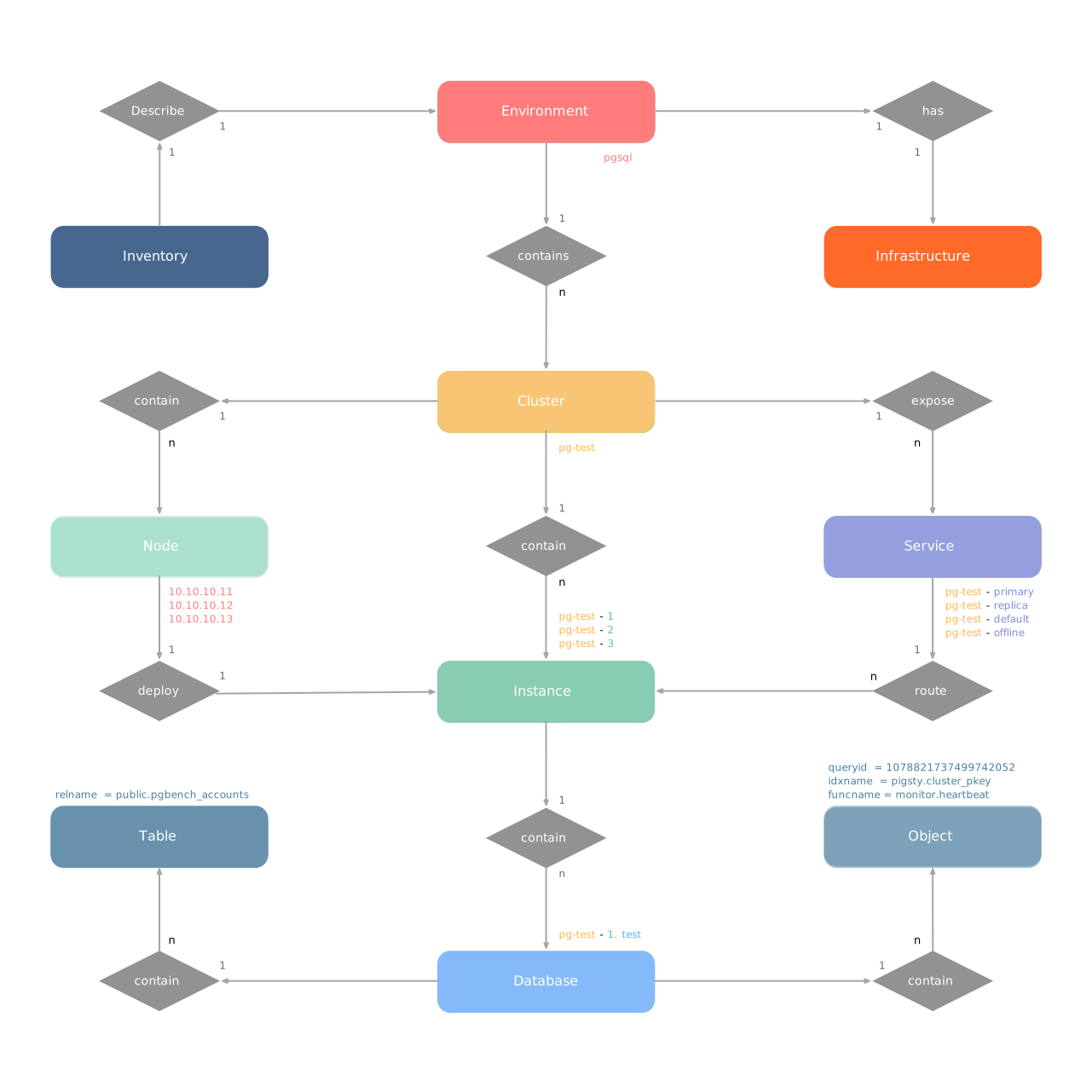
A deployment can also be understood as an Environment. For example, Production (Prod), User Acceptance Testing (UAT), Staging, Testing, Development (Devbox), etc. Each environment corresponds to a Pigsty inventory that describes all entities and attributes in that environment.
Typically, an environment includes shared infrastructure (INFRA), which broadly includes ETCD (HA DCS) and MINIO (centralized backup repository),
serving multiple PostgreSQL database clusters (and other database module components). (Exception: there are also deployments without infrastructure)
In Pigsty, almost all database modules are organized as “Clusters”. Each cluster is an Ansible group containing several node resources. For example, PostgreSQL HA database clusters, Redis, Etcd, and Silo all exist as clusters. An environment can contain multiple clusters.
1 - E-R Model of Infra Cluster
The INFRA module plays a special role in Pigsty: it’s not a traditional “cluster” but rather a management hub composed of a group of infrastructure nodes, providing core services for the entire Pigsty deployment. Each INFRA node is an autonomous infrastructure service unit running core components like Nginx, Grafana, and VictoriaMetrics, collectively providing observability and management capabilities for managed database clusters.
There are two core entities in Pigsty’s INFRA module:
- Node: A server running infrastructure components—can be bare metal, VM, container, or Pod.
- Component: Various infrastructure services running on nodes, such as Nginx, Grafana, VictoriaMetrics, etc.
INFRA nodes typically serve as Admin Nodes, the control plane of Pigsty.
Component Composition
Each INFRA node runs the following core components:
| Component | Port | Description |
|---|---|---|
| Nginx | 80/443 |
Web portal, local repo, unified reverse proxy |
| Grafana | 3000 |
Visualization platform, dashboards, data apps |
| VictoriaMetrics | 8428 |
Time-series database, Prometheus API compatible |
| VictoriaLogs | 9428 |
Log database, receives structured logs from Vector |
| VictoriaTraces | 10428 |
Trace storage for slow SQL / request tracing |
| VMAlert | 8880 |
Alert rule evaluator based on VictoriaMetrics |
| Alertmanager | 9059 |
Alert aggregation and dispatch |
| Blackbox Exporter | 9115 |
ICMP/TCP/HTTP black-box probing |
| DNSMASQ | 53 |
DNS server for internal domain resolution |
| Chronyd | 123 |
NTP time server |
These components together form Pigsty’s observability infrastructure.
Examples
Let’s look at a concrete example with a two-node INFRA deployment:
The above config fragment defines a two-node INFRA deployment:
| Group | Description |
|---|---|
infra |
INFRA infrastructure node group |
| Node | Description |
infra-1 |
10.10.10.10 INFRA node #1 |
infra-2 |
10.10.10.11 INFRA node #2 |
For production environments, deploying at least two INFRA nodes is recommended for infrastructure component redundancy.
Identity Parameters
Pigsty uses the INFRA_ID parameter group to assign deterministic identities to each INFRA module entity. One parameter is required:
| Parameter | Type | Level | Description | Format |
|---|---|---|---|---|
infra_seq |
int |
Node | INFRA node sequence, required | Natural number, starting from 1, unique within group |
With node sequence assigned at node level, Pigsty automatically generates unique identifiers for each entity based on rules:
| Entity | Generation Rule | Example |
|---|---|---|
| Node | infra-{{ infra_seq }} |
infra-1, infra-2 |
The INFRA module assigns infra-N format identifiers to nodes for distinguishing multiple infrastructure nodes in the monitoring system.
However, this doesn’t change the node’s hostname or system identity; nodes still use their existing hostname or IP address for identification.
Service Portal
INFRA nodes provide unified web service entry through Nginx. The infra_portal parameter defines services exposed through Nginx.
The default configuration only defines the home server:
Pigsty automatically configures reverse proxy endpoints for enabled components (Grafana, VictoriaMetrics, AlertManager, etc.). If you need to access these services via separate domains, you can explicitly add configurations:
| Domain | Service | Description |
|---|---|---|
i.pigsty |
Home | Pigsty homepage |
g.pigsty |
Grafana | Monitoring dashboard |
p.pigsty |
VictoriaMetrics | TSDB Web UI |
a.pigsty |
Alertmanager | Alert management UI |
Accessing Pigsty services via domain names is recommended over direct IP + port.
Deployment Scale
The number of INFRA nodes depends on deployment scale and HA requirements:
| Scale | INFRA Nodes | Description |
|---|---|---|
| Dev/Test | 1 | Single-node deployment, all on one node |
| Small Prod | 1-2 | Single or dual node, can share with other services |
| Medium Prod | 2-3 | Dedicated INFRA nodes, redundant components |
| Large Prod | 3+ | Multiple INFRA nodes, component separation |
In singleton deployment, INFRA components share the same node with PGSQL, ETCD, etc.
In small-scale deployments, INFRA nodes typically also serve as “Admin Node” / backup admin node and local software repository (/www/pigsty).
In larger deployments, these responsibilities can be separated to dedicated nodes.
Monitoring Label System
Pigsty’s monitoring system collects metrics from INFRA components themselves. Unlike database modules, each component in the INFRA module is treated as an independent monitoring object, distinguished by the cls (class) label.
| Label | Description | Example |
|---|---|---|
cls |
Component type, each forming a “class” | nginx |
ins |
Instance name, format {component}-{infra_seq} |
nginx-1 |
ip |
INFRA node IP running the component | 10.10.10.10 |
job |
VictoriaMetrics scrape job, fixed as infra |
infra |
Using a two-node INFRA deployment (infra_seq: 1 and infra_seq: 2) as example, component monitoring labels are:
| Component | cls |
ins Example |
Port |
|---|---|---|---|
| Nginx | nginx |
nginx-1, nginx-2 |
9113 |
| Grafana | grafana |
grafana-1, grafana-2 |
3000 |
| VictoriaMetrics | vmetrics |
vmetrics-1, vmetrics-2 |
8428 |
| VictoriaLogs | vlogs |
vlogs-1, vlogs-2 |
9428 |
| VictoriaTraces | vtraces |
vtraces-1, vtraces-2 |
10428 |
| VMAlert | vmalert |
vmalert-1, vmalert-2 |
8880 |
| Alertmanager | alertmanager |
alertmanager-1, alertmanager-2 |
9059 |
| Blackbox | blackbox |
blackbox-1, blackbox-2 |
9115 |
All INFRA component metrics use a unified job="infra" label, distinguished by the cls label:
2 - E-R Model of PostgreSQL Cluster
The PGSQL module organizes PostgreSQL in production as clusters—logical entities composed of a group of database instances associated by primary-replica relationships.
Each cluster is an autonomous business unit consisting of at least one primary instance, exposing capabilities through services.
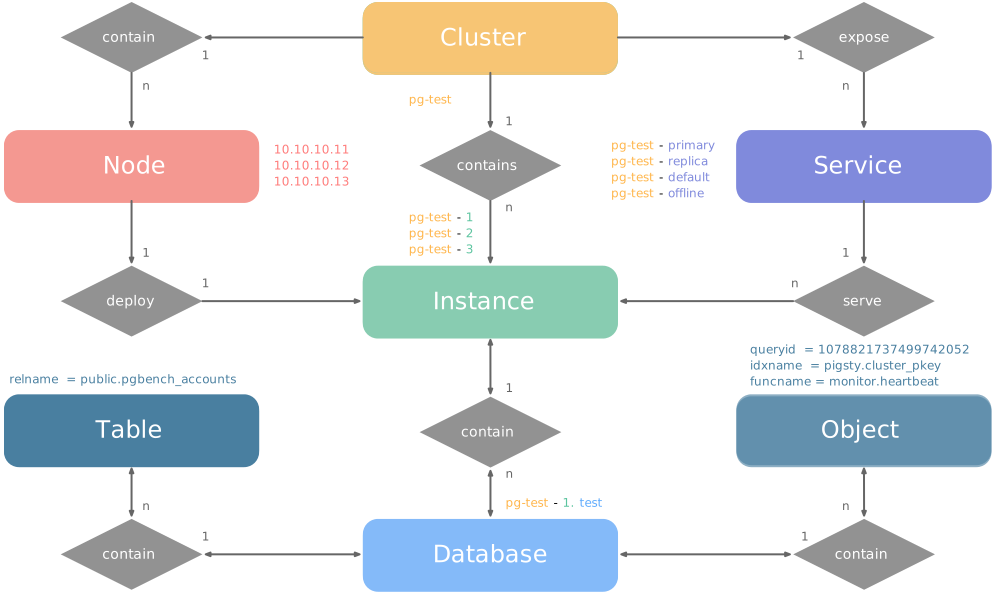
There are four core entities in Pigsty’s PGSQL module:
- Cluster: An autonomous PostgreSQL business unit serving as the top-level namespace for other entities.
- Service: A named abstraction that exposes capabilities, routes traffic, and exposes services using node ports.
- Instance: A single PostgreSQL server consisting of running processes and database files on a single node.
- Node: A hardware resource abstraction running Linux + Systemd environment—can be bare metal, VM, container, or Pod.
Along with two business entities—“Database” and “Role”—these form the complete logical view as shown below:
Examples
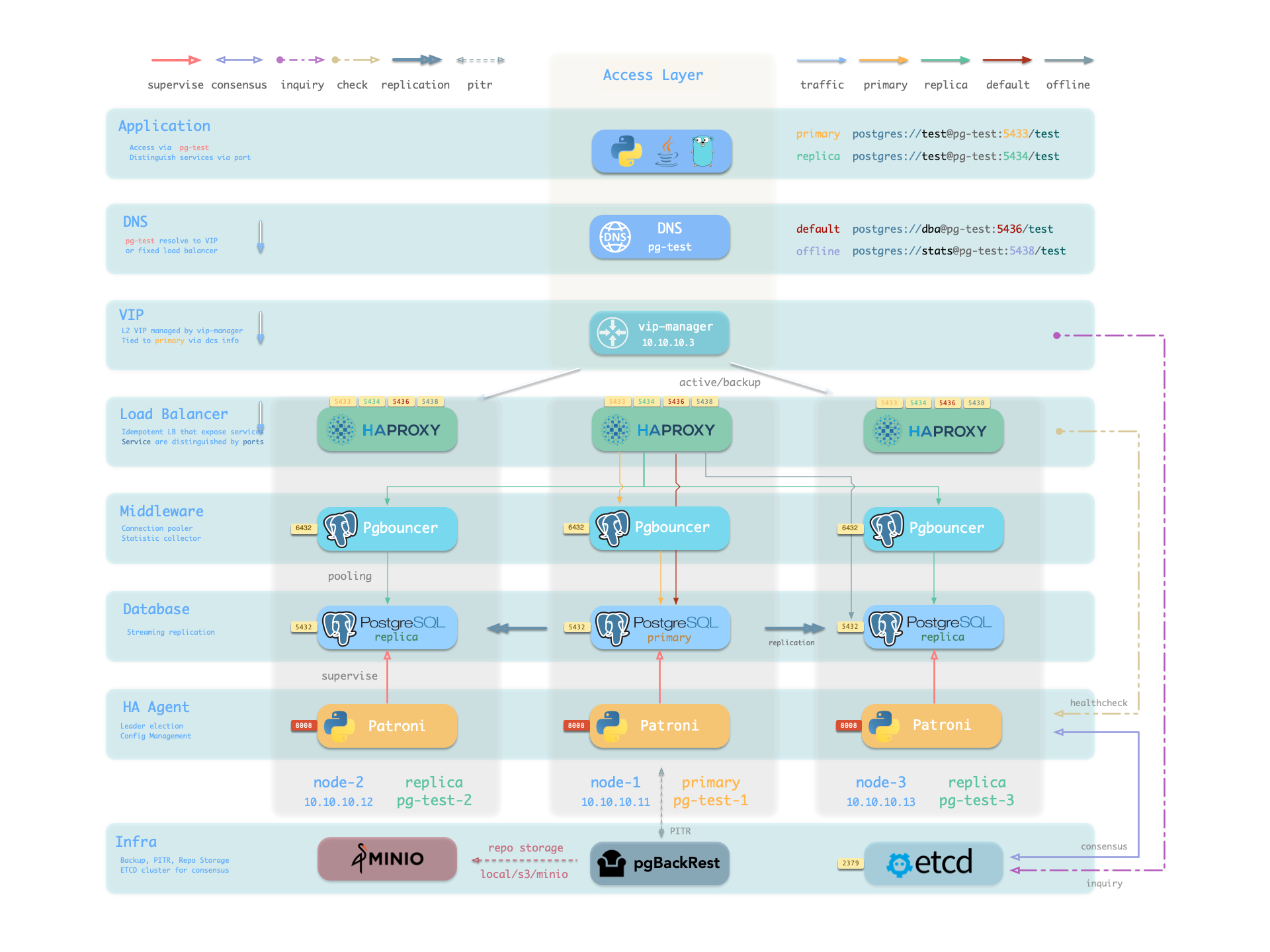
Let’s look at two concrete examples. Using the four-node Pigsty sandbox, there’s a three-node pg-test cluster:
The above config fragment defines a high-availability PostgreSQL cluster with these related entities:
| Cluster | Description |
|---|---|
pg-test |
PostgreSQL 3-node HA cluster |
| Instance | Description |
pg-test-1 |
PostgreSQL instance #1, default primary |
pg-test-2 |
PostgreSQL instance #2, initial replica |
pg-test-3 |
PostgreSQL instance #3, initial replica |
| Service | Description |
pg-test-primary |
Read-write service (routes to primary pgbouncer) |
pg-test-replica |
Read-only service (routes to replica pgbouncer) |
pg-test-default |
Direct read-write service (routes to primary postgres) |
pg-test-offline |
Offline read service (routes to dedicated postgres) |
| Node | Description |
node-1 |
10.10.10.11 Node #1, hosts pg-test-1 PG instance |
node-2 |
10.10.10.12 Node #2, hosts pg-test-2 PG instance |
node-3 |
10.10.10.13 Node #3, hosts pg-test-3 PG instance |
Identity Parameters
Pigsty uses the PG_ID parameter group to assign deterministic identities to each PGSQL module entity. Three parameters are required:
| Parameter | Type | Level | Description | Format |
|---|---|---|---|---|
pg_cluster |
string |
Cluster | PG cluster name, required | Valid DNS name, regex [a-zA-Z0-9-]+ |
pg_seq |
int |
Instance | PG instance number, required | Natural number, starting from 0 or 1, unique within cluster |
pg_role |
enum |
Instance | PG instance role, required | Enum: primary, replica, offline |
With cluster name defined at cluster level and instance number/role assigned at instance level, Pigsty automatically generates unique identifiers for each entity based on rules:
| Entity | Generation Rule | Example |
|---|---|---|
| Instance | {{ pg_cluster }}-{{ pg_seq }} |
pg-test-1, pg-test-2, pg-test-3 |
| Service | {{ pg_cluster }}-{{ pg_role }} |
pg-test-primary, pg-test-replica, pg-test-offline |
| Node | Explicitly specified or borrowed from PG | pg-test-1, pg-test-2, pg-test-3 |
Because Pigsty adopts a 1:1 exclusive deployment model for nodes and PG instances, by default the host node identifier borrows from the PG instance identifier (node_id_from_pg).
You can also explicitly specify nodename to override, or disable nodename_overwrite to use the current default.
Sharding Identity Parameters
When using multiple PostgreSQL clusters (sharding) to serve the same business, two additional identity parameters are used: pg_shard and pg_group.
In this case, this group of PostgreSQL clusters shares the same pg_shard name with their own pg_group numbers, like this Citus cluster:
In this case, pg_cluster cluster names are typically composed of: {{ pg_shard }}{{ pg_group }}, e.g., pg-citus0, pg-citus1, etc.
Pigsty provides dedicated monitoring dashboards for horizontal sharding clusters, making it easy to compare performance and load across shards, but this requires using the above entity naming convention.
There are also other identity parameters for special scenarios, such as pg_upstream for specifying backup clusters/cascading replication upstream, gp_role for Greenplum cluster identity,
pg_exporters for external monitoring instances, pg_offline_query for offline query instances, etc. See PG_ID parameter docs.
Monitoring Label System
Pigsty provides an out-of-box monitoring system that uses the above identity parameters to identify various PostgreSQL entities.
For example, the cls, ins, ip labels correspond to cluster name, instance name, and node IP—the identifiers for these three core entities.
They appear along with the job label in all native monitoring metrics collected by VictoriaMetrics and VictoriaLogs log streams.
The job name for collecting PostgreSQL metrics is fixed as pgsql;
The job name for monitoring remote PG instances is fixed as pgrds.
The job name for collecting PostgreSQL CSV logs is fixed as postgres;
The job name for collecting pgbackrest logs is fixed as pgbackrest, other PG components collect logs via job: syslog.
Additionally, some entity identity labels appear in specific entity-related monitoring metrics, such as:
datname: Database name, if a metric belongs to a specific database.relname: Table name, if a metric belongs to a specific table.idxname: Index name, if a metric belongs to a specific index.funcname: Function name, if a metric belongs to a specific function.seqname: Sequence name, if a metric belongs to a specific sequence.query: Query fingerprint, if a metric belongs to a specific query.
3 - E-R Model of Etcd Cluster
The ETCD module organizes ETCD in production as clusters—logical entities composed of a group of ETCD instances associated through the Raft consensus protocol.
Each cluster is an autonomous distributed key-value storage unit consisting of at least one ETCD instance, exposing service capabilities through client ports.
There are three core entities in Pigsty’s ETCD module:
- Cluster: An autonomous ETCD service unit serving as the top-level namespace for other entities.
- Instance: A single ETCD server process running on a node, participating in Raft consensus.
- Node: A hardware resource abstraction running Linux + Systemd environment, implicitly declared.
Compared to PostgreSQL clusters, the ETCD cluster model is simpler, without Services or complex Role distinctions. All ETCD instances are functionally equivalent, electing a Leader through the Raft protocol while others become Followers. During scale-out intermediate states, non-voting Learner instance members are also allowed.
Examples
Let’s look at a concrete example with a three-node ETCD cluster:
The above config fragment defines a three-node ETCD cluster with these related entities:
| Cluster | Description |
|---|---|
etcd |
ETCD 3-node HA cluster |
| Instance | Description |
etcd-1 |
ETCD instance #1 |
etcd-2 |
ETCD instance #2 |
etcd-3 |
ETCD instance #3 |
| Node | Description |
10.10.10.10 |
Node #1, hosts etcd-1 instance |
10.10.10.11 |
Node #2, hosts etcd-2 instance |
10.10.10.12 |
Node #3, hosts etcd-3 instance |
Identity Parameters
Pigsty uses the ETCD parameter group to assign deterministic identities to each ETCD module entity. Two parameters are required:
| Parameter | Type | Level | Description | Format |
|---|---|---|---|---|
etcd_cluster |
string |
Cluster | ETCD cluster name, required | Valid DNS name, defaults to fixed etcd |
etcd_seq |
int |
Instance | ETCD instance number, required | Natural number, starting from 1, unique within cluster |
With cluster name defined at cluster level and instance number assigned at instance level, Pigsty automatically generates unique identifiers for each entity based on rules:
| Entity | Generation Rule | Example |
|---|---|---|
| Instance | {{ etcd_cluster }}-{{ etcd_seq }} |
etcd-1, etcd-2, etcd-3 |
The ETCD module does not assign additional identity to host nodes; nodes are identified by their existing hostname or IP address.
Ports & Protocols
Each ETCD instance listens on the following two ports:
| Port | Parameter | Purpose |
|---|---|---|
| 2379 | etcd_port |
Client port, accessed by Patroni, vip-manager, etc. |
| 2380 | etcd_peer_port |
Peer communication port, used for Raft consensus |
ETCD clusters enable TLS-encrypted communication by default and use RBAC authentication. Clients need the correct certificates and passwords to access ETCD services.
Cluster Size
As a distributed coordination service, ETCD cluster size directly affects availability, requiring more than half (quorum) of nodes to be alive to maintain service.
| Cluster Size | Quorum | Fault Tolerance | Use Case |
|---|---|---|---|
| 1 node | 1 | 0 | Dev, test, demo |
| 3 nodes | 2 | 1 | Small-medium production |
| 5 nodes | 3 | 2 | Large-scale production |
Even-member ETCD clusters are technically valid, but they do not tolerate more failures than an odd cluster with one fewer member and add deployment and quorum cost. Production clusters therefore usually have one, three, or five members; clusters larger than five are uncommon.
Monitoring Label System
Pigsty provides an out-of-box monitoring system that uses the above identity parameters to identify various ETCD entities.
For example, the cls, ins, ip labels correspond to cluster name, instance name, and node IP—the identifiers for these three core entities.
They appear along with the job label in all ETCD monitoring metrics collected by VictoriaMetrics.
The job name for collecting ETCD metrics is fixed as etcd.
4 - MINIO Cluster Model
MINIO is Pigsty’s compatibility module name for object storage. The current v4.5.0 source deploys Silo through minio_type: silo and organizes a group of object-storage instances into a cluster.
Each cluster is an autonomous S3-compatible object-storage unit consisting of at least one instance and exposing service through the S3 API port.
There are three core entities in Pigsty’s MINIO module:
- Cluster: An autonomous object-storage service unit serving as the top-level namespace for other entities.
- Instance: A single Silo server process running on a node and managing local disks.
- Node: A hardware resource abstraction running Linux + Systemd environment, implicitly declared.
Silo also retains the Storage Pool concept for expansion.
Deployment Modes
Silo supports Pigsty’s three inventory deployment modes:
| Mode | Code | Description | Use Case |
|---|---|---|---|
| Single-Node Single-Drive | SNSD | Single node, single data directory or disk | Dev, test, demo |
| Single-Node Multi-Drive | SNMD | Single node, multiple disks, typically 4+ | Resource-constrained small deployments |
| Multi-Node Multi-Drive | MNMD | Multiple nodes, multiple disks per node | Production recommended |
SNSD mode can use a regular directory for quick experimentation. Multi-drive Silo deployments should use real disk mount points or the service will refuse to start.
Examples
The following example explicitly selects the current default Silo backend and defines a four-node multi-drive cluster:
This config fragment defines a four-node Silo cluster with four disks per node. Instance identifiers retain the MINIO module’s compatibility naming:
| Cluster | Description |
|---|---|
minio |
Silo 4-node HA cluster |
| Instance | Description |
minio-1 |
Object-storage instance #1, managing 4 disks |
minio-2 |
Object-storage instance #2, managing 4 disks |
minio-3 |
Object-storage instance #3, managing 4 disks |
minio-4 |
Object-storage instance #4, managing 4 disks |
| Node | Description |
10.10.10.10 |
Node #1, hosts minio-1 instance |
10.10.10.11 |
Node #2, hosts minio-2 instance |
10.10.10.12 |
Node #3, hosts minio-3 instance |
10.10.10.13 |
Node #4, hosts minio-4 instance |
Identity Parameters
Pigsty uses the MINIO parameter group to assign deterministic identities to each MinIO module entity. Two parameters are required:
| Parameter | Type | Level | Description | Format |
|---|---|---|---|---|
minio_cluster |
string |
Cluster | Object-storage cluster name, required | Valid non-empty name, no default |
minio_seq |
int |
Instance | Object-storage instance number, required | Natural number, starting from 1, unique within cluster |
With cluster name defined at cluster level and instance number assigned at instance level, Pigsty automatically generates unique identifiers for each entity based on rules:
| Entity | Generation Rule | Example |
|---|---|---|
| Instance | {{ minio_cluster }}-{{ minio_seq }} |
minio-1, minio-2, minio-3, minio-4 |
The MINIO module does not assign additional identity to host nodes; nodes are identified by their existing hostname or IP address.
The minio_node parameter generates node names for internal Silo cluster use (written to /etc/hosts for cluster discovery), not host-node identity.
Roles locate actual members across the entire inventory by minio_cluster; the Ansible group name does not need to match the cluster name. minio_type is a retained backend selector and currently must be silo.
Core Configuration Parameters
Beyond identity parameters, the following parameters are critical for Silo cluster configuration:
| Parameter | Type | Description |
|---|---|---|
minio_type |
enum |
Retained selector; currently only silo |
minio_data |
path |
Data directory, use {x...y} for multi-drive |
minio_node |
string |
Node name pattern for multi-node deployment |
minio_domain |
string |
Service domain, defaults to sss.pigsty |
These parameters determine minio_volumes, which the role writes to Silo’s MINIO_VOLUMES:
- SNSD: Direct
minio_datavalue, e.g.,/data/minio - SNMD: Expanded
minio_datadirectories, e.g.,/data{1...4} - MNMD: Combined
minio_nodeandminio_data, e.g.,https://minio-{1...4}.pigsty:9000/data{1...4}
Ports & Services
Each object-storage instance listens on the following ports:
| Port | Parameter | Purpose |
|---|---|---|
| 9000 | minio_port |
S3 API service port |
| 9001 | minio_admin_port |
Web admin console port |
The MINIO module enables HTTPS by default, controlled by minio_https. Keep HTTPS enabled with the default pgBackRest S3 repository configuration and install the Pigsty CA correctly.
Clients can reach a multi-node Silo cluster through any member. For a stable entry point, use a load balancer such as HAProxy with a VIP.
Resource Provisioning
After Silo cluster deployment, Pigsty automatically creates the following resources (controlled by minio_provision):
Default Buckets (defined by minio_buckets):
| Bucket | Purpose |
|---|---|
pgsql |
PostgreSQL pgBackREST backup storage |
meta |
Metadata storage, versioning enabled |
data |
General data storage |
Default Users (defined by minio_users):
| User | Default Password | Policy | Purpose |
|---|---|---|---|
pgbackrest |
S3User.Backup |
pgsql |
PostgreSQL backup dedicated user |
s3user_meta |
S3User.Meta |
meta |
Access meta bucket |
s3user_data |
S3User.Data |
data |
Access data bucket |
These passwords are publicly documented default credentials, intended only for demonstrations and local development. Replace them before production deployment.
pgbackrest is used for PostgreSQL cluster backups; s3user_meta and s3user_data are reserved users not actively used.
Monitoring Label System
Pigsty uses the identity parameters above to identify object-storage entities. A Silo availability series looks like this:
Here cls, ins, and ip identify the cluster name, instance name, and node IP. Compatible monitoring naming keeps job="minio", while the current backend label is flavor=silo. See the metric list for details.
5 - E-R Model of Redis Cluster
The Redis module organizes Redis in production as clusters—logical entities composed of a group of Redis instances deployed on one or more nodes.
Each cluster is an autonomous high-performance cache/storage unit consisting of at least one Redis instance, exposing service capabilities through ports.
There are three core entities in Pigsty’s Redis module:
- Cluster: An autonomous Redis service unit serving as the top-level namespace for other entities.
- Instance: A single Redis server process running on a specific port on a node.
- Node: A hardware resource abstraction running Linux + Systemd environment, can host multiple Redis instances, implicitly declared.
Unlike PostgreSQL, Redis uses a single-node multi-instance deployment model: one physical/virtual machine node typically deploys multiple Redis instances to fully utilize multi-core CPUs. Therefore, nodes and instances have a 1:N relationship. Additionally, production typically advises against Redis instances with memory > 12GB.
Operating Modes
Redis has three different operating modes, specified by the redis_mode parameter:
| Mode | Code | Description | HA Mechanism |
|---|---|---|---|
| Standalone | standalone |
Classic master-replica, default mode | Requires Sentinel |
| Sentinel | sentinel |
HA monitoring and auto-failover for standalone | Multi-node quorum |
| Native Cluster | cluster |
Redis native distributed cluster, no sentinel needed | Built-in auto-failover |
- Standalone: Default mode, replication via
replica_ofparameter. Requires additional Sentinel cluster for HA. - Sentinel: Stores no business data, dedicated to monitoring standalone Redis clusters for auto-failover; multi-node itself provides HA.
- Native Cluster: Data auto-sharded across multiple primaries, each can have multiple replicas, built-in HA, no sentinel needed.
Examples
Let’s look at concrete examples for each mode:
Standalone Cluster
Classic master-replica on a single node:
| Cluster | Description |
|---|---|
redis-ms |
Redis standalone cluster |
| Node | Description |
redis-ms-1 |
10.10.10.10 Node #1, hosts 2 instances |
| Instance | Description |
redis-ms-1-6379 |
Primary instance, listening on port 6379 |
redis-ms-1-6380 |
Replica instance, port 6380, replicates from 6379 |
Sentinel Cluster
Three sentinel instances on a single node for monitoring standalone clusters. Sentinel clusters specify monitored standalone clusters via redis_sentinel_monitor:
Native Cluster
A Redis native distributed cluster with two nodes and six instances (minimum spec: 3 primaries, 3 replicas):
This creates a 3 primary 3 replica native Redis cluster.
| Cluster | Description |
|---|---|
redis-test |
Redis native cluster (3P3R) |
| Instance | Description |
redis-test-1-6379 |
Instance on node 1, port 6379 |
redis-test-1-6380 |
Instance on node 1, port 6380 |
redis-test-1-6381 |
Instance on node 1, port 6381 |
redis-test-2-6379 |
Instance on node 2, port 6379 |
redis-test-2-6380 |
Instance on node 2, port 6380 |
redis-test-2-6381 |
Instance on node 2, port 6381 |
| Node | Description |
redis-test-1 |
10.10.10.12 Node #1, hosts 3 instances |
redis-test-2 |
10.10.10.13 Node #2, hosts 3 instances |
Identity Parameters
Pigsty uses the REDIS parameter group to assign deterministic identities to each Redis module entity. Three parameters are required:
| Parameter | Type | Level | Description | Format |
|---|---|---|---|---|
redis_cluster |
string |
Cluster | Redis cluster name, required | Valid DNS name, regex [a-z][a-z0-9-]* |
redis_node |
int |
Node | Redis node number, required | Natural number, starting from 1, unique within cluster |
redis_instances |
dict |
Node | Redis instance definition, required | JSON object, key is port, value is instance config |
With cluster name defined at cluster level and node number/instance definition assigned at node level, Pigsty automatically generates unique identifiers for each entity:
| Entity | Generation Rule | Example |
|---|---|---|
| Instance | {{ redis_cluster }}-{{ redis_node }}-{{ port }} |
redis-ms-1-6379, redis-ms-1-6380 |
The Redis module does not assign additional identity to host nodes; nodes are identified by their existing hostname or IP address.
redis_node is used for instance naming, not host node identity.
Instance Definition
redis_instances is a JSON object with port number as key and instance config as value:
Each Redis instance listens on a unique port within the node. You can choose any port number,
but avoid system reserved ports (< 1024) or conflicts with Pigsty used ports.
The replica_of parameter sets replication relationship in standalone mode, format '<ip> <port>', specifying upstream primary address and port.
Additionally, each Redis node runs a Redis Exporter collecting metrics from all local instances:
| Port | Parameter | Purpose |
|---|---|---|
| 9121 | redis_exporter_port |
Redis Exporter port |
Redis’s single-node multi-instance deployment model has some limitations:
- Node Exclusive: A node can only belong to one Redis cluster, not assigned to different clusters simultaneously.
- Port Unique: Redis instances on the same node must use different ports to avoid conflicts.
- Password Shared: Multiple instances on the same node cannot have different passwords (redis_exporter limitation).
- Manual HA: Standalone Redis clusters require additional Sentinel configuration for auto-failover.
Monitoring Label System
Pigsty provides an out-of-box monitoring system that uses the above identity parameters to identify various Redis entities.
For example, the cls, ins, ip labels correspond to cluster name, instance name, and node IP—the identifiers for these three core entities.
They appear along with the job label in all Redis monitoring metrics collected by VictoriaMetrics.
The job name for collecting Redis metrics is fixed as redis.